USE OF THE STORAGE CABINET AS300
D0716C-EN
USE OF THE STORAGE CABINET AS300
STARTUP
A start-up procedure must be carried out the first time the AS300 cabinet is used and every time it is powered
on. This operation calibrates the sections of the endoscope rack plate.
Proceed as follows:
1. When switching on power to the cabinet, wait until the start-up process on the touch screen is
completed.
2. Confirm reading the error messages that appear in the window in the foreground by pressing as
many times as necessary.
3. After having read all the error messages, start the identification process using the barcode reader (or
RFID system).
4. Press the Operator Menu on the top of the touch screen.
5. Press « start up cabinet ».
6. Wait for the start-up procedure to end. When the process is finished, the button turns
green.
7. Press on this button to return to the main screen.
Recommendation: Prior to and while handling endoscopes in the context of the storage procedure
and in particular when inserting and removing, it is recommended to sanitize the hands according to
the applicable protocol.
Please note that it is necessary to reduce the time between the end of the cleaning/disinfection cycle and the
beginning of storage in the aseptic unit in order to reduce the risks of environmental contamination. This time
must not exceed 25 minutes.
At the end of the standard disinfection protocol, place the endoscope on a clean surface on which you have
prepared the disinfected connector dried with medical or compressed air and if applicable also the aseptic
sheath for the treated endoscope.
Storage / Blowing phase
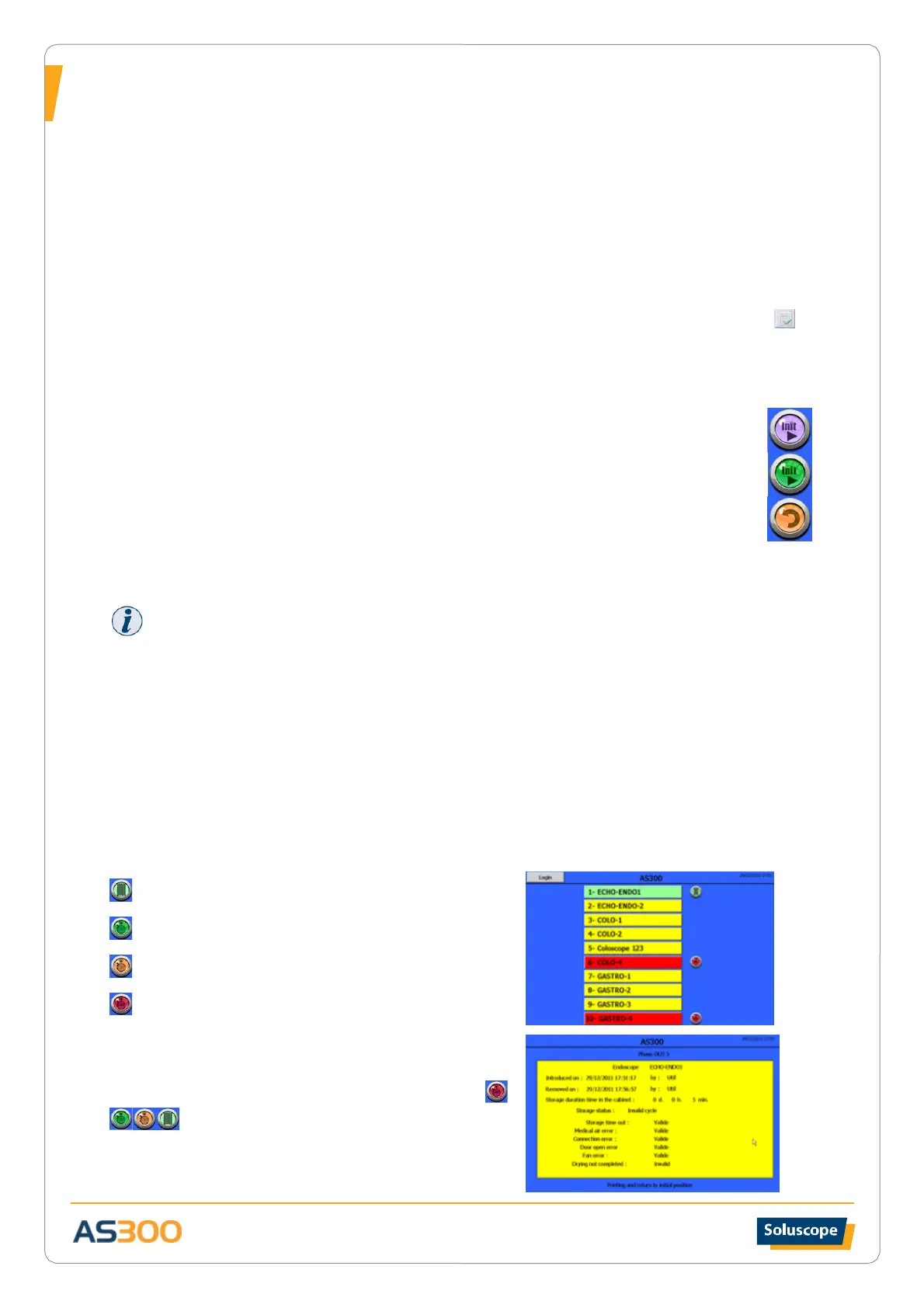
During the storage/blowing phase, the home screen looks like this:
The clear green sections indicate occupied positions in the
blowing phase
The dark green sections indicate endoscopes for which
the cycle is valid (blowing complete)
The orange sections indicate endoscopes for which the
cycle is close to being invalidated
The red sections indicate endoscopes for which the cycle
is invalid (e.g.: maximum storage time exceeded)
The yellow sections indicate empty positions.
Simply pressing the symbol next to the occupied section
brings up information relating to the identification
of the equipment, date and time of insertion and presence
time in the AS300:


 To Next Page