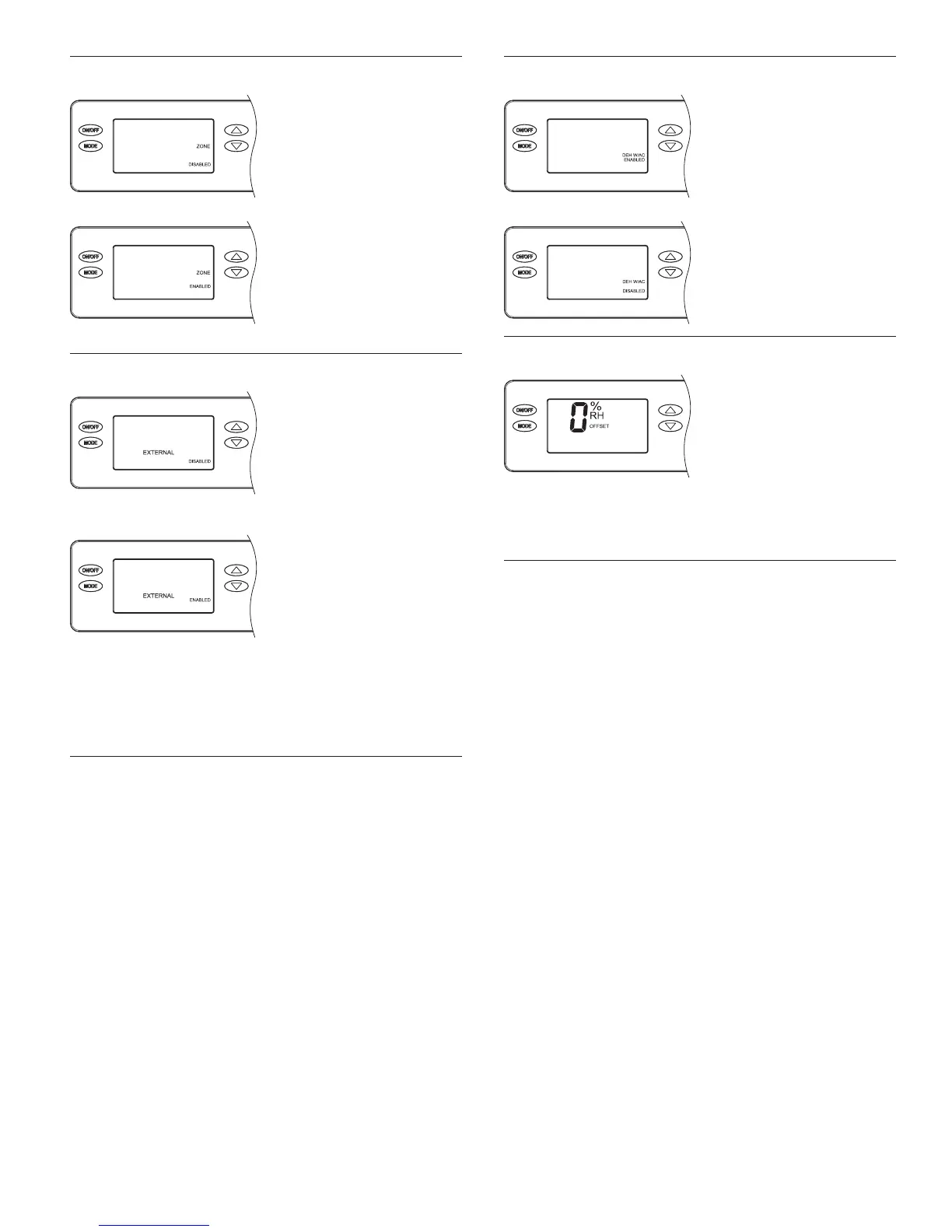
DEH W/AC
To allow dehumidication
during active air
conditioning, select
ENABLED and press
MODE.
To disable dehumidication
when the air conditioning is
on, select DISABLED and
Press MODE.
RH OFFSET
An offset can be
applied to the on-board
humidity reading to avoid
discrepancies with other
humidity measuring devices
in the home. Use the UP/
DOWN arrows to select
an offset from -5% to 5%.
Press MODE to exit the
installer set-up screens.
ZONE
If installing the dehumidier
in a single zone application,
select DISABLED and
press MODE to go to the
EXTERNAL control screen
selections.
If installing the dehumidier
in a two-zone application,
use the UP or DOWN
arrows to select ENABLED
and press MODE to go to
the EXTERNAL control
screen selections.
EXTERNAL CONTROL
If using the dehumidier
on-board control select
DISABLED and press
MODE to go to the
dehumidication with air
conditioning (DEH W/AC)
screen selections.
If using an iComfort
®
Thermostat or a Y6456 as
an external control or other
third-party external control,
such as a thermostat with
dehumidier outputs, use
the UP or DOWN arrows
to select ENABLED and
press MODE to go to the
dehumidication with air
conditioning (DEH W/AC)
screen selections.
13


 To Next Page