VENTILATION
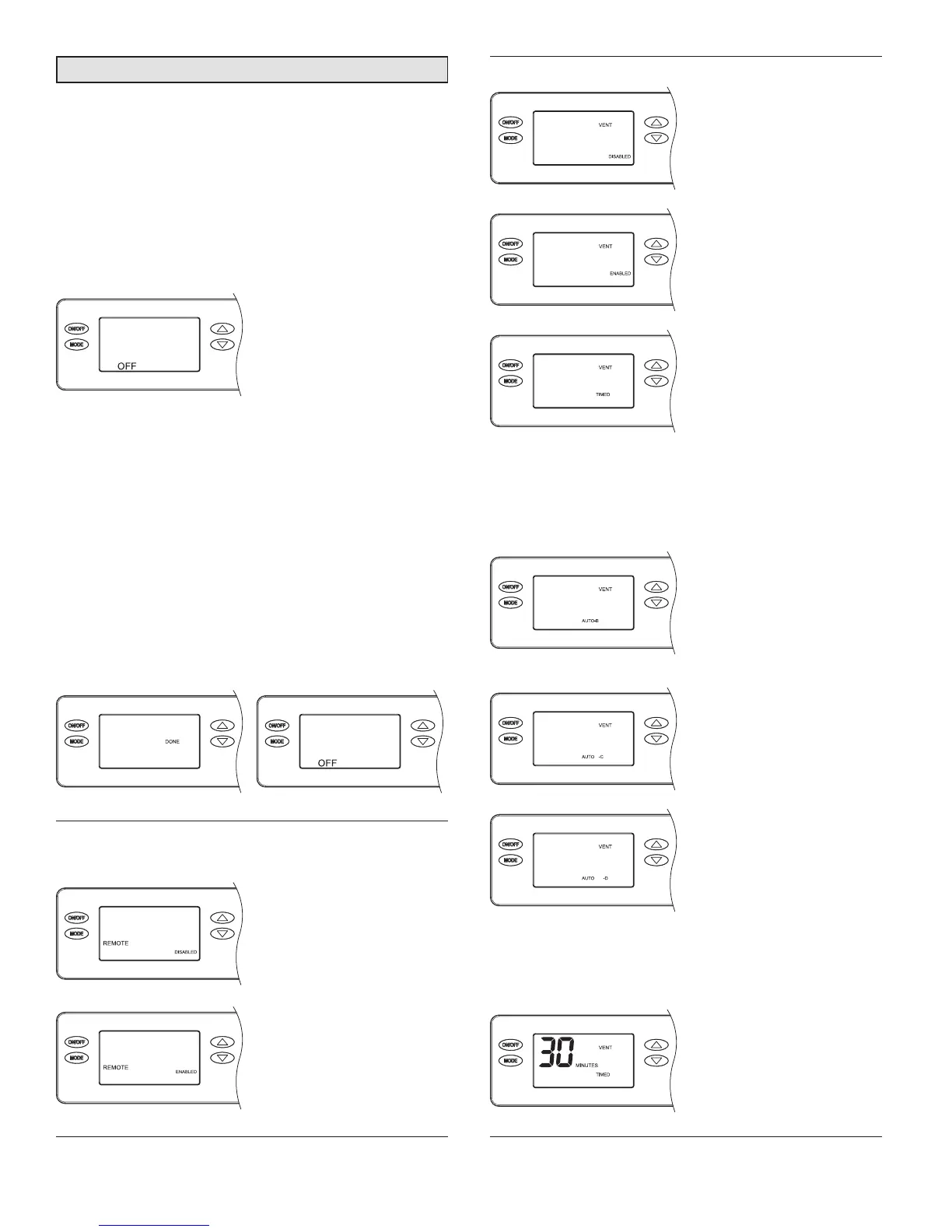
If not using the dehumidier
to bring in outdoor air,
press MODE to go to
ZONE screen selections.
If using the dehumidier
for ventilation, Enable and
press MODE to select
TIMED or AUTO.
If ventilating based on time
only (no outdoor temperature
restrictions), press MODE
at the VENT TIMED screen
to go to ventilation time
selection screen.
If ventilating with outdoor temperature restrictions, use the
UP arrow to go from VENT TIMED to VENT AUTO –B and
then the UP/DOWN arrows to select the desired ventilation
mode, B, C, or D. Press MODE to go to the ventilation time
selection screen.
Vent-Auto-B: Ventilation
prevented when outdoor
temperature is below 0°F
and above 100°F. Between
0°F – 20°F ventilation
is only allowed during a
HVAC heat call.
Vent-Auto-C: Ventilation
prevented when outdoor
temperature is below 0°F
and above 100°F.
Vent-Auto-D: Ventilation
prevented when outdoor
temperature is below 0°F
and above 90°F. Between
0°F – 40°F ventilation
is only allowed during a
HVAC heat call.
Vent-Auto-B, -C, -D modes apply outdoor temperature
limits and require an outdoor temperature sensor to be
installed.
Press the UP or DOWN
arrows to adjust the
ventilation time per hour
from 0 to 60 minutes.
After selecting time, press
MODE to go to the ZONE
screen selections.
System Set-up and Checkout
If dehumidier installation does not include ventilation or
zoning and will not be wired to an external control, remote
control or the HVAC system, proceed to INSTALLER TEST
MODE section on page 14.
1. Check all wiring.
2. Make sure the wire access cover has been snapped
back onto the on-board control.
3. Plug unit in and turn power switch to ON.
4. The on-board control screen should display OFF.
NOTE: If the display backlight is not on, the rst button
press (any button) will only turn on the backlight. Press
the button a second time to achieve function.
5. Hold the MODE button on the on-board control for 3
seconds to enter the Installer Set-up Menu.
6. Navigate through the following screens to set up the
dehumidier for the installed application.
Use the UP or DOWN arrows to select items and use
MODE to switch to the next set-up option. To exit installer
set-up, all options must be scrolled through using the
MODE button.
7. After the installer set up options have been completed,
DONE will blink for 3 seconds and the control will return
to the OFF screen.
REMOTE CONTROL –
CRAWL SPACE/SEALED ATTIC
If not installing in a crawl
space or sealed attic with
Y6456 remote control,
press MODE to go to VENT
screen selections
If installing in a crawl space
or sealed attic with remote
control, Enable and press
MODE. The installer set-up
is complete, proceed to
INSTALLER TEST MODE
section on page 14.
12


 To Next Page