Step 3 / 7
CHECK DIRECTION
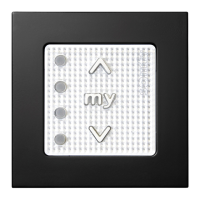
Press the DOWN button.
If the blind travels down, move on to the next step.
If the blind travels up, change direction by PRESSING
& HOLDING the 'MY' button until the blind jogs
(approx 5 secs). Press the DOWN button to check the
direction has reversed.
Step 4 / 7
SET THE UPPER STOP POSITION
Use the control to adjust the blind to the upper stop
position.
BRIEFLY PRESS & RELEASE the DOWN & 'MY' buttons
together.
The blind will start to lower (if nothing happens,
repeat the process until the blind starts to lower).
BRIEFLY PRESS the 'MY' button to stop the blind at
the desired lower stop position (ne tune to the exact
point with the control).
Step 5 / 7
SET THE LOWER STOP POSITION
BRIEFLY PRESS & RELEASE the UP & 'MY' buttons
together.
The blind will move up and stop at the upper stop
position previously set (if nothing happens, repeat the
process until the blind starts to move up).
Version 41
23



 To Next Page