Somfy Rollup 28 Motor Control Programming
Somfy Rollup 28 Motor Control Programming
Pairing-Deleting A Single Channel Control
Step 1 / 3
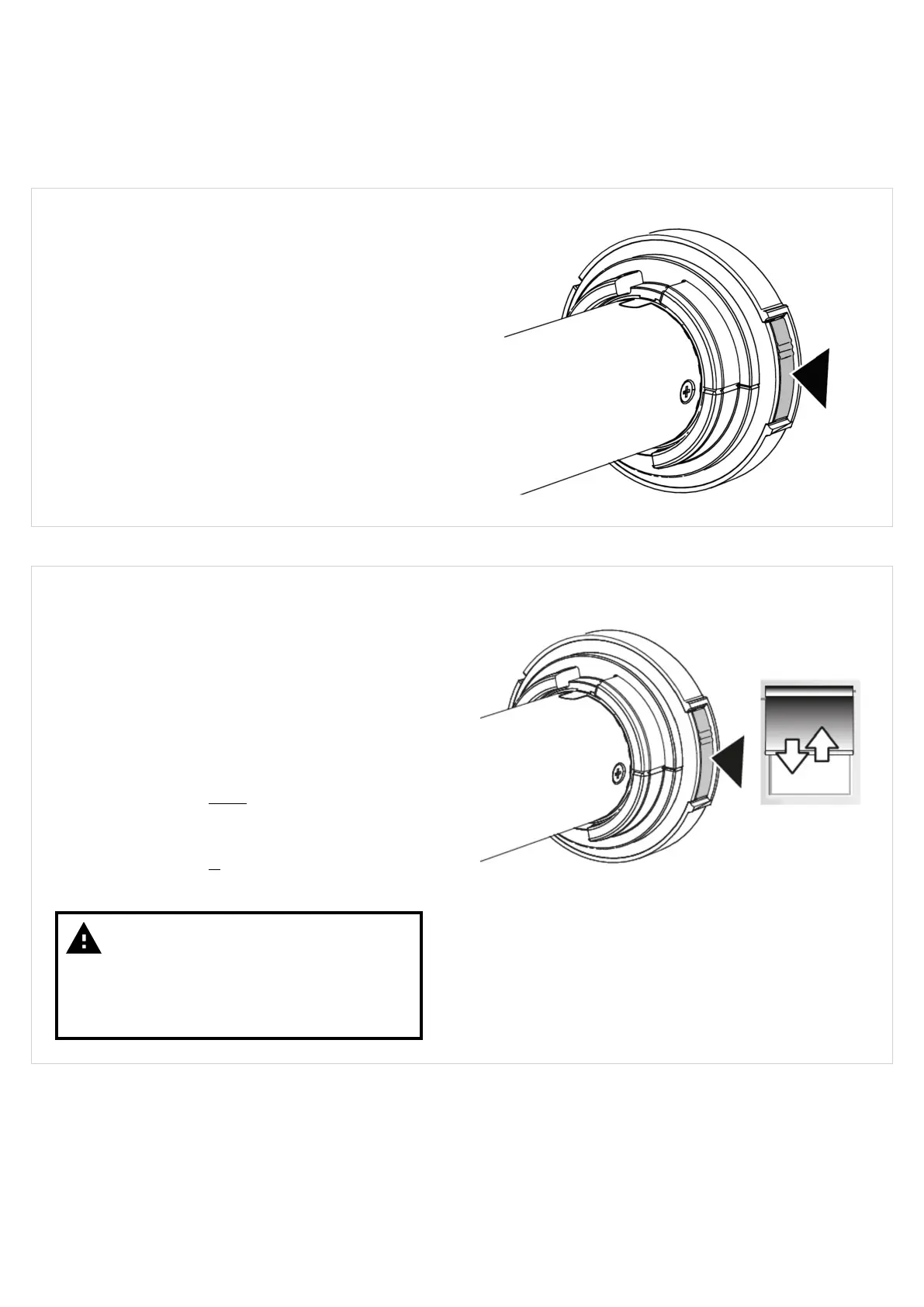
Pair or delete a control to a blind using the motor
program/reset button - applicable to:
Somfy Rollup 28 RTS
Somfy Rollup 28 RTS Li-ion (integral battery)
This procedure enables a control to be paired to a
blind without the need to disconnect power to other
blinds in range.
Step 2 / 3
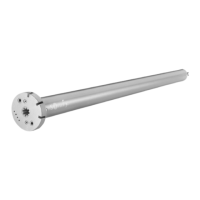
Press and hold the program/reset button on the
motor head until the blind jogs Up/Down - then
release (about 2-3 seconds).
The motor is now in programming mode and will now
accept a control to either pair or delete.
If the control selected is not currently paired to the
motor, then it will be added.
If the control selected is currently paired to the motor,
then it will be deleted.
Warning
Only hold the motor program/reset
button until the blind jogs a single time
- then release. Holding the button down
too long may result in a motor reset.
Version 41
25



 To Next Page