The Somfy Roller Blind is an automated window covering system designed for ease of installation, programming, and use. It features an integral rechargeable Li-ion battery motor, offering a wire-free solution for controlling light and privacy in your home or office. The system supports various blind types, including standard and cassette roller blinds, and can be operated with a Somfy control or integrated into an existing Somfy-compatible setup.
Function Description:
The primary function of the Somfy Roller Blind is to provide automated control over window coverings. The motor allows for smooth and quiet operation, moving the blind up, down, and to a customizable "MY" intermediate position. The system is designed for straightforward installation and offers flexible programming options for setting upper and lower stop positions, as well as an intermediate "MY" position. It supports both single and multi-channel controls, allowing for individual or group operation of multiple blinds. The motor includes a program/reset button for initial setup, pairing controls, and performing a full motor reset if needed.
Important Technical Specifications:
- Motor Type: Integral rechargeable Li-ion battery motor. This eliminates the need for external wiring, simplifying installation and maintaining a clean aesthetic.
- Battery Life: The motor is supplied with sufficient charge for initial operation before a recharge is required. The motor program/reset button blinks red slowly for 3 seconds before and after blind operation when batteries are low.
- Charging: The motor is charged via a dedicated charger cable. The LED on the charger indicates charging status: solid red for charging, solid orange for near completion, and solid green for complete. It is important not to operate the blind while it is charging.
- Bracket Types:
- Standard Roller Blind: Uses 2 x universal brackets.
- Cassette Roller Blinds:
- Up to 1M wide: 2 brackets.
- 1M to 2M wide: 3 brackets.
- Over 2M wide: 4 brackets.
- Cassette blinds also offer face fix and top fix bracket options.
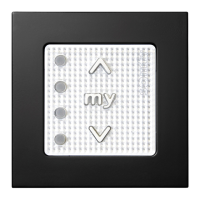
- Control Compatibility: Compatible with Somfy Situo single channel controls, Telis 1, Telis 4, Situo 5 handsets, and Smoove Origin 4 wall switches. The system is designed to be paired with various Somfy RTS (Radio Technology Somfy) controls.
- Motor Reset: A motor reset can be performed by pressing and holding the program/reset button on the motor head until the blind jogs 3 times (approximately 10 seconds), deleting all settings and resetting the motor.
- Programming Mode: The motor enters programming mode by pressing and holding the program/reset button until the blind jogs Up/Down once (about 2-3 seconds) for pairing/deleting single or multi-channel controls, or twice (about 5-6 seconds) for deleting all recorded controls and pairing a new one.
Usage Features:
- Easy Installation: The manual provides detailed steps for both standard and cassette roller blind installations, including marking and fitting brackets, and mounting the roller blind assembly. Key considerations like fabric roll direction (front or rear) and motor program/reset button accessibility are highlighted.
- Motor Wake-up: To preserve battery charge during shipping, the motor is supplied in 'Sleep Mode'. It requires a brief press of the program/reset button on the motor head to wake up, indicated by a brief Up/Down jog of the blind.
- Control Pairing: If a control was ordered with the blind, it comes pre-paired. For blinds supplied without a control, or for pairing additional controls, a simple pairing procedure involves waking the motor, briefly pressing the Up & Down buttons on the control, and then briefly pressing the program button on the back of the control.
- Adjustable Stop Positions:
- Upper Stop Position: Can be adjusted by sending the blind to its current upper stop, then pressing and holding both Up & Down buttons until the blind jogs. The blind can then be adjusted to the new desired upper position using the Up/Down buttons, and the new position saved by pressing and holding the 'my'/stop button until the blind jogs.
- Lower Stop Position: Similar to the upper stop, the lower position is adjusted by sending the blind to its current lower stop, pressing and holding both Up & Down buttons until it jogs, adjusting to the new desired position, and saving with the 'my'/stop button.
- Warning: When adjusting the upper position on a cassette blind, ensure the bottom bar hangs down from the profile to prevent damage. When adjusting the lower position, avoid lowering the fabric too much to prevent reverse rolling around the tube.
- Set a 'MY' Position: Users can set an intermediate "MY" position by operating the blind to the desired point and then pressing and holding the 'MY' button until the blind jogs. This allows for quick recall of a favorite position with a single button press.
- Delete 'MY' Position: The 'MY' position can be deleted by sending the blind to the 'MY' position and then pressing and holding the 'MY' button until the blind jogs.
- Direction Check: After a motor reset, the blind's direction can be checked. If the direction is reversed, pressing and holding the 'MY' button for approximately 5 seconds will reverse it.
- Multi-Channel Control: The system supports multi-channel controls, allowing users to select specific channels to pair or delete, enabling control of multiple blinds individually or in groups.
- Delete All Recorded Controls: A procedure is available to delete all previously stored controls/channels from the motor's memory and overwrite them with a new single or multi-channel control. This involves pressing and holding the program/reset button on the motor head until the blind jogs Up/Down twice.
Maintenance Features:
- Battery Charging Indication: The motor's program/reset button provides a visual cue (slow red blinking) when the battery is low, prompting the user to recharge. The charger's LED also clearly indicates the charging status.
- Troubleshooting Guide: The manual includes a troubleshooting section for common issues such as the blind not responding (low battery, control not paired) or stopping incorrectly (low battery, stop positions need adjustment). It directs users to relevant sections for motor reset and stop position adjustments.
- Online Version: An online version of the guide is available via a QR code and URL, ensuring users have access to the most up-to-date information and support. This is a valuable feature for ongoing maintenance and support.
- Motor Reset for Reprogramming: The motor reset function is a crucial maintenance feature, allowing users to clear all previous settings and start fresh with programming, which is useful for resolving complex programming issues or when changing controls.

 Need help?
 General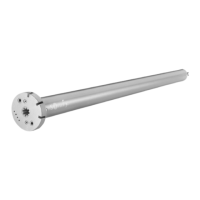


 To Next Page