EN
RS485 SETTING TOOL
7Copyright
©
2020 SOMFY ACTIVITES SA, Société Anonyme. All rights reserved.
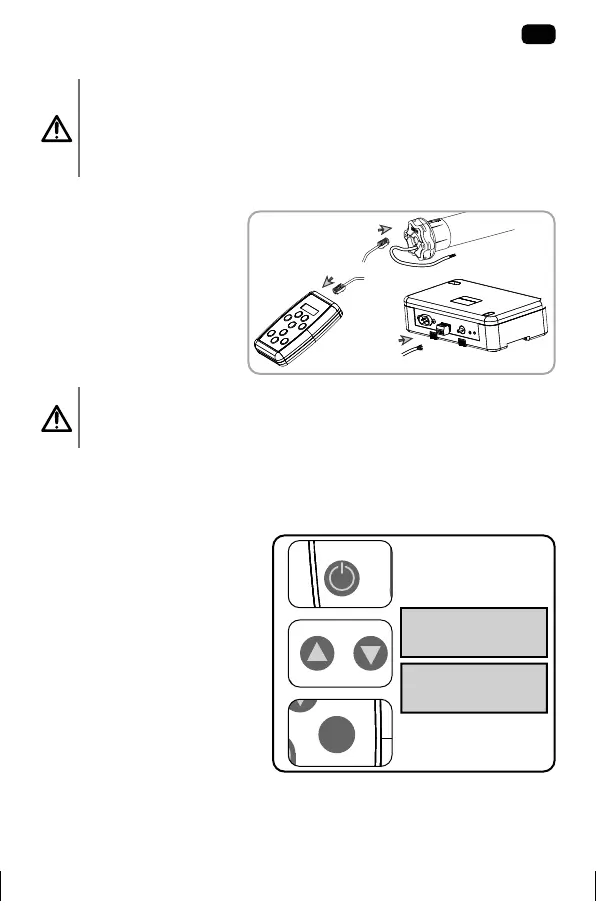
2.2. WIRING
Precaution
• Cables which pass through a metal wall must be protected and
isolated using a sheath or sleeve.
• Attach cables to prevent any contact with moving parts.
Connect the RS485 SETTING TOOL to the RS485 product.
Precaution
Between the RS485 SETTING TOOL and the RS485 product, the
cable length should not exceed 10 m.
2.3. COMMISSIONING
2.3.1. Switch on the RS485 SETTING TOOL
! Point to point settings only (this
is not a network tool).
1) Press the on/o button
to switch on the RS485
SETTING TOOL.
2) Choose the «Somfy RS485
node discovery» fonction
or the «setting tool
parameters» fonction by
pressing the up and down
buttons.
! Use the «Up», «Down», «Back»
and «Ok» buttons to naviguate
in the menu.
SOMFY RS485
NODE DISCOVERY
SETTING TOOL
PARAMETERS
5101887C005_RS485 Setting tool.indb 7 23/09/2020 17:04
5101887C006_RS485 Setting tool.pdf 7 9/25/2020 2:49:23 PM


 To Next Page