OPERATING THE EQUIPMENT
Use the following procedure to upgrade the HOST firmware. To upgrade the DAS
firmware refer to Step 8.
HOST Firmware Upgrade Procedure
1 Using the Dual Test Cable, connect the CPU connector to a comms port on the PC.
Make note of which comms port is used.
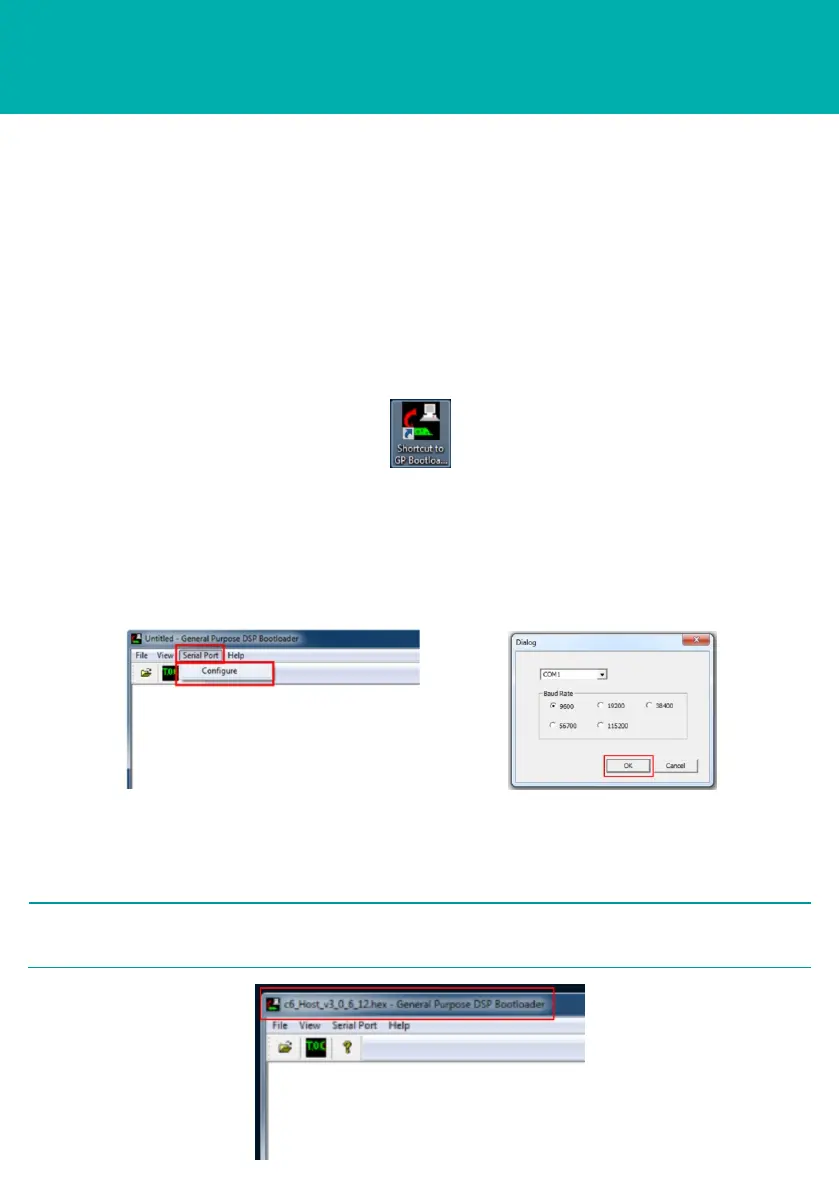
2 Double click on the GP Bootloader.exe icon to open the program.
STEP 5
3 From the menu toolbar select Serial Port, then Configure.
4 In the Dialog screen select the correct COM port and Baud Rate 38400, 56700
or 115200.
5 Click OK.
6 Select File, then Open.
7 Browse to the location where the new firmware is stored.
8 Select the new firmware.
2 NOTE
The new firmware version will appear in the Bootloader title bar.



 To Next Page