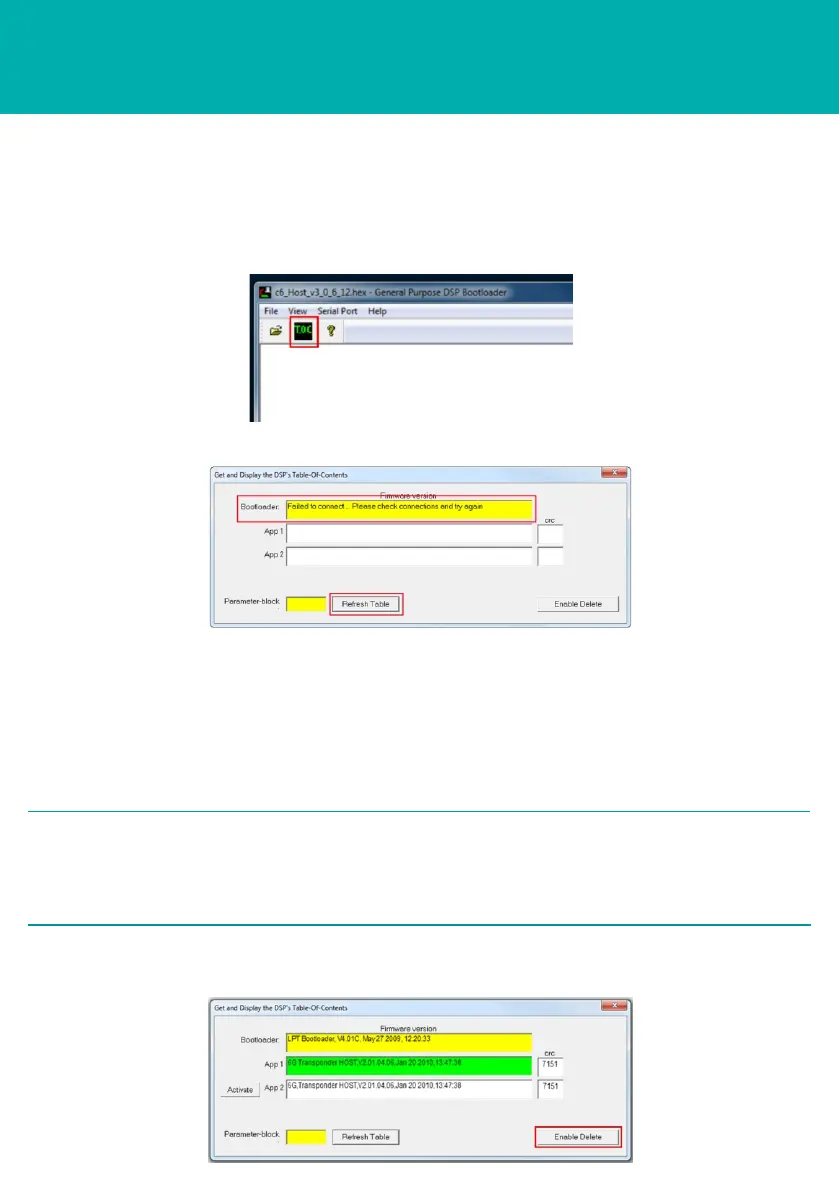
11 Check all cables are connected correctly to the PC.
12 Go to the Device Manager facility on the PC and check the CPU cable is
connected to the correct Comms Port.
13 Click Refresh after checking the connections.
14 If all the cable connections have been made, the window will refresh.
OPERATING THE EQUIPMENT
HOST Firmware Upgrade Procedure
STEP 6
15 To erase an application, click Enable Delete.
2 NOTES
Two spaces are available on the hardware for firmware. If all spaces are full,
then one must be deleted to accommodate the firmware upgrade.
The green highlighted App indicates the currently active firmware.
10 If connections are not made successfully, an error message will appear.
9 On the main screen, select TOC.



 To Next Page