Chapter 1 Overview
Chapter 1 Overview 23
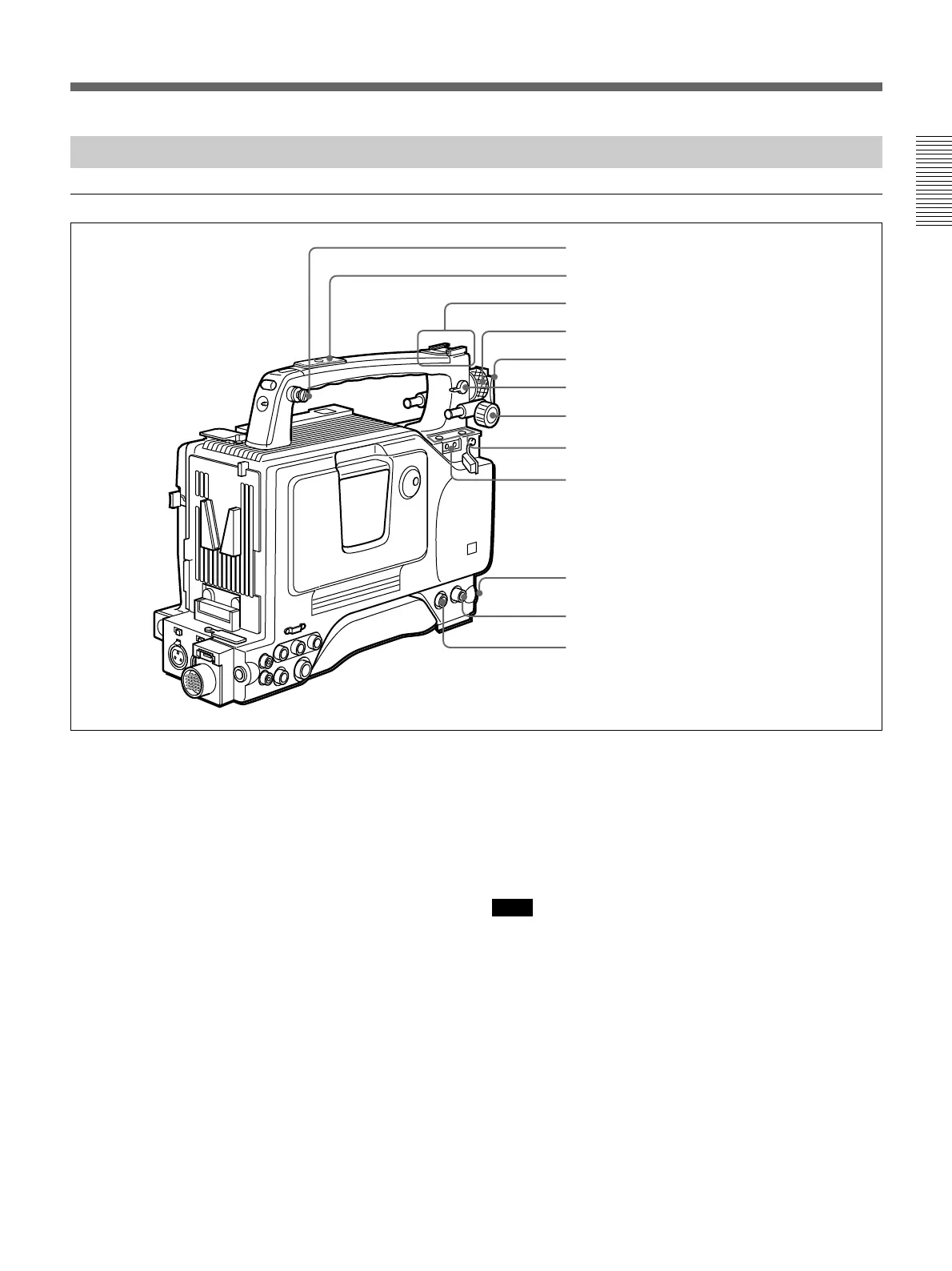
Left and Upper View
Front section
1 Shoulder strap fitting
To use the supplied shoulder strap, fix one end here
and the other end to the right side.(See page 38.)
2 Attachment shoe for large viewfinder
This allows you to attach the optional electronic
viewfinder. (See page 35.)
3 Accessory fitting shoe and screw hole
Attach optional video lights or other accessories here.
(See page 37.)
4 Viewfinder left-to-right position fixing ring
Loosen this ring to adjust the left-to-right position of
the viewfinder. (See page 34.)
5 Viewfinder fitting shoe
Fix the DXF-801/801CE Viewfinder here. (See page
34.)
6 REMOTE connector 1 (mini-jack)
Connect the RM-LG1 Remote Control Unit to enable
remote operation of the ClipLink function.
If you connect the optional cable (Sony part number:
1-790-779-11) to this connector, you can control the
zoom using the optional RM-VJ1 Remote Control Unit
(equipped with microphone and monitor), even if you
use the conventional lens.
For details, consult your Sony dealer.
Note
The RM-81 cannot be connected.
7 Viewfinder front-to-back position locking knob
Loosen this knob to adjust the front-to-back position of
the viewfinder. (See page 34.)
8 Fitting for optional microphone holder
You can fit an optional CAC-12 Microphone Holder
here. (See page 36.)
9 Video light connector
A video light with a maximum power consumption of
30 W such as the Anton Bauer Ultralight 2 or
equivalent can be connected. (See page 37.)
1 Shoulder strap fitting
2 Attachment shoe for large viewfinder
3 Accessory fitting shoe and screw hole
4 Viewfinder left-to-right positioning ring
5 Viewfinder fitting shoe
6 REMOTE connector 1
7 Viewfinder front-to-back position locking knob
8 Fitting for optional microphone holder
9 Video light connector
0 LENS connector
qa VIDEO OUT connector
qs REMOTE connector 2






 To Next Page