Chapter 2 Fitting and Connections
48 Chapter 2 Fitting and Connections
Using an AC Adaptor
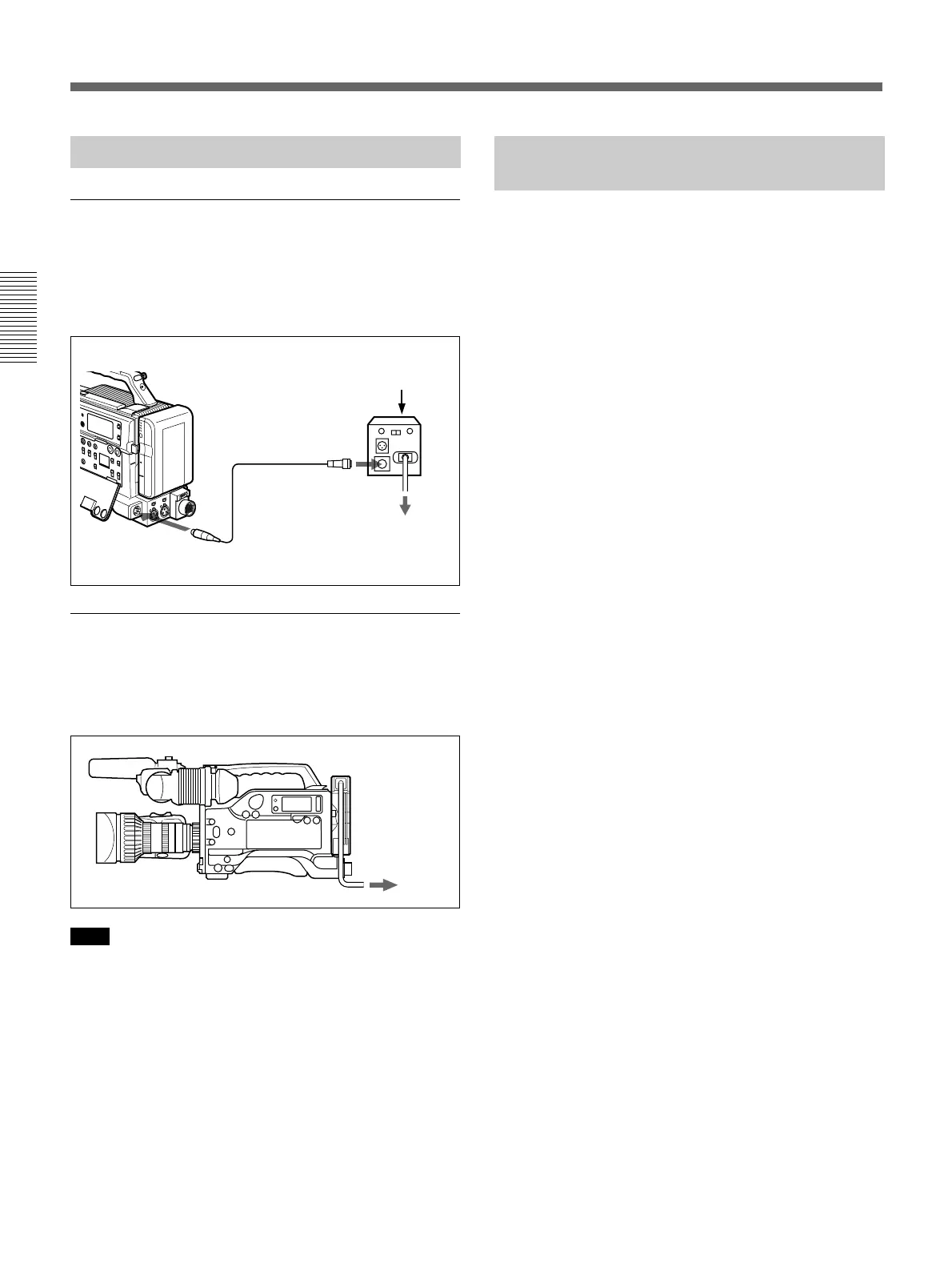
Using a CMA-8A/8ACE AC Adaptor
Connect the camcorder to the AC power supply as
shown in the following figure, and turn the POWER
switch of the CMA-8A/8ACE to ON.
Using an AC-DN1/DN2A AC Adaptor
Mount the AC-DN1/DN2A on the camcorder in the
same way as a battery, then connect to the AC power
source.
Note
When power consumption of the camcorder and
accessories is 38 W or higher, use the AC-DN2A AC
adaptor (lower than 150 W).
Using the Anton Bauer
Intelligent Battery System
You can equip the camcorder with a special battery
mount which the Anton Bauer Corporation has
developed for its Intelligent Battery System and
Ultralight System.
When the camcorder is used with an Anton Bauer
Digital Magnum series battery, the remaining battery
capacity is shown numerically in the viewfinder
display.
Contact your Sony dealer for more information.
LOCK
To AC power source
POWER switch: ON
DC IN
CAMERA/CCU
CMA-8A/8ACE
AC Adaptor
CCQX-3 cable
To AC power
source
Power Supply






 To Next Page