Chapter 2 Fitting and Connections
Chapter 2 Fitting and Connections 39
WRR
WRR connector
CA-WR855
Fasten the screws (supplied with
the WRR-855A).
Connecting to Audio System
The DSR-500WSL/500WSPL is able to record sound not only from the microphone attached but also from a
wireless microphone or an external audio system.
Using a wireless microphone system
You can use the wireless microphone system
including a WRT-810A/830A UHF Wireless
Microphone and a WRR-810A/855A/860A UHF
synthesized tuner to record sound.
For details on using the wireless microphone system, see the
operating instructions for the microphone and tuner.
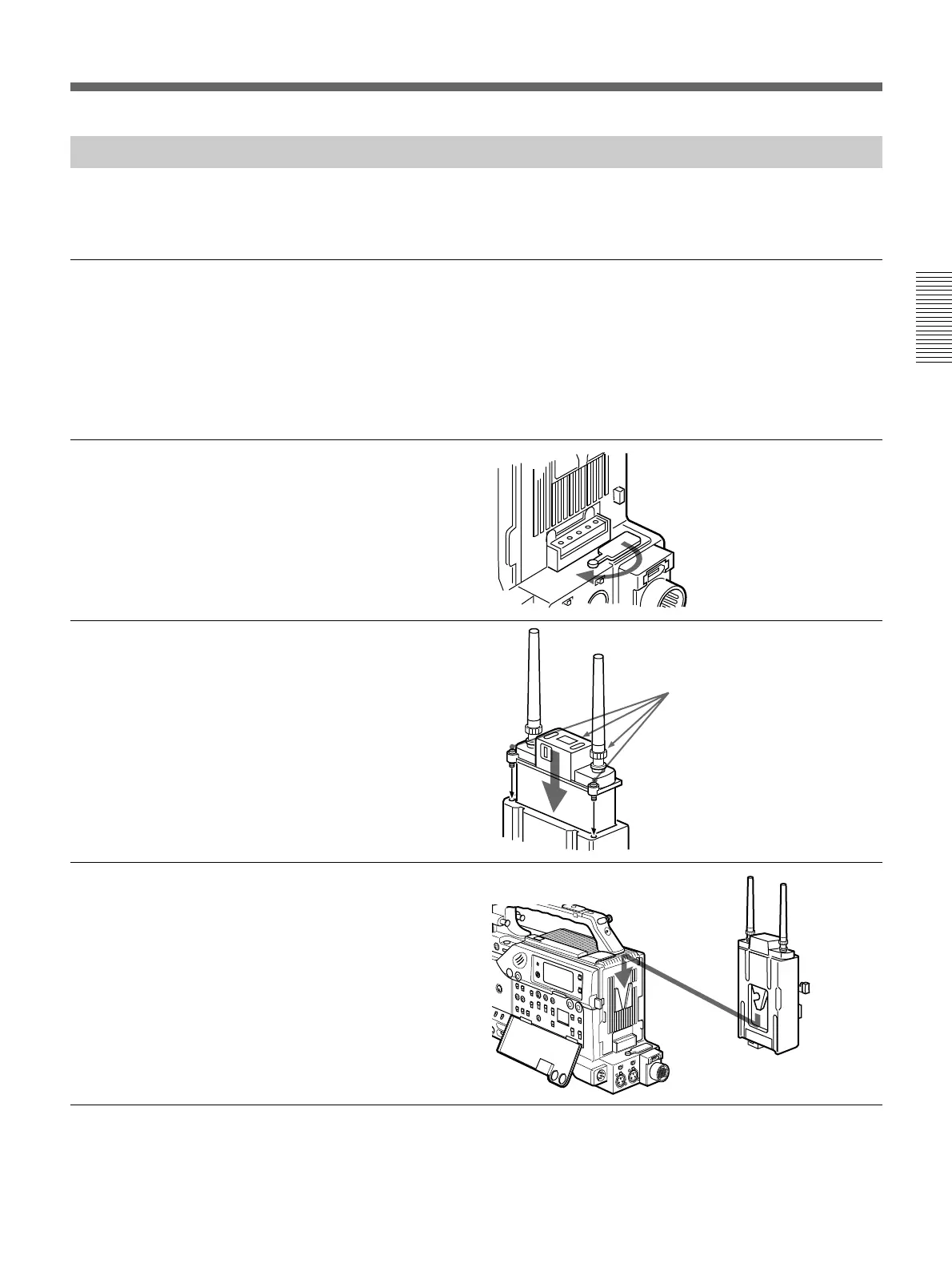
To connect a WRR-855A
1 Open the cover of the WRR
connector.
2 Insert the WRP-855A into the
CA-WR855.
3 Fit the attachment plate on the
rear side of the CA-WR855 to
the V-groove on the battery
attachment interface, and then
slide the CA-WR855 down
until it connects to the WRR
connector.
4 Set one of the AUDIO IN (CH-
1/CH-2) switches to WRR.






 To Next Page