91
Using the shooting function
You can check the focus by enlarging the image before shooting.
Checking the focus by enlarging the image
1 MENU button t 1 t [Focus Magnifier] t [On]
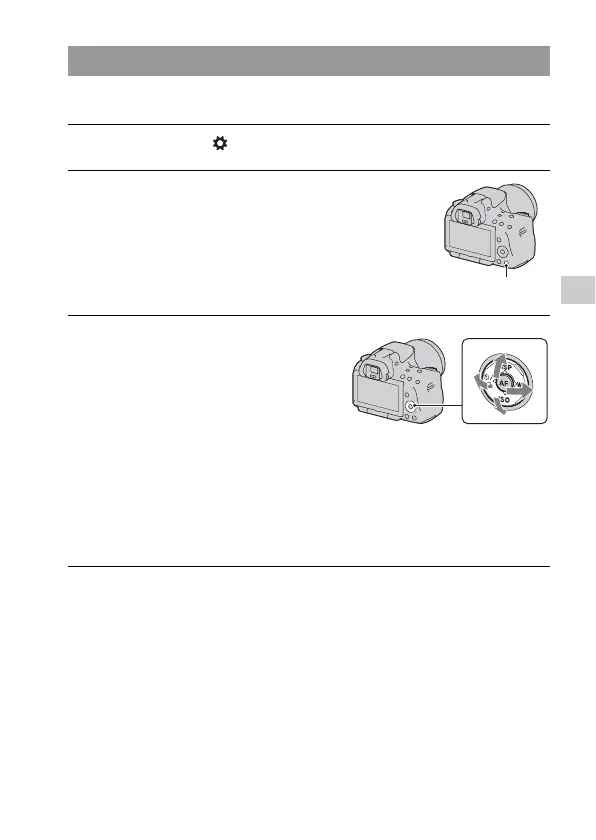
2 Press the Focus Magnifier button.
Focus Magnifier button
3 Press the Focus Magnifier button
again to enlarge the image and
select the portion you want to
enlarge with v/V/b/B on the
control button.
• Each time you press the Focus
Magnifier button, the zoom scaling
changes as follows: Full display t
Approx. ×7.5 t Approx. ×15 (SLT-
A55/A55V)/Full display t Approx.
×7 t Approx. ×14 (SLT-A33)
4 Confirm and adjust the focus.
• Rotate the focusing ring to adjust the focus in manual focus mode.
• If you press the AF button in autofocus mode, the Focus Magnifier function
is canceled and the autofocus is activated.
• The Focus Magnifier function is canceled if you press the shutter button
halfway down.



 To Next Page