148
Zooming
The zoom features available with this camera
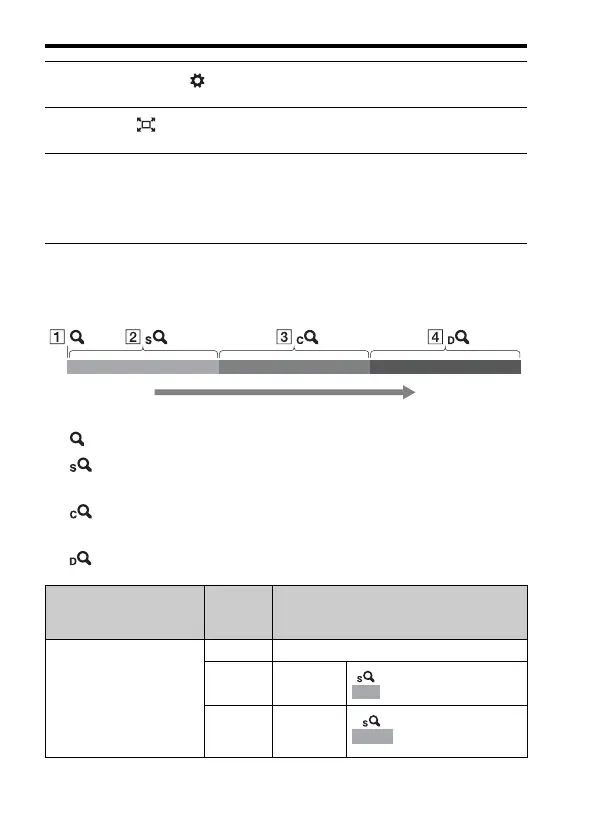
The icon displayed on the screen changes as follows according to the zoom
scale.
A : The zoom feature of the camera is not used (×1.0 is indicated).
B Smart Zoom: You can magnify images by trimming them slightly.
(Available only when [Image Size] is set to M or S.)
C Clear Image Zoom: You can magnify images using a high-quality
image process.
D Digital Zoom: You can magnify images using an image process.
1 MENU button t 4 t [Smart Telecon. Button] t [Zoom]
2 Press the button.
3 Magnify the image up to the desired zoom factor with b/B on
the multi-selector.
• You can magnify the image at wider intervals with v/V.
Zoom scale
(low)
Zoom scale
(high)
Setting
Image
size
Zoom scale with optical zoom
(Upper row: Full-frame size shooting/lower
row: APS-C size shooting)
Zooms images by
trimming them in the
available range (without
deterioration of image
quality).
Clear Image Zoom: Off
Digital Zoom: Off
L–
M About 1.5×
About 1.5×
S About 2.3×
About 2.3×














 To Next Page