194
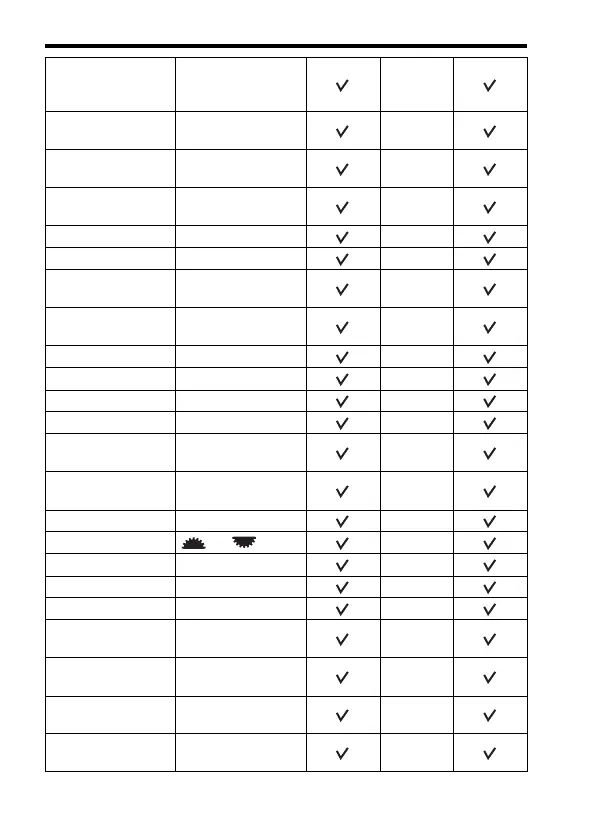
Resetting to the default
DISP
Button(Monitor) (87)
For viewfinder/No
Disp. Info./Level/
Histogram
–
DISP Button(Finder)
(87)
No Disp. Info./Level/
Histogram
–
AF RANGE Button
(41, 98)
AF Range Control
–
AF Range Control
Assist (41)
On
–
Peaking Level (102) Off –
Peaking Color (103) White –
Live View Display
(89)
Setting Effect ON
–
Func. of AEL button
(176)
AEL hold
–
ISO Button (176) ISO –
AF/MF button (176) AF/MF Control Hold –
Custom button (177) FEL Lock toggle –
Preview Button (176) Aperture Preview –
Smart Telecon.
Button (103, 147)
Smart Telecon.
–
Focus Hold Button
(42)
Focus Hold
–
MOVIE Button (42) Always –
Ctrl dial setup (42) SS F/no. –
Dial exp.comp (107) Off –
Exp.comp.set (43) Ambient&flash –
Bracket order (43) 0 t – t +–
Lens Comp.: Shading
(181)
Auto
–
Lens Comp.: Chro.
Aber. (181)
Auto
–
Lens Comp.:
Distortion (181)
Off
–
Front Curtain Shutter
(177)
On
–



 To Next Page