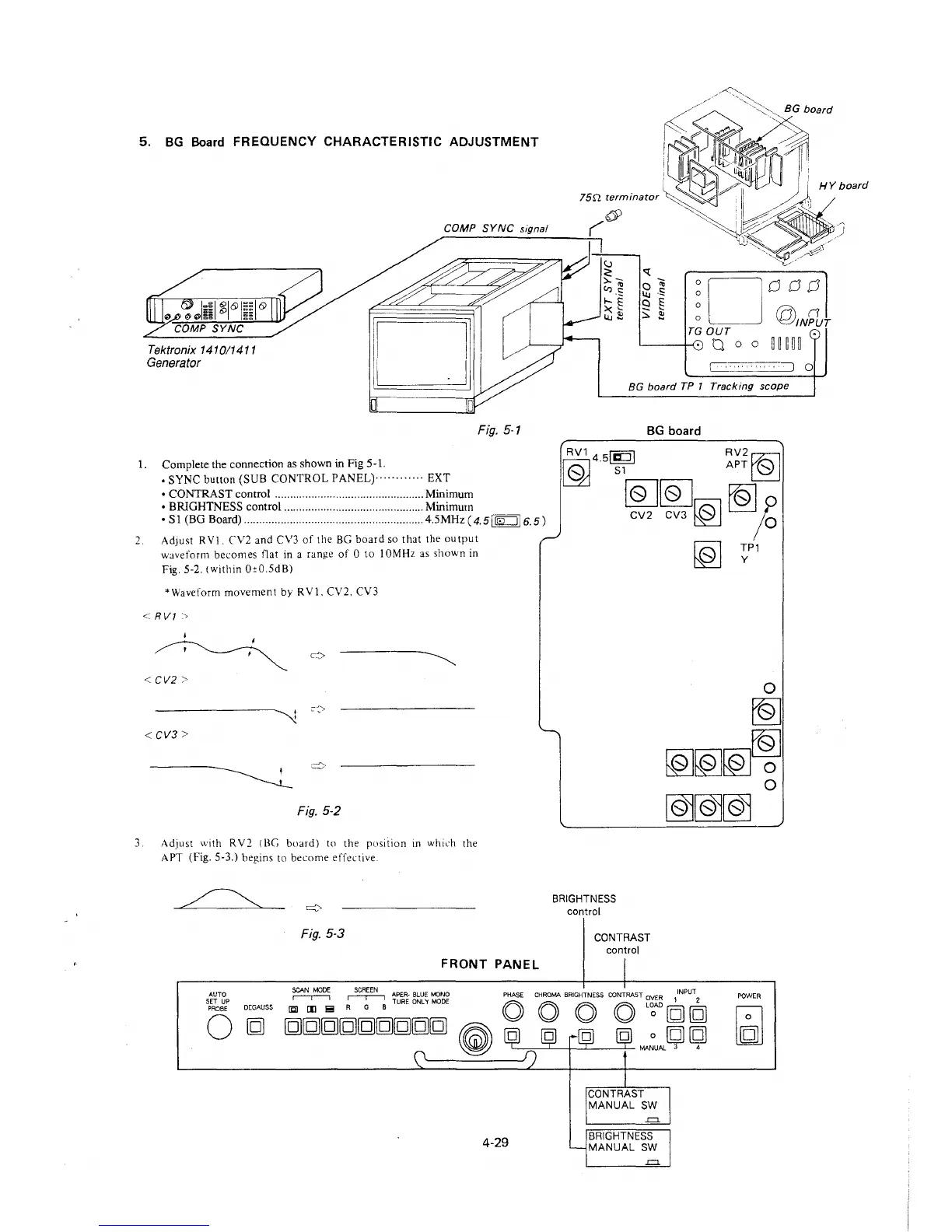
5. BG Board FREQUENCY CHARACTERISTIC ADJUSTMENT
Tektronix 1410/1411
Generator
COMP SYNC signal
Fig. 5-1
1.
Complete the connection as shown in Fig 5-1.
, SYNC button (SUB CONTROL PANEL)············ EXT
• CONTRAST control ................................................. Minimum
• BRIGHTNESS control .............................................. Minimum
• Sl (BG Board) ........................................................... 4.5MHz(4.5j~l6.5)
2.
Adjust RY!. C\/2 and C\/3 of the BG board so that the output
waveform becomes t1at in a range of O to I 0MHz as shown in
Fig. 5-2. (within Oc0.5dB)
*Waveform movement by RY!. CV2. CV3
< RV1 :,
< CV2 >
< CV3>
Fig. 5-2
3. Ad Just with R Y2 ( BG board) to the position in which the
APT (Fig. 5-3.) begins to become effective.
Fig. 5-3
FRONT PANEL
AUTO
SET UP
PROBE
0
DEGAUSS
~
~
APER-BLUE MONO
li:lJ [I] i!!I R G B TURE ONLY MODE
[g][g][g][g][g][g][g][g][g]
~
4-29
/~::--_~"'-
'~ BG board
HY board
~oooo
0
@,i:1u
TG OUT
,___......,, a o o iim
BG board TP 1 Tracking scope
BG board
RV145!1CDI RV2~
10J . S1 APT@j
[Q]lQJ
~
CV2 CV3 [(?) I ;o
BRIGHTNESS
control
CONTRAST
control
CONTRAST
MANUAL SW
-=
BRIGHTNESS
MANUAL SW
-=
[ol ~Pl
POWER
0







 To Next Page