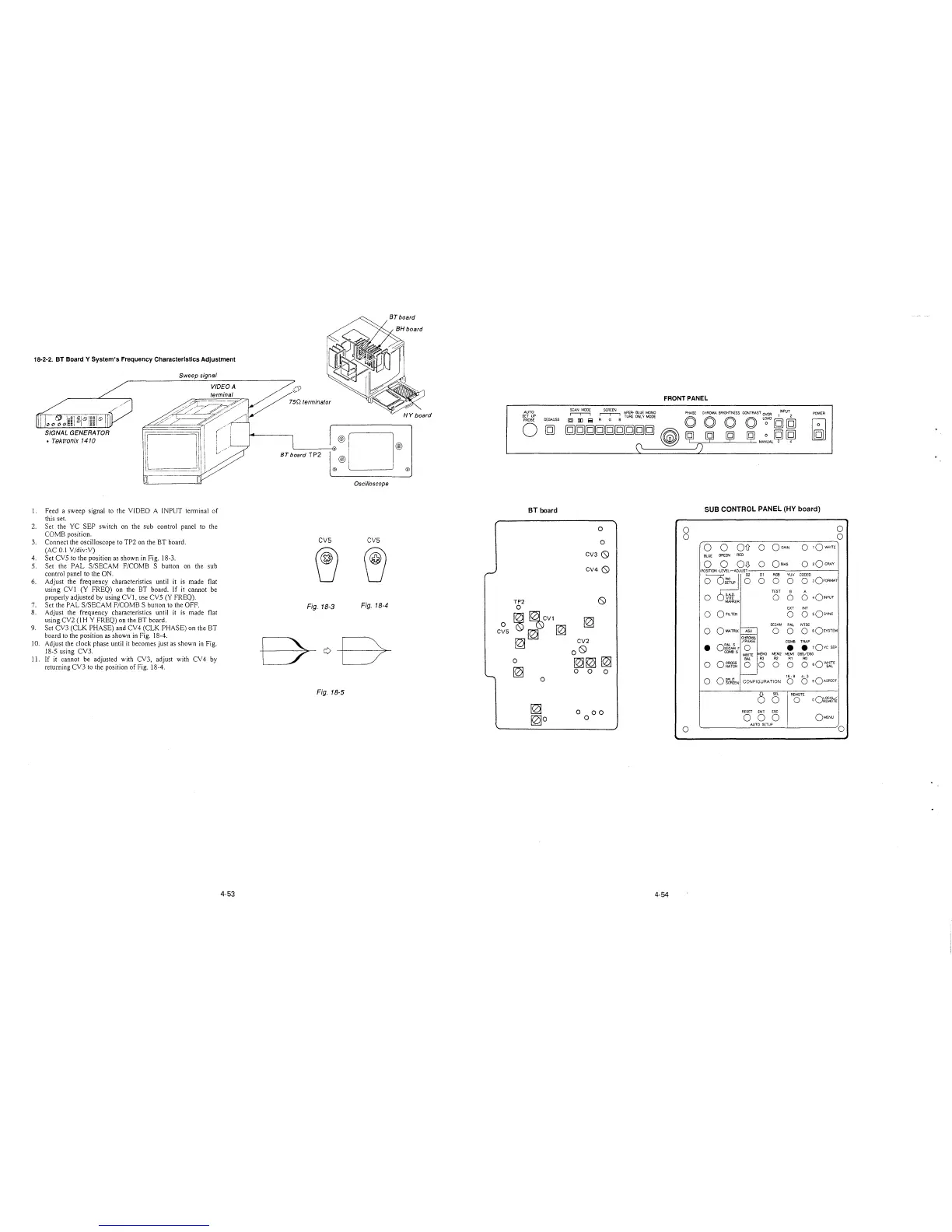
18-2-2. BT Board Y System's Frequency Characteristics Adjustment
Sweep signal
VIDEO A
terminal
SIGNAL GENERA TOR
• Tektronix 1410
1. Feed a sweep signal to the VIDEO A INPUT terminal of
this set.
2. Set the YC SEP switch on the sub control panel to the
COMB position.
3. Connect the oscilloscope to TP2 on the BT board.
(AC 0.1 V/div:V)
4. Set CVS to the position as shown in Fig. 18-3.
5. Set the PAL S/SECAM F/COMB S button on the sub
control panel to the ON.
6. Adjust the frequency characteristics until it is made flat
using CVl (Y FREQ) on the BT board. If it cannot be
properly adjusted by using CV!, use CVS (Y FREQ).
7. Set the PAL S/SECAM F/COMB S button to the OFF.
8. Adjust the frequency characteristics until it is made flat
using CV2 (1 HY FREQ) on the BT board.
9. Set CV3 (CLK PHASE) and CV4 (CLK PHASE) on the BT
board to the position as shown in Fig. 18-4.
10. Adjust the clock phase until it becomes just as shown in Fig.
18-5 using CV3.
11. If it cannot be adjusted with CV3, adjust with CV 4 by
returning CV3 to the position of Fig. 18-4.
4-53
BT board TP2
·®D®
@)
@) @
Oscilloscope
CV5 CV5
Fig. 18-3
Fig. 18-4
0
CV5
Fig. 18-5
AUTO
SET UP
PROBE
DEGAUSS
FRONT PANEL
~
~
APER· BLUE MONO PHASE CHROMA BRIGHTNESS CONTRAST OVER INPUT
POWER
0
IQ) II] i3 A G B TUAE ONL'I MODE O O O O L~AO [g] [g]
[g)[gfil][g)[gfil][g)~[g)
~
[\ll I)
~ ~
~
...:JQI
~
BT board
SUB CONTROL PANEL (HY board)
0
0
0
0
0
0
CV3 0
0
0
Oil 0
OGAIN
0
1QWHITE
BLUE
GREEN
RED
CV4 0
0
0
OD
0
OSIAS
0
20 GRAY
Dl
RGB
YUV CODED
0
0
0
o ,o,oAMAT
TEST
B
A
TP2
0
0
0 0 0
401NPUT
0
EXT INT
~
~CV1
~
0 0
0
sQsvNc
SECAM
PAL NTSC
~
~
0
0 0
O sOsvsTEM
CHROMA
~
CV2
/PHASE
COMB TRAP
o0
•
o:t6~ F
0
•
• 10vc SEP
COMBS
WHITE
MEM3 MEM2 MEMl 065/093
0
~~
~
BAL
R3 R2 Al RO
0
0 CROSS
0 0
0
0 0
eQWJ!?
~
HATCH
0
0
0
0
16: 9 4. 3
0 oi~wlEN
CONFIGURATION
0 0
sQASPECT
0
SEL
REMOTE
0
0
oQ~~i1-iE
~
0
00
RESET ENT ESC
[0)0
0
0
0 0
OMENU
AUTO SETUP
0
0
4-54







 To Next Page