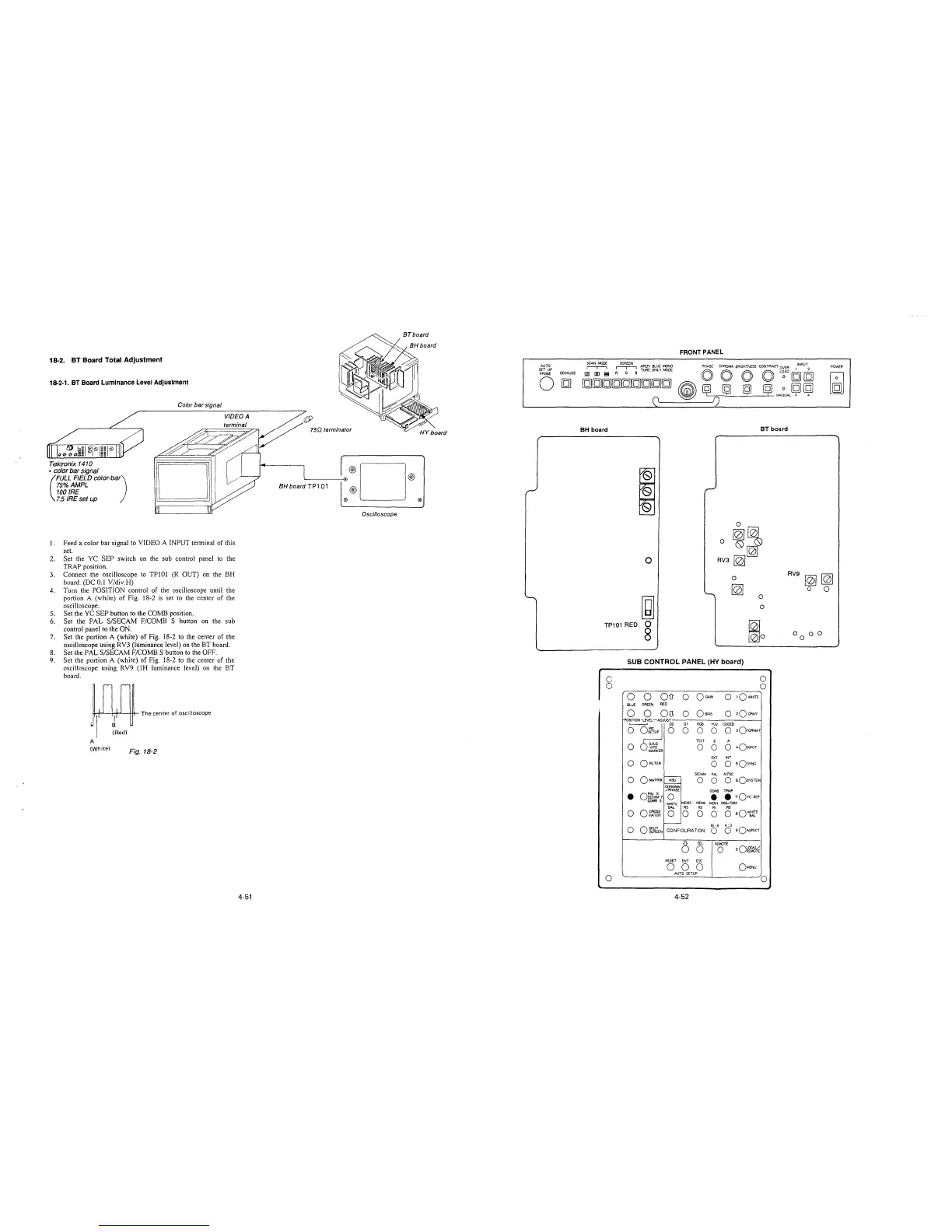
18-2. BT Board Total Adjustment
18-2-1. BT Board Luminance Level Adjustment
Color bar signal
VIDEO A
terminal
Tektronix 141 O
• color bar signal
(
FULL FIELD color-ba)
75%AMPL
100 IRE
7.5 IRE set up
I. Feed a color bar signal to VIDEO A INPUT terminal of this
set.
2. Set the YC SEP switch on the sub control panel to the
TRAP position.
3. Connect the oscilloscope to TPl0l (R OUT) on the BH
board. (DC 0.1 V/div:H)
4. Tum the POSITION coniroi of ihe oscilioscope until the
portion A (white) of Fig. 18-2 is set to the center of the
oscilloscope.
5. Set the YC SEP button to the COMB position.
6. Set the PAL S/SECAM F/COMB S button on the sub
control panel to the ON.
7. Set the portion A (white) of Fig. 18-2 to the center of the
oscilloscope using RY3 (luminance level) on the BT board.
8. Set the PAL S/SECAM F/COMB S button to the OFF.
9. Set the portion A (white) of Fig. 18-2 to the center of the
oscilloscope using RV9 (IH luminance level) on the BT
board.
I n rn T""""'" of ose,11oseope
Jr-rt
I fRed)
A
(White)
Fig. 18-2
4-51
AUTO
SET UP
PROBE
DEGAUSS
0
[g]
BH board TP101
®D®
@)
® ®
Oscilloscope
FRONT PANEL
SCAN MODE
~
APER· BLUE tv'ONO PHASE CHRQM,.4. BRIGHTNESS CONTRAST OVER
1
INPU\
POWER
,--,-,
R G B TUAE ONLY MODE
0 0 0 0 L~AD[g][g]
l§J [I) I!!
~
[g][g][g][g][g][g][g][g][g]
~
~
ij ij
~
0 [g] [g]
M.A.NUAL 3
4
0
f)
BH board
BT board
i
'
0
0
[0]~
0~
0
RV3
~
RV9
~[0]
0
[0J
O 0
~
-.
0
0
TP101 RED
0
~o 8
0
oo
0
SUB CONTROL PANEL (HY board)
C
0
0
0
0
0
OD
0
OGAJN
0
1QWHITE
BLUE
GREEN
RED
0
0 OD-
0
OBIAS
0
2QoRAY
POSITION -LEVEL -ADJUST
o~o
01 RGB
YW
CODED
0
0
0
0 30FORMAT
TEST
B
A
0 S.A.D.
0
0
0
401NPUT
VITC
MARKER
EXT
INT
0
0 FILTER
0
0
sQsYNC
SECAM
PAL
NTSC
0
OMATAIX
,----
0
0
O sOsYSTEM
ASU
CHROMA
/PHASE
COMB
TRAP
•
o:~A~ F
0
•
• ,Ovc SEP
COMBS
MEM3 MEM2
MEMI D65/093
WHITE
BAL R3
R2
RI
RC
0
ocROSS
HATCH
0
0 0
0
0
eQ~E
-
16: 9
4: 3
0
oi~wJEN
CONFIGURATION
0
0
sQASPECT
cS
SEL
REMOTE
0 0
oO~m'-~
RESET
ENT
ESC
0
0 0
OMENU
AUTO SETUP
0
0
4-52







 To Next Page