8
GB
• Connection for recording from a CD in the CD-ROM drive
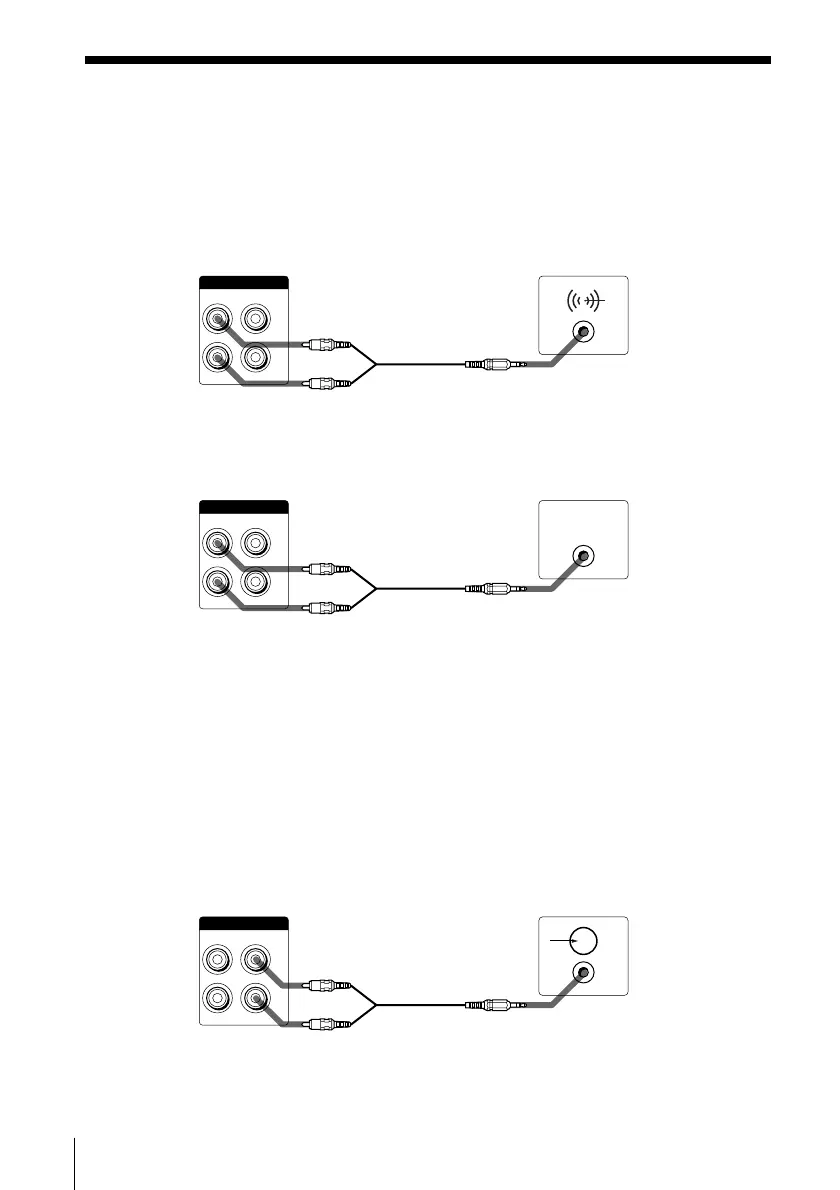
The connections below are possible if your computer has the LINE OUT jack or
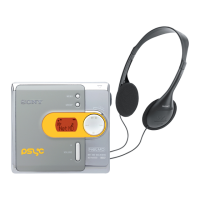
PHONES jack. Connect the computer to the MD deck using an optional audio
connecting cord* (pin-plug ˜ stereo mini-plug).
— If your computer has the LINE OUT jack
MD deck Computer
(VARIABLE)
LINE (ANALOG)
OUT
L
R
IN
jack type: stereo mini-jack
— If your computer has the PHONES jack
MD deck Computer
2
(VARIABLE)
LINE (ANALOG)
OUT
L
R
IN
jack type: stereo mini-jack
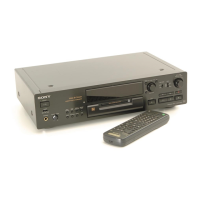
• Connection for listening to the MD deck output from your computer’s
speakers
Connect the LINE IN jack on your computer to the LINE (ANALOG) OUT jacks on
the MD deck using an optional audio connecting cord* (pin-plug ˜ stereo mini-
plug).
When using this connection, open the “Volume Control” window, click “Options”
to display the “Properties” window, click “Recording,” and then check “Line In” in
“Show the following volume controls.” For details on the “Volume Control”
window, refer to the Windows operating instructions.
MD deck Computer
(VARIABLE)
LINE (ANALOG)
OUT
L
R
IN
jack type: stereo mini-jack
* Sony RK-G129HG (1.5 m (approx. 5 ft), no load resistance) or equivalent.



 To Next Page