7
GB
Connections
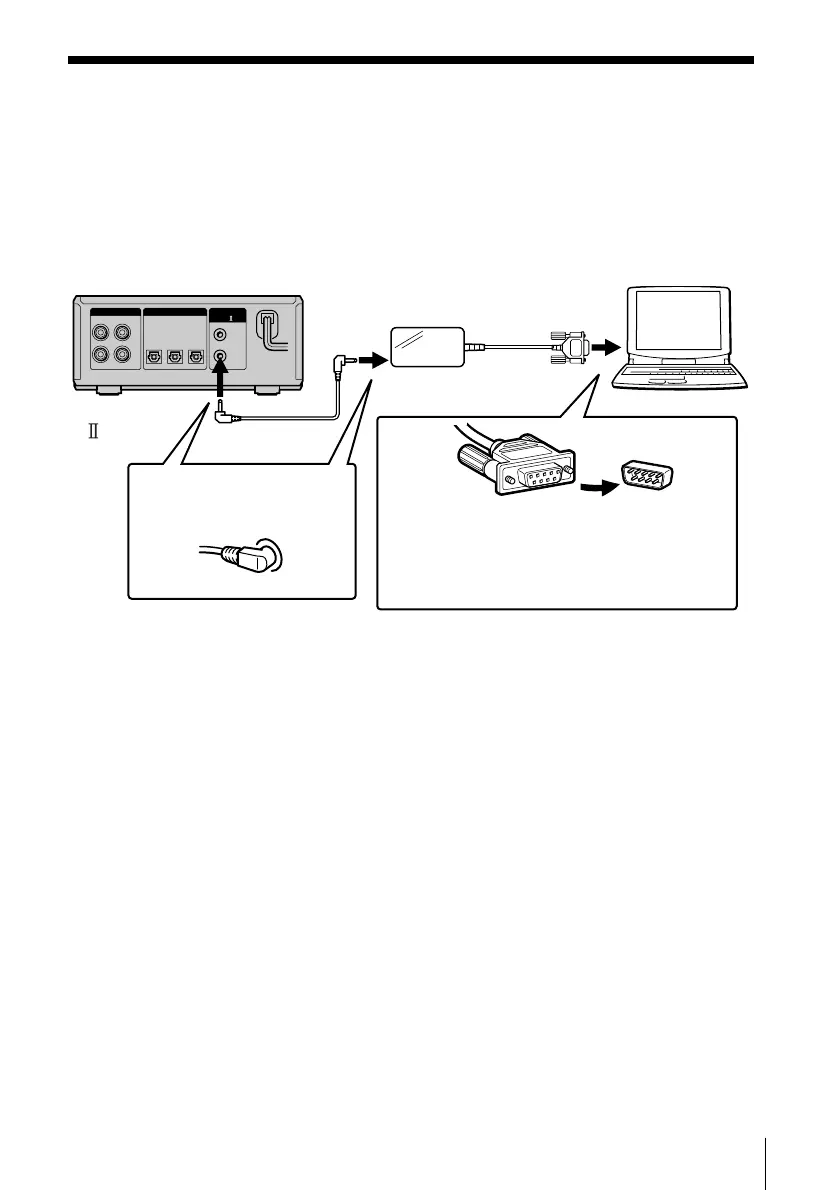
Connecting your computer to the MD deck
• Connection for controlling the MD deck from your computer
Use the supplied connector and monaural (2P) mini-plug cord to connect your
personal computer to the MD deck.
DIGITAL CONTROL
A1
(VARIABLE)
IN1 OUTIN2
LINE (ANALOG)
OUT (OPTICAL)
L
R
IN
Notes
• Different brands of personal computers refer to their RS-232C serial terminals
with different terminal names. For further information, refer to the
instruction manual of your computer.
• Match the orientation of the connector with that of the serial connector on
your computer when plugging the cable. The orientation of a serial connector
differs from computer to computer.
• Plug the cord in straight when connecting. Plugging the cord in at an angle
may result in damage.
• Do not insert any metal objects into the connection jacks. Shorting may occur
resulting in damage.
MD Deck
Computer
Connector
To the CONTROL
A1 jack
Computer
Insert the plug deeply
into the matching jack.
Match the orientation of the connectors
and insert the plug deeply into the
matching connector then secure the plug
with the retaining screws on both sides
of the plug.
To the computer’s
RS-232C serial
connector



 To Next Page