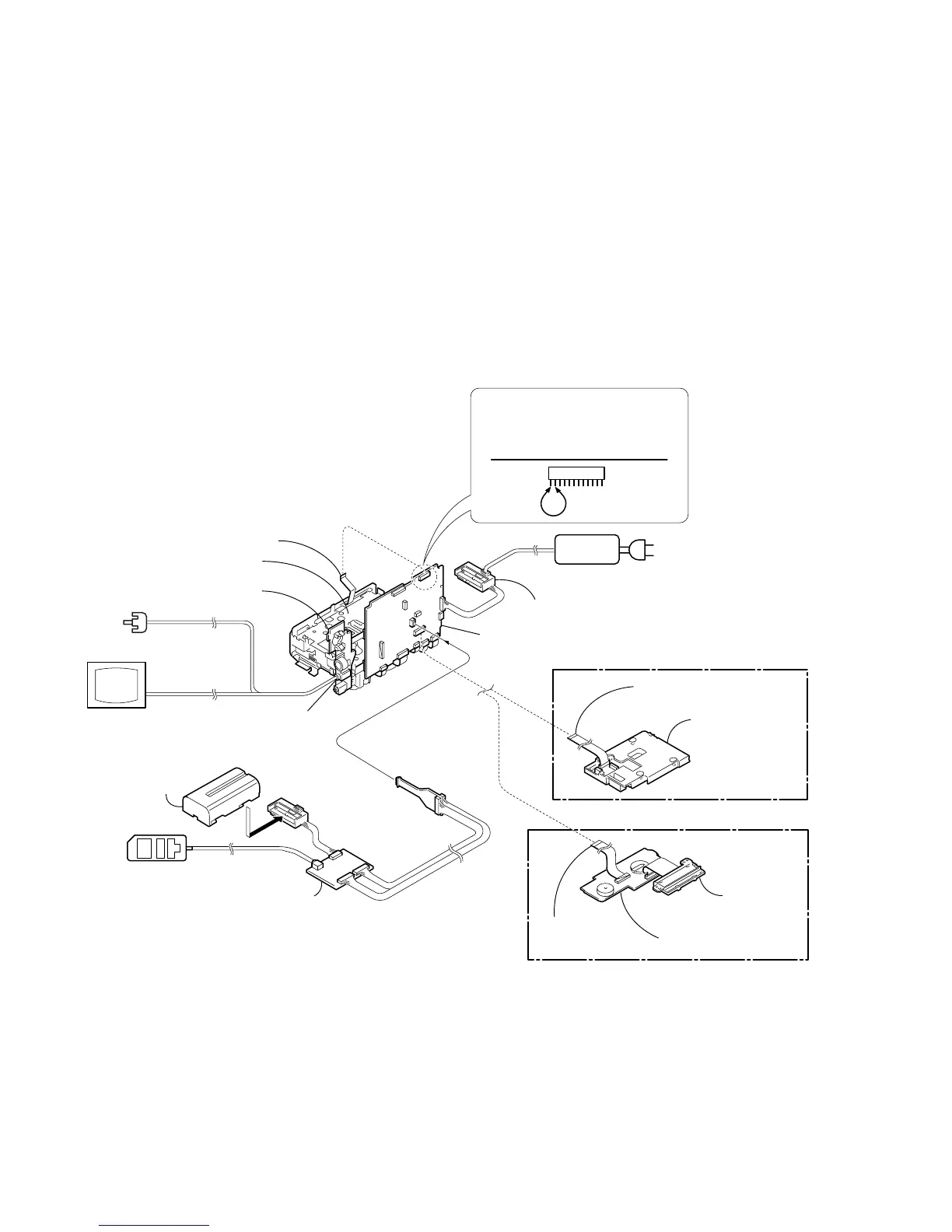
2-12
V
C
-251
CF-077 board
CF-077
Adjustment remote
commander (RM-95)
Info lithium battery
(L series)
A/V out jack
CPC-jig for BX/BK
(J-6082-521-A)
Monitor TV
Video
Audio
FP-257 flexible board
CN710
12
1
When you eject the cassette,
connect Pin
qa
and Pin
qs
(GND) of
CN710 on VC-251 board for 1 second.
Control switch block (FK-1000) (12P)
Mechanism deck
Battery terminal board
[SERVICE POSITION TO CHECK THE VTR SECTION]
AC IN
AC power
adaptor
VC-251 board
FFC-295 flexible
flat cable (24P)
Control switch block
(CF-1000)
FFC-295 flexible
flat cable (24P)
Liquid crystal
display panel,
LCD holder
(TR model)
(TRV model)
Connection to Check the VTR Section
To check the VTR section, set the VTR to the "Forced VTR power ON" mode.
Operate the VTR functions using the adjustment remote commander (with the HOLD switch set in the OFF position).
Setting the “Forced VTR Power ON” mode
1) Select page: 0, address: 01, and set data: 01.
2) Select page: D, address: 10, set data: 02, and press
the PAUSE button of the adjustment remote
commander.
Exiting the “Forced VTR Power ON” mode
1) Select page: 0, address: 01, and set data: 01.
2) Select page: D, address: 10, set data: 00, and press
the PAUSE button of the adjustment remote
commander.
3) Select page: 0, address: 01, and set data: 00.
Note: If the machine malfunctions (the operating mode changes by itself), connect the FK-1000 block,
CF-1000 block/CF-077 board.








 To Next Page