EasyManua.ls Logo

Sony CCD-TR814 - Hints for Better Shooting

Sony CCD-TR814
56 pages
Print Icon
To Next Page IconTo Next Page
To Previous Page IconTo Previous Page
Loading...
Hints
for
Better
Shooting
For
hand-held
shots,
you'll
get
better
results
holding
the
camcorder
according
to
the
following
suggestions:
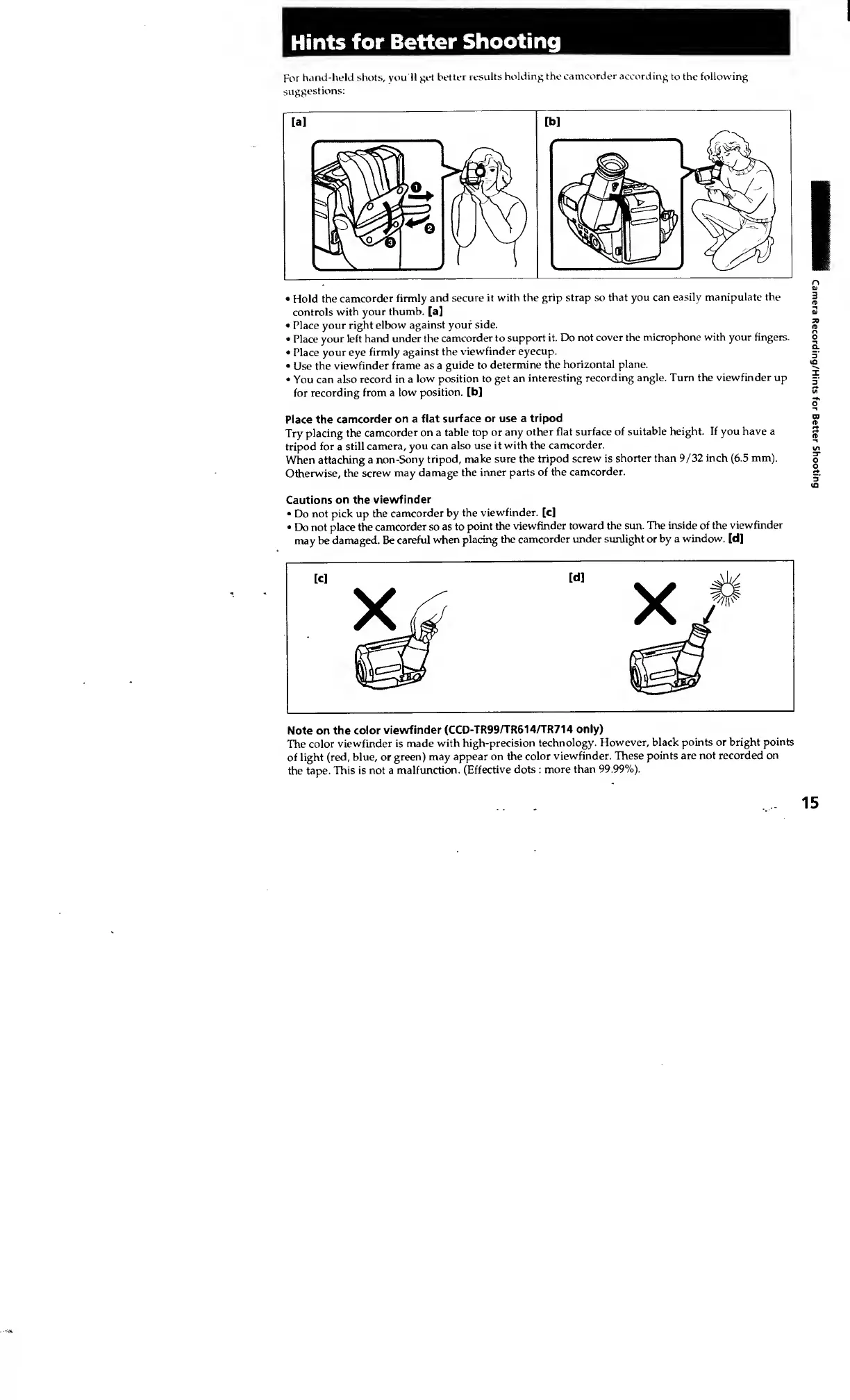
Hold
the
camcorder
firmly
and
secure
it
with
the
grip
strap
so
that
you
can
easily
manipulate
the
controls
with
your
thumb,
[a]
Place
your
right
elbow
against
your
side.
Place
your
left
hand
under
the
camcorder
to
support
it.
Do
not
cover
the
microphone
with
your
fingers.
Place
your
eye
firmly
against
the
viewfinder
eyecup.
Use
the
viewfinder
frame
as
a
guide
to
determine
the
horizontal
plane.
You
can
also
record
in
a
low
position
to
get
an
interesting
recording
angle.
Turn
the
viewfinder
up
for
recording
from
a
low
position,
[b]
Place
the
camcorder
on
a
flat
surface
or
use
a
tripod
Try
placing
the
camcorder
on
a
table
top
or
any
other
flat
surface
of
suitable
height.
If
you
have
a
tripod
for
a
still
camera,
you
can
also
use
it
with
the
camcorder.
When
attaching
a
non-Sony
tripod,
make
sure
the
tripod
screw
is
shorter
than
9/32
inch
(6.5
mm).
Otherwise,
the
screw
may
damage
the
inner
parts
of
the
camcorder.
Cautions
on
the
viewfinder
Do
not
pick
up
the
camcorder
by
the
viewfinder,
[c]
Do
not
place
the
camcorder
so
as
to
point
the
viewfinder
toward
the
sun.
The
inside
of
the
viewfinder
may
be
damaged.
Be
careful
when
placing
the
camcorder
under
sunlight
or
by
a
window,
[d]
[C]
[d]
X
ytw
V
SEE
f
Note
on
the
color
viewfinder
(CCD-TR99/TR614/TR714
only)
The
color
viewfinder
is
made
with
high-precision
technology.
However,
black
points
or
bright
points
of
light
(red,
blue,
or
green)
may
appear
on
the
color
viewfinder.
These
points
are
not
recorded
on
the
tape.
This
is
not
a
malfunction.
(Effective
dots
:
more
than
99.99%).
Camera
Recording/Hints
for
Better
Shooting