EasyManua.ls Logo

Sony CCD-TR814 - Page 22

Sony CCD-TR814
56 pages
Print Icon
To Next Page IconTo Next Page
To Previous Page IconTo Previous Page
Loading...
Using
Alternative
Power
Sources
WARNING
AC
power
cord
must
only
be
changed
at
qualified
service
shop.
PRECAUTIONS
The
set
is
not
disconnected
from
the
AC
power
source
(mains)
as
long
as
it
is
connected
to
the
wall
outlet,
even
if
the
set
itself
has
been
turned
off.
Notes
on
the
POWER
lamp
•The
POWER
lamp
will
remain
lit
for
a
while
even
if
the
unit
is
unplugged
after
use.
This
is
normal.
If
the
POWER
lamp
does
not
light,
disconnect
the
power
cord.
After
about
one
minute,
reconnect
the
power
cord.
To
remove
the
adaptor
The
adaptor
is
removed
in
the
same
way
as
the
battery
pack
(p.
9).
Using
the
Battery
Case
CCD-TR99
only
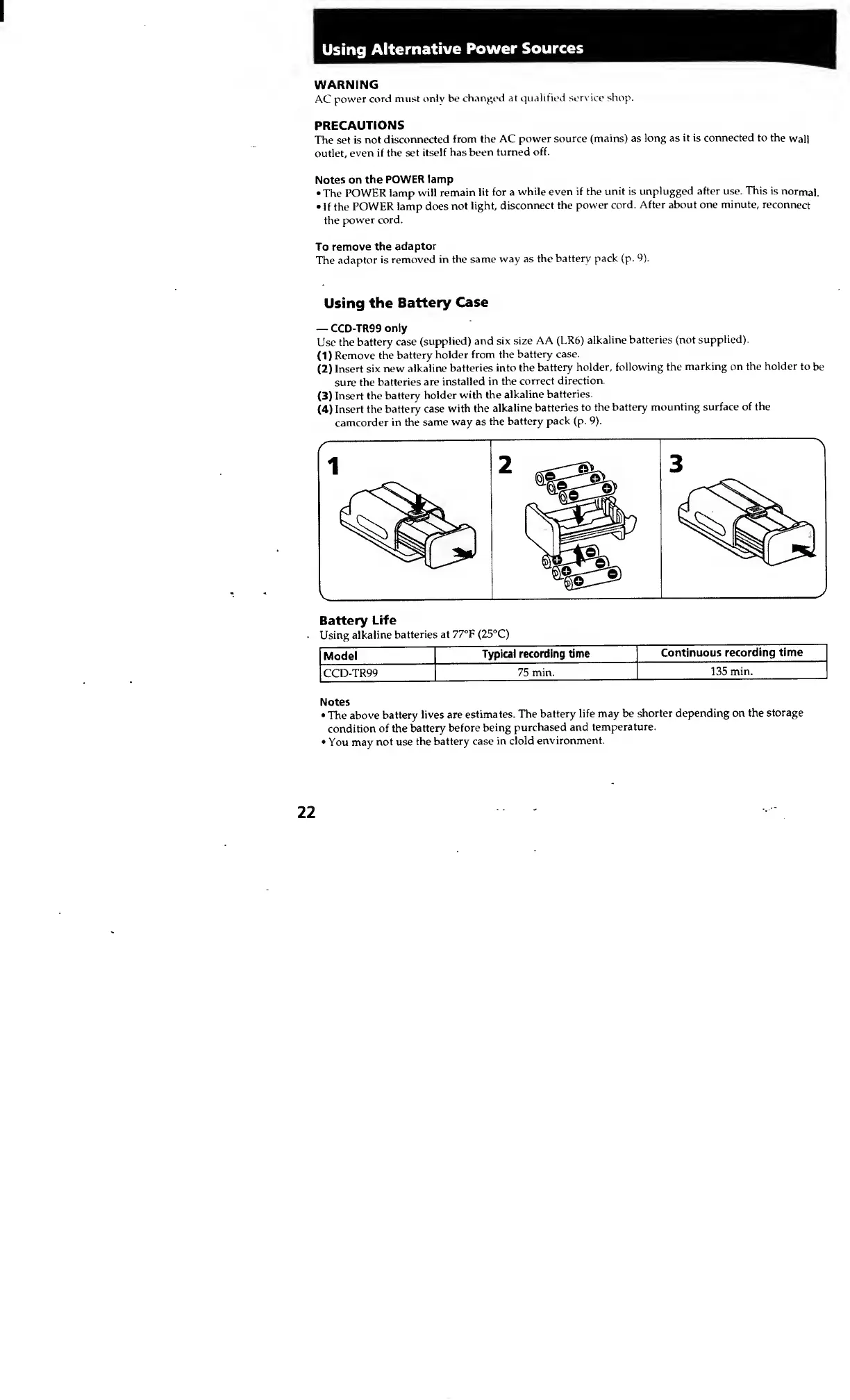
Use
the
battery
case
(supplied)
and
six
size
AA
(LR6)
alkaline
batteries
(not
supplied).
(D
Remove
the
battery
holder
from
the
battery
case.
(2)
Insert
six
new
alkaline
batteries
into
the
battery
holder,
following
the
marking
on
the
holder
to
be
sure
the
batteries
are
installed
in
the
correct
direction.
(3)
Insert
the
battery
holder
with
the
alkaline
batteries.
(4)
Insert
the
battery
case
with
the
alkaline
batteries
to
the
battery
mounting
surface
of
the
camcorder
in
the
same
way
as
the
battery
pack
(p.
9).
Battery
Life
Using
alkaline
batteries
at
77°F
(25°C)
Model
Typical
recording
time
Continuous
recording
time
CCD-TR99
75
min.
135
min.
Notes
The
above
battery
lives
are
estimates.
The
battery
life
may
be
shorter
depending
on
the
storage
condition
of
the
battery
before
being
purchased
and
temperature.
You
may
not
use
the
battery
case
in
clold
environment.
22