EasyManua.ls Logo

Sony CCD-TR814 - Page 53

Sony CCD-TR814
56 pages
Print Icon
To Next Page IconTo Next Page
To Previous Page IconTo Previous Page
Loading...
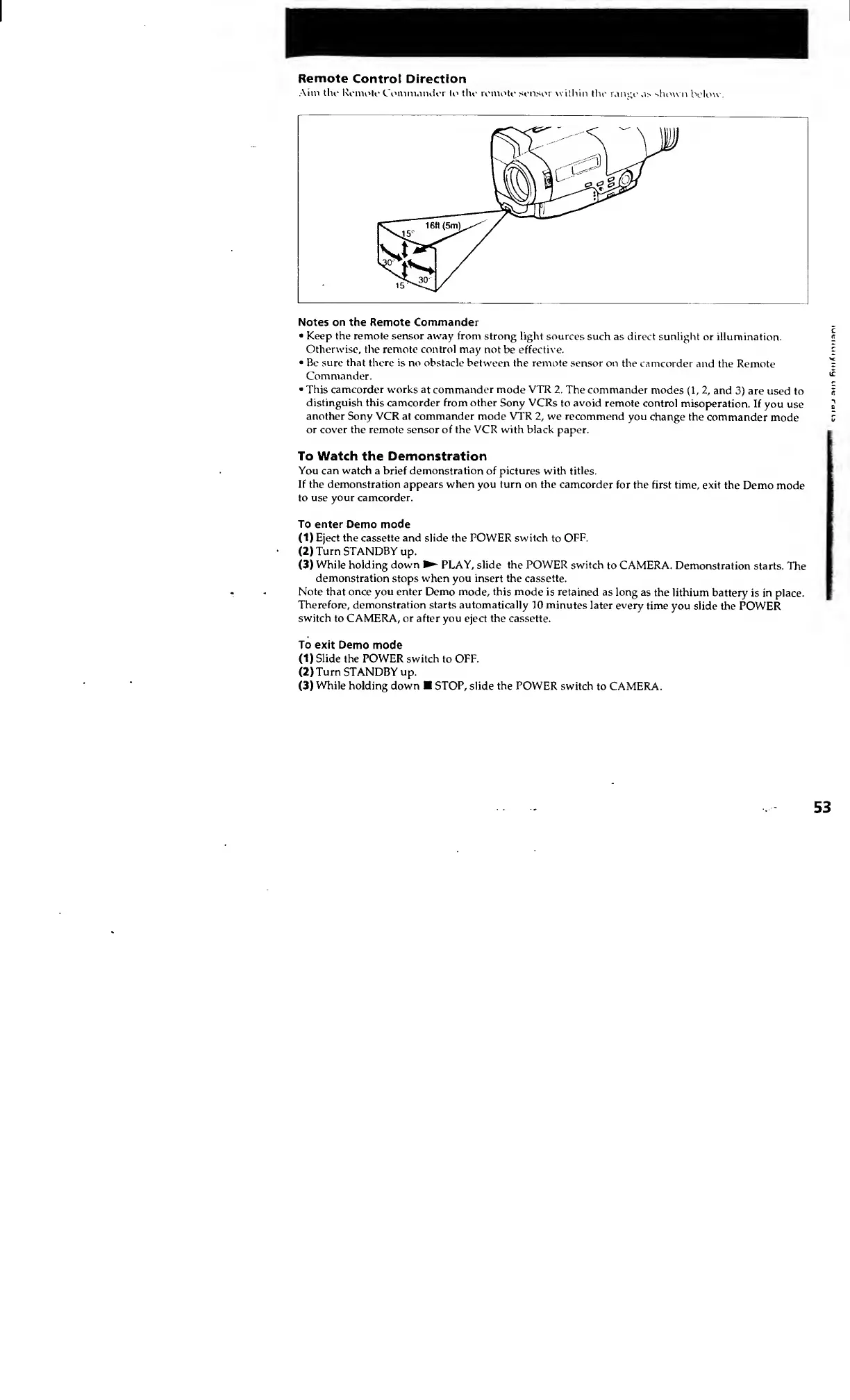
Remote
Control
Direction
Aim
the
Remote
Commander
to
the
remote
sensor
within
the
range
as
shown
below
Notes
on
the
Remote
Commander
Keep
the
remote
sensor
away
from
strong
light
sources
such
as
direct
sunlight
or
illumination.
Otherwise,
the
remote
control
may
not
be
effective.
Be
sure
that
there
is
no
obstacle
between
the
remote
sensor
on
the
camcorder
and
the
Remote
Commander.
This
camcorder
works
at
commander
mode
VTR
2.
The
commander
modes
(1,
2,
and
3)
are
used
to
distinguish
this
camcorder
from
other
Sony
VCRs
to
avoid
remote
control
misoperation.
If
you
use
another
Sony
VCR
at
commander
mode
VTR
2,
we
recommend
you
change
the
commander
mode
or
cover
the
remote
sensor
of
the
VCR
with
black
paper.
To
Watch
the
Demonstration
You
can
watch
a
brief
demonstration
of
pictures
with
titles.
If
the
demonstration
appears
when
you
turn
on
the
camcorder
for
the
first
time,
exit
the
Demo
mode
to
use
your
camcorder.
To
enter
Demo
mode
(1)
Eject
the
cassette
and
slide
the
POWER
switch
to
OFF.
(
2
)
Turn
STANDBY
up.
(
3
)
While
holding
down
PLAY,
slide
the
POWER
switch
to
CAMERA.
Demonstration
starts.
The
demonstration
stops
when
you
insert
the
cassette.
Note
that
once
you
enter
Demo
mode,
this
mode
is
retained
as
long
as
the
lithium
battery
is
in
place.
Therefore,
demonstration
starts
automatically
10
minutes
later
every
time
you
slide
the
POWER
switch
to
CAMERA,
or
after
you
eject
the
cassette.
To
exit
Demo
mode
(1)
Slide
the
POWER
switch
to
OFF.
(
2
)
Turn
STANDBY
up.
(
3
)
While
holding
down
STOP,
slide
the
POWER
switch
to
CAMERA.
53
luenuiymy
me
raiii