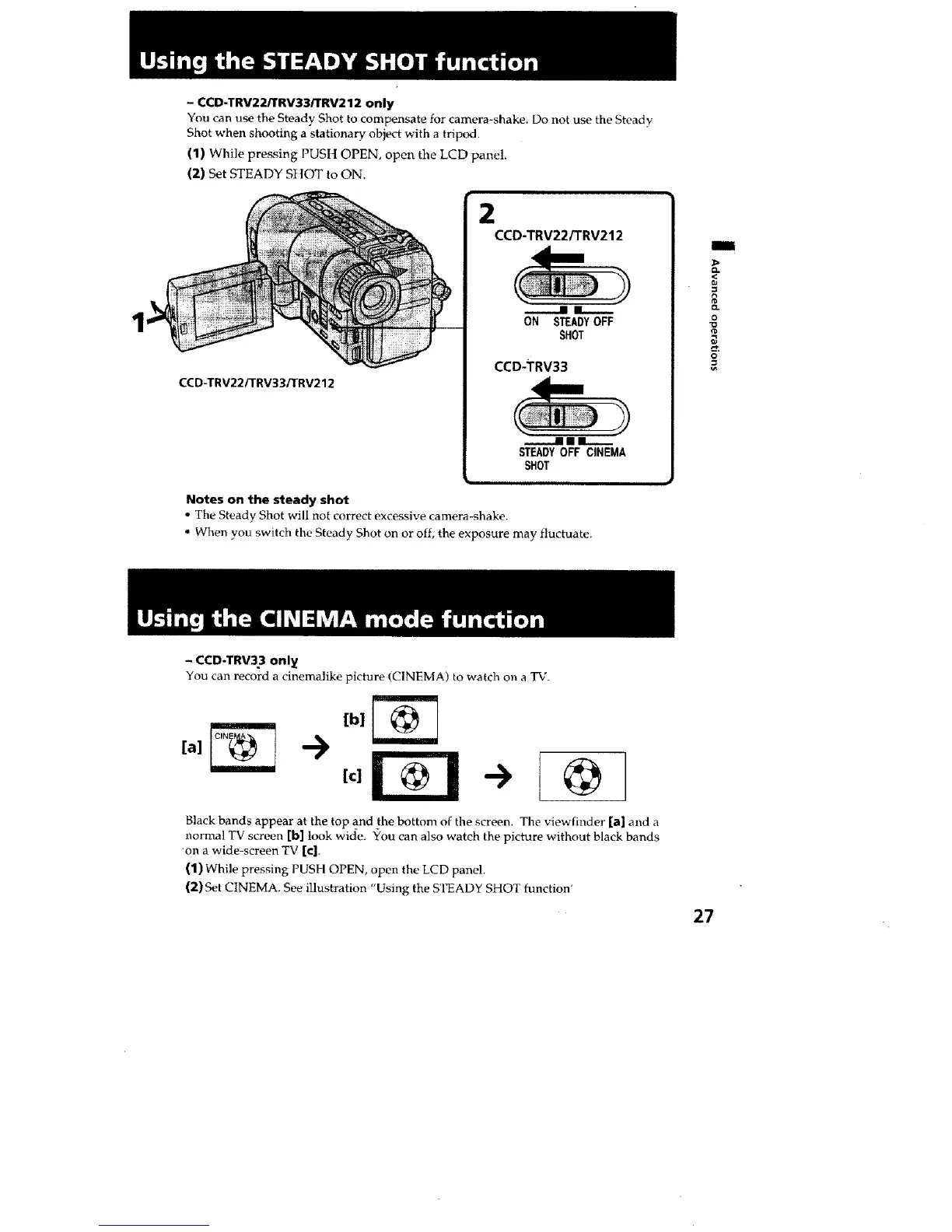
- CCD-TRV22/TRV33/TRV212 only
You can use the Steady Shot to compensate for camera-shake. Do not use the Steady
Shot when shooting a stationary object with a tripod.
(1) While pressing PUS|] OPEN, open the LCD panel.
(2) Set STEADY SHOT to ON.
CCD-TRV22/TRV33iTRV212
CCD-TRV22/TRV212
n i_._.
ON STEADYOFF
SHOT
CCD-TRV33
nllm
STEADYOFF CINEMA
SHOT
Notes on the steady shot
• The Steady Shot will not correct excessive camera-shake.
• When you switch the Steady Shot on or off, the exposure may fluctuate.
i
<
o-
o
@
- CCD-TRV33 onl_
You can record a cinemalike picture (CINEMA) to watch on a TV.
[c]
->
@
Black bands appear at the top a_nd the bottom of the screen. The viewfinder [a] and a
normal TV screen [b] look wide. You can also watch the picture without black bands
on a wide-screen TV [c].
(1) While pressing PUSH OPEN, open the LCD panel.
(2) Set CINEMA. See illustration "Using the STEADY SHOT function'
27 •







 To Next Page