p.-
1
3
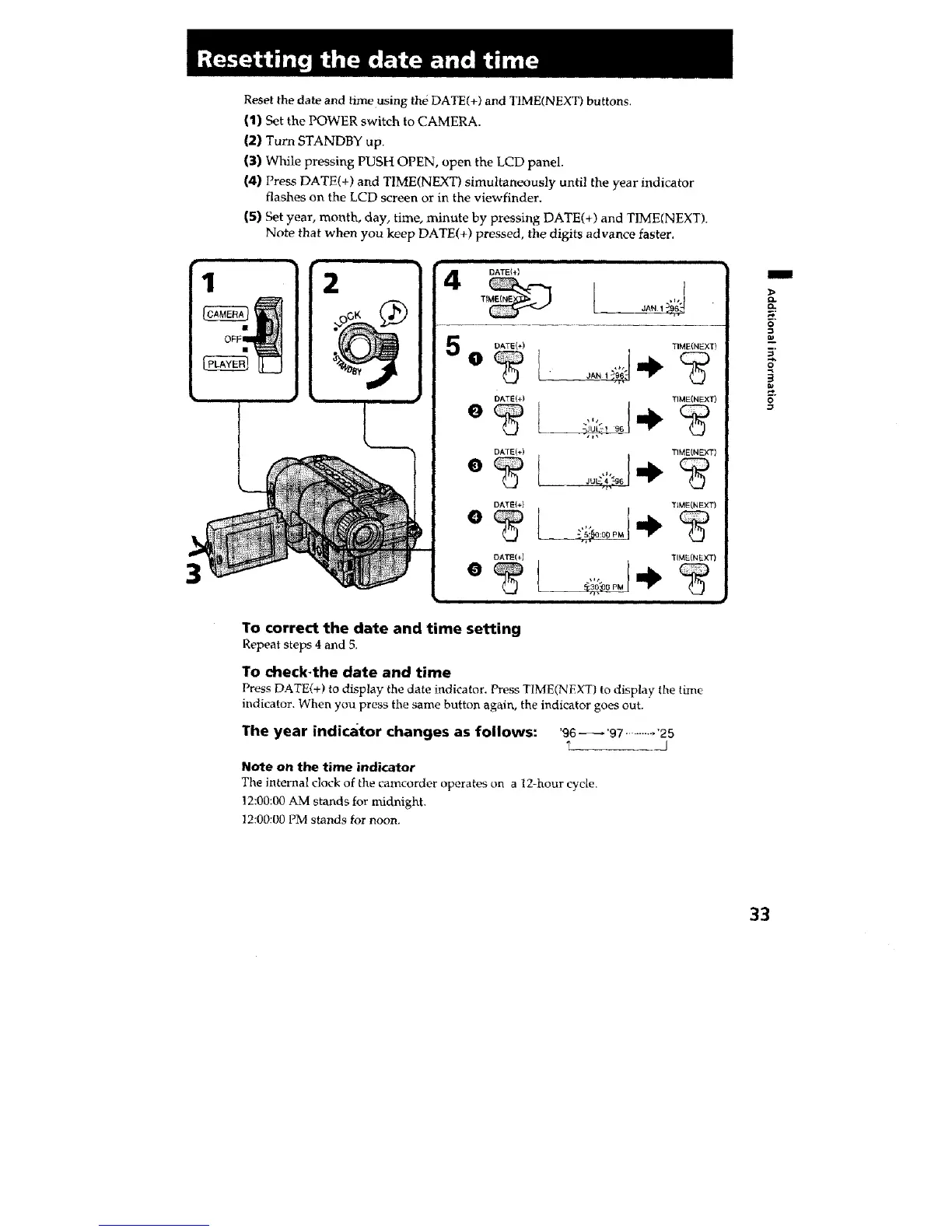
Reset the date and time using the DATE(+) and TIME(NEXT) buttons.
(1) Set the POWER switch to CAMERA.
(2) Turn STANDBY up.
(3) While pressing PUSH OPEN, open the LCD panel.
(4) Press DATE(+) and TIME(NEXT) simultaneously until the year indicator
flashes on the LCD screen or in the viewfinder.
(5) Set year, month, day, time, minute by pressing DATE(+) and TIME(NEXT).
Note that when you keep DATE(+) pressed, the digits advance faster.
OFF
2
4
5
DATEI_)
DATE(+) TIME(NEXT)
DATE(+) TIME(NEXT)
DATE(+) TIME(NEXT)
DATE(+} TSME(NEXT)
DATE(;J TIME(NEXT)
To correct the date and time setting
Repeat steps 4 and 5,
TO dleck-the date and time
Press DATE(+) to display the date indicator. Press TIME(NEXT) to display the time
indicator. When you press the same button again, the indicator goes out.
The year indicator changes as follows: '96 _'97 ......... '25
I
Note on the time indicator
The internal clock of the camcorder operates on a 12-hour cycle.
12:00:00 AM stands for midnight.
12:00:00 PM stands for noon.
I
D.
o
O
g
33







 To Next Page