EasyManua.ls Logo

Sony CCP-13B - Page 10

Sony CCP-13B
18 pages
Print Icon
To Next Page IconTo Next Page
To Previous Page IconTo Previous Page
Loading...
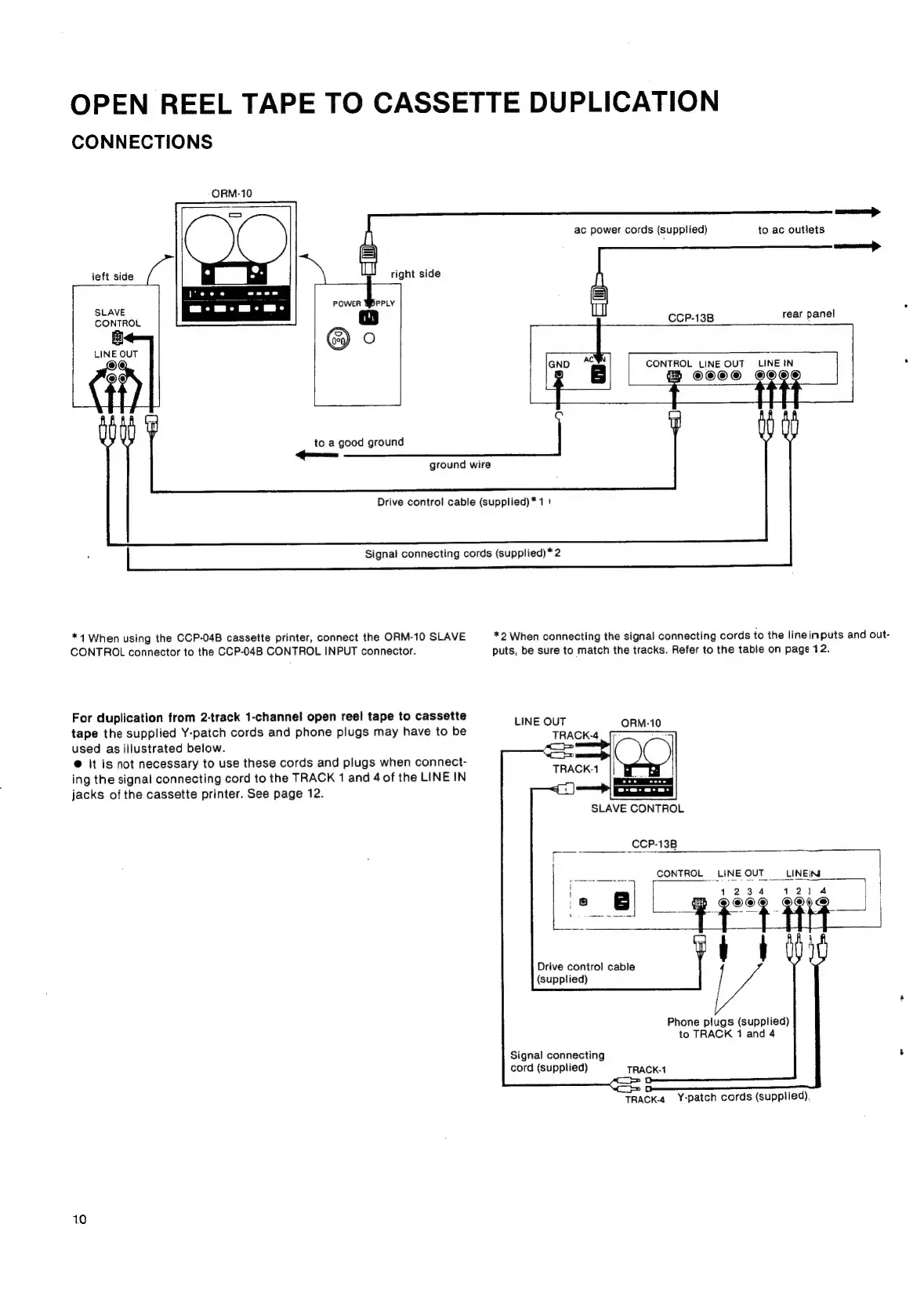
OPEN
REEL
TAPE
TO
CASSETTE
DUPLICATION
CONNECTIONS
ORM-10
ac
power
cords
(supplied)
to
ac
outlets
left
side
SLAVE
CONTROL
it]
CCP-13B
rear
panel
LINE
OUT
@@
end
44
CONTROL
LINE
OUT
LINE
IN
t
©©O®
©
to
a
good
ground
ground
wire
Drive
control
cable
(supplied)*
1!
Signal
connecting
cords
(supplied)
*
2
*4
When
using
the
CCP-04B
cassette
printer,
connect
the
ORM-10
SLAVE
*2
When
connecting
the
signal
connecting
cords
to
the
lineinputs
and
out-
CONTROL
connector
to
the
CCP-04B
CONTROL
INPUT
connector.
puts,
be
sure
to
match
the
tracks.
Refer
to
the
table
on
page
12.
For
duplication
from
2-track
1-channel
open
reel
tape
to
cassette
:
LINE
OUT
tape
the
supplied
Y-patch
cords
and
phone
plugs
may
have
to
be
TRACK-4
used
as
illustrated
below.
@
It
is
not
necessary
to
use
these
cords
and
plugs
when
connect-
ing
the
signal
connecting
cord
to
the
TRACK
1
and
4
of
the
LINE
IN
jacks
of
the
cassette
printer.
See
page
12.
TRACK-1
SLAVE
CONTROL
_CCP-13B
Drive
control
cable
(supplied)
Phone
piugs
(supplied)
to
TRACK
1
and
4
Signal
connecting
cord
(supplied)
TRACK-1
TRacK-4
Y-patch
cords
(supplied),
10