EasyManua.ls Logo

Sony CCP-13B - Ccp-04 B; Using an Additional CCP-04 B Printer

Sony CCP-13B
18 pages
Print Icon
To Next Page IconTo Next Page
To Previous Page IconTo Previous Page
Loading...
USING
AN
ADDITIONAL
CCP-04B
PRINTER
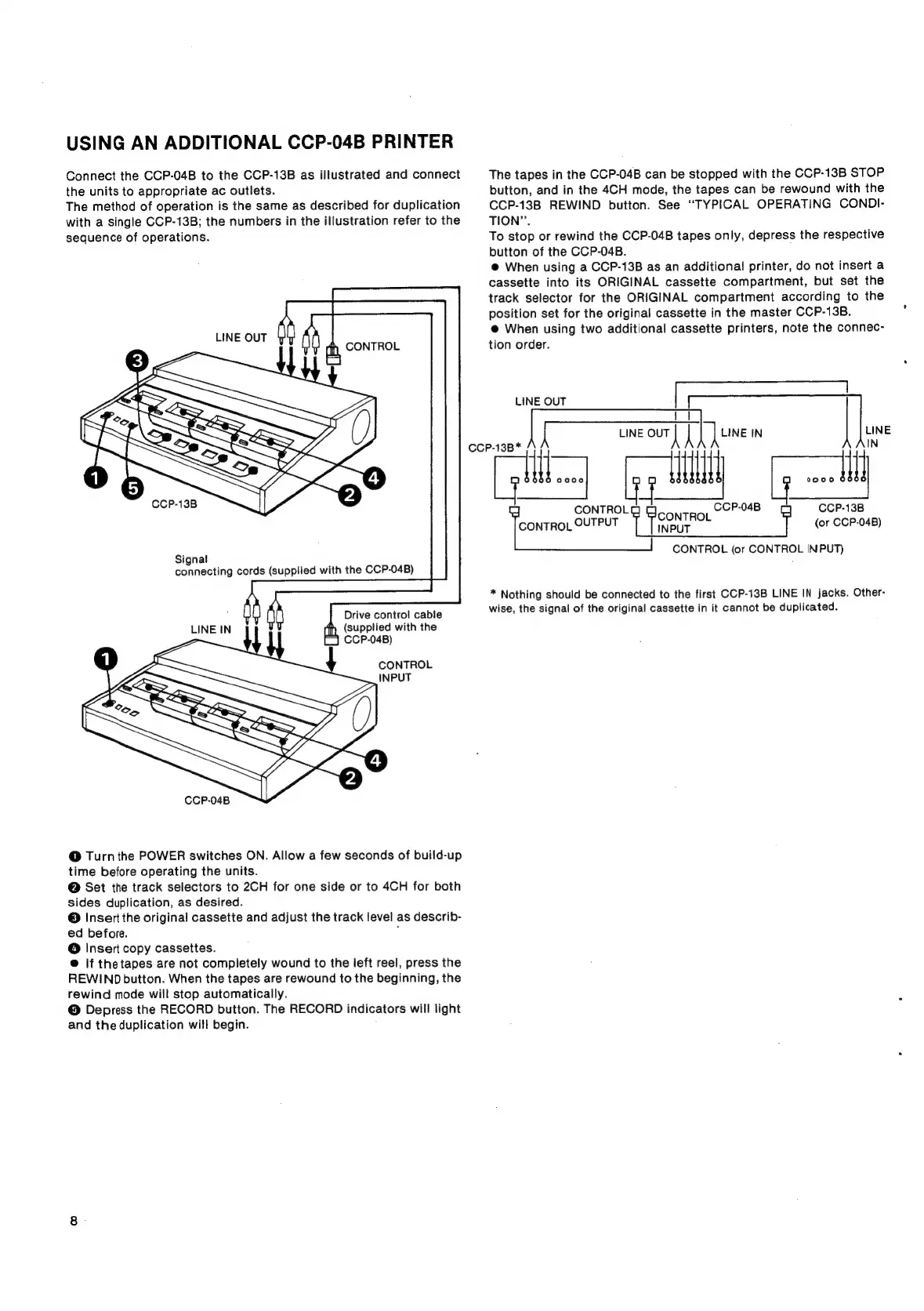
Connect
the
CCP-04B
to
the
CCP-13B
as
illustrated
and
connect
the
units
to
appropriate
ac
outlets.
The
method
of
operation
is
the
same
as
described
for
duplication
with
a
single
CCP-13B;
the
numbers
in
the
illustration
refer
to
the
sequence
of
operations.
LINE
OUT
CONTROL
CCP-13B
Signal
connecting
cords
(supplied
with
the
CCP-04B)
Drive
contro!
cable
(supplied
with
the
CCP-04B)
LINE
IN
CONTROL
INPUT
CCP-04B
@
Turn
the
POWER
switches
ON.
Allow
a
few
seconds
of
build-up
time
before
operating
the
units.
@
Set
the
track
selectors
to
2CH
for
one
side
or
to
4CH
for
both
sides
duplication,
as
desired.
©
Insert
the
original
cassette
and
adjust
the
track
level
as
describ-
ed
before.
,
@
Insert
copy
cassettes.
@
If
thetapes
are
not
completely
wound
to
the
left
reel,
press
the
REWIND
button.
When
the
tapes
are
rewound
to
the
beginning,
the
rewind
mode
will
stop
automatically.
@
Depress
the
RECORD
button.
The
RECORD
indicators
will
light
and
the
duplication
will
begin.
CCP-13B*
The
tapes
in
the
CCP-04B
can
be
stopped
with
the
CCP-13B
STOP
button,
and
in
the
4CH
mode,
the
tapes
can
be
rewound
with
the
CCP-13B
REWIND
button.
See
“TYPICAL
OPERATING
CONDI-
TION”.
To
stop
or
rewind
the
CCP-04B
tapes
only,
depress
the
respective
button
of
the
CCP-04B.
@
When
using
a
CCP-13B
as an
additional
printer,
do
not
insert
a
cassette
into
its
ORIGINAL
cassette
compartment,
but
set
the
track
selector
for
the
ORIGINAL
compartment
according
to
the
position
set
for
the
original
cassette
in
the
master
CCP-13B.
@
When
using
two
additional
cassette
printers,
note
the
connec-
tion
order.
LINE
our
|
[une
IN
LINE
IN
I
RL
ecc
ee
(or
CCP-04B)
CONTROL
(or
CONTROL
IN
PUT)
LINE
OUT
*
Nothing
should
be
connected
to
the
first
CCP-13B
LINE
IN
jacks.
Other-
wise,
the
signal
of
the
original
cassette
in
it
cannot
be
duplicated.

Related product manuals