EasyManua.ls Logo

Sony CCP-13B - Parts Identification

Sony CCP-13B
18 pages
Print Icon
To Next Page IconTo Next Page
To Previous Page IconTo Previous Page
Loading...
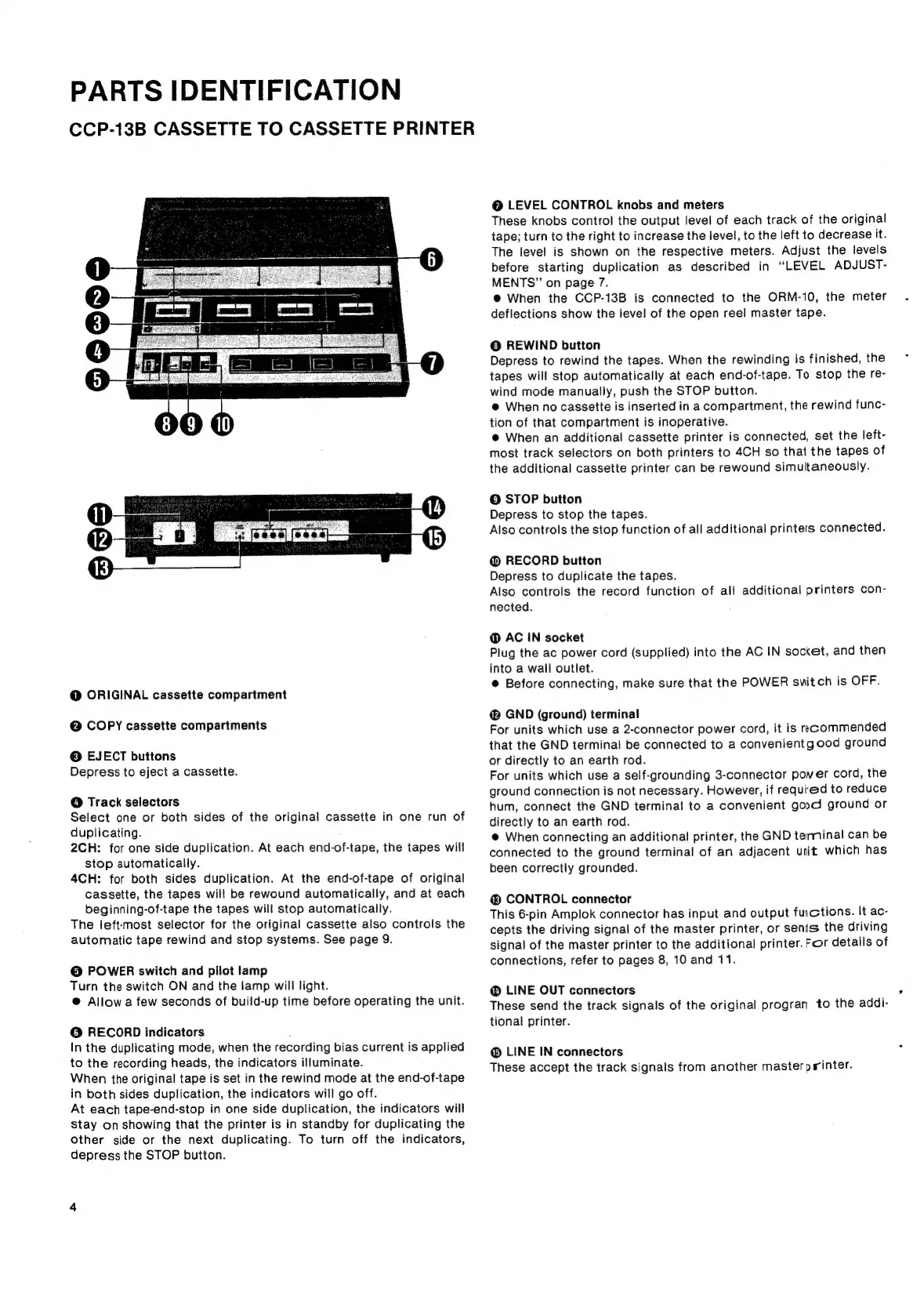
PARTS
IDENTIFICATION
CCP-13B
CASSETTE
TO
CASSETTE
PRINTER
@
ORIGINAL
cassette
compartment
@
COPY
cassette
compartments
©
EJECT
buttons
Depress
to
eject
a
cassette.
@
Track
selectors
Select
one
or
both
sides
of
the
original
cassette
in
one
run
of
duplicating.
2CH:
for
one
side
duplication.
At
each
end-of-tape,
the
tapes
will
stop
automatically.
4CH:
for
both
sides
duplication.
At
the
end-of-tape
of
original
cassette,
the
tapes
will
be
rewound
automatically,
and
at
each
beginning-of-tape
the
tapes
will
stop
automatically.
The
left-most
selector
for
the
original
cassette
also
controls
the
automatic
tape
rewind
and
stop
systems.
See
page
9.
@
POWER
switch
and
pilot
lamp
Turn
the
switch
ON
and
the
lamp
will
light.
@
Allow
a
few
seconds
of
build-up
time
before
operating
the
unit.
@
RECORD
indicators
:
In
the
duplicating
mode,
when
the
recording
bias
current
is
applied
to
the
recording
heads,
the
indicators
illuminate.
When
the
original
tape
is
set
in
the
rewind
mode
at
the
end-of-tape
in
both
sides
duplication,
the
indicators
will
go
off.
At
each
tape-end-stop
in
one
side
duplication,
the
indicators
wiil
stay
on
showing
that
the
printer
is
in
standby
for
duplicating
the
other
side
or
the
next
duplicating.
To
turn
off
the
indicators,
depress
the
STOP
button.
@
LEVEL
CONTROL
knobs
and
meters
These
knobs
control
the
output
level
of
each
track
of
the
original
tape;
turn
to
the
right
to
increase
the
level,
to
the
left
to
decrease
it.
The
level
is
shown
on
the
respective
meters.
Adjust
the
levels
before
starting
duplication
as
described
in
“LEVEL
ADJUST-
MENTS”
on
page
7.
@
When
the
CCP-13B
is
connected
to
the
ORM-10,
the
meter
deflections
show
the
jevel
of
the
open
reel
master
tape.
@
REWIND
button
Depress
to
rewind
the
tapes.
When
the
rewinding
is
finished,
the
tapes
will
stop
automatically
at
each
end-of-tape.
To
stop
the
re-
wind
mode
manually,
push
the
STOP
button.
@
When
no
cassette
is
inserted
in
a
compartment,
the
rewind
func-
tion
of
that
compartment
is
inoperative.
@
When
an
additional
cassette
printer
is
connected,
set
the
left-
most
track
selectors
on
both
printers
to
4CH
so
that
the
tapes
of
the
additional
cassette
printer
can
be
rewound
simultaneously.
©
STOP
button
Depress
to
stop
the
tapes.
Also
controls
the
stop
function
of
all
additional
printers
connected.
@
RECORD
button
Depress
to
duplicate
the
tapes.
Also
controls
the
record
function
of
al!
additional
printers
con-
nected.
@
AC
IN
socket
Plug
the
ac
power
cord
(supplied)
into
the
AC
IN
socket,
and
then
into
a
wall
outlet.
©
Before
connecting,
make
sure
that
the
POWER
switch
is
OFF.
GND
(ground)
terminal
For
units
which
use
a
2-connector
power
cord,
it
is
recommended
that
the
GND
terminal
be
connected
to
a
convenientgood
ground
or
directly
to
an
earth
rod.
For
units
which
use
a
self-grounding
3-connector
pover
cord,
the
ground
connection
is
not
necessary.
However,
if
required
to
reduce
hum,
connect
the
GND
terminal
to
a
convenient
good
ground
or
directly
to
an
earth
rod.
@
When
connecting
an
additional
printer,
the
GND
terminal
can
be
connected
to
the
ground
terminal
of
an
adjacent
unit
which
has
been
correctly
grounded.
®
CONTROL
connector
This
6-pin
Amplok
connector
has
input
and
output
fuictions.
It
ac-
cepts
the
driving
signal
of
the
master
printer,
or
senis
the
driving
signal
of
the
master
printer
to
the
additional
printer.
For
details
of
connections,
refer
to
pages
8,
10
and
11.
@
LINE
OUT
connectors
These
send
the
track
signals
of
the
original
progran
to
the
addi-
tional
printer.
LINE
IN
connectors
These
accept
the
track
signals
from
another
masterp
inter.
*

Related product manuals