EasyManua.ls Logo

Sony CCP-13B - Page 7

Sony CCP-13B
18 pages
Print Icon
To Next Page IconTo Next Page
To Previous Page IconTo Previous Page
Loading...
CASSETTE
TO
CASSETTE
DUPLICATION
CASSETTE
INSERTION
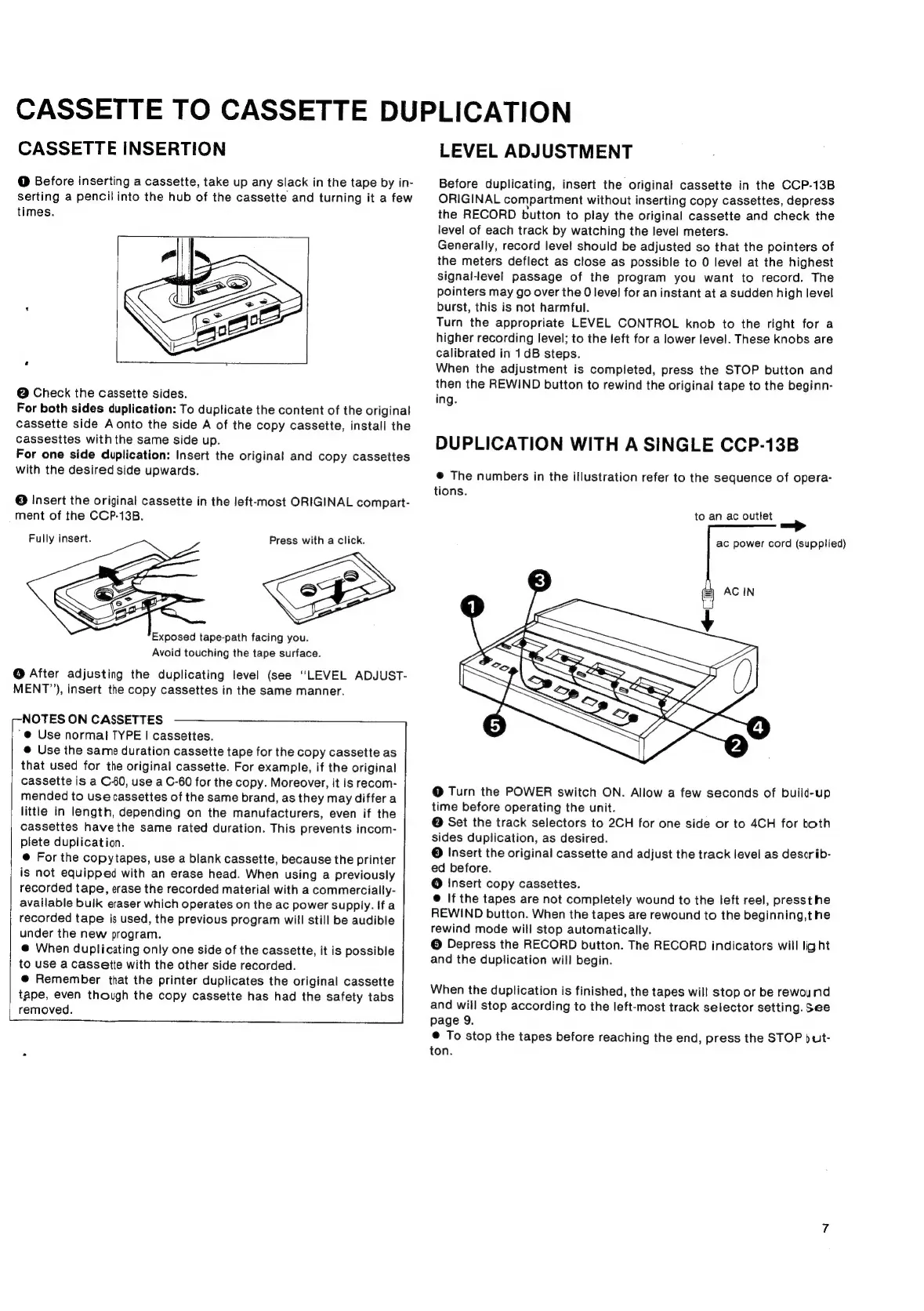
@
Before
inserting
a
cassette,
take
up
any
slack
in
the
tape
by
in-
serting
a
pencil
into
the
hub
of
the
cassette
and
turning
it
a
few
times.
@
Check
the
cassette
sides.
For
both
sides
duplication:
To
duplicate
the
content
of
the
original
cassette
side
A
onto
the
side
A
of
the
copy
cassette,
install
the
cassesites
with
the
same
side
up.
For
one
side
duplication:
Insert
the
original
and
copy
cassettes
with
the
desired
side
upwards.
®
Insert
the
original
cassette
in
the
left-most
ORIGINAL
compart-
ment
of
the
CCP-13B.
Fully
insert.
Press
with
a
click.
Exposed
tape-path
facing
you.
Avoid
touching
the
tape
surface.
@
After
adjusting
the
duplicating
level
(see
“LEVEL
ADJUST-
MENT”),
insert
the
copy
cassettes
in
the
same
manner.
--NOTES
ON
CASSETTES
'@
Use
normal
TYPE
|
cassettes.
@
Use
the
same
duration
cassette
tape
for
the
copy
cassette
as
that
used
for
the
original
cassette.
For
example,
if
the
original
cassette
is
a
C-60,
use
a
C-60
for
the
copy.
Moreover,
it
is
recom-
mended
to
use
cassettes
of
the
same
brand,
as
they
may
differ
a
little
in
length,
depending
on
the
manufacturers,
even
if
the
cassettes
have
the
same
rated
duration.
This
prevents
incom-
plete
duplication.
©
For
the
copytapes,
use
a
blank
cassette,
because
the
printer
is
not
equipped
with
an
erase
head.
When
using
a
previously
recorded
tape,
erase
the
recorded
material
with
a
commercially-
available
bulk
eraser
which
operates
on
the
ac
power
supply.
If
a
recorded
tape
is
used,
the
previous
program
will
still
be
audible
under
the
new
program.
@
When
duplicating
only
one
side
of
the
cassette,
it
is
possible
to
use
a
cassette
with
the
other
side
recorded.
@
Remember
that
the
printer
duplicates
the
original
cassette
tape,
even
though
the
copy
cassette
has
had
the
safety
tabs
removed.
LEVEL
ADJUSTMENT
Before
duplicating,
insert
the
original
cassette
in
the
CCP-13B
ORIGINAL
compartment
without
inserting
copy
cassettes,
depress
the
RECORD
bution
to
play
the
original
cassette
and
check
the
level
of
each
track
by
watching
the
level
meters.
Generally,
record
level
should
be
adjusted
so
that
the
pointers
of
the
meters
deflect
as
close
as
possible
to
0
level
at
the
highest
signal-level
passage
of
the
program
you
want
to
record.
The
pointers
may
go
over
the
0
level
for
an
instant
at
a
sudden
high
level
burst,
this
is
not
harmful.
Turn
the
appropriate
LEVEL
CONTROL
knob
to
the
right
for
a
higher
recording
level;
to
the
left
for
a
lower
level.
These knobs
are
calibrated
in
1dB
steps.
When
the
adjustment
is
completed,
press
the
STOP
button
and
then
the
REWIND
button
to
rewind
the
original
tape
to
the
beginn-
ing.
DUPLICATION
WITH
A
SINGLE
CCP-13B
@
The
numbers
in
the
illustration
refer
to
the
sequence
of
opera-
tions.
to
an
ac
outlet
ac
power
cord
(supplied)
@
Turn
the
POWER
switch
ON.
Allow
a
few
seconds
of
build-up
time
before
operating
the
unit.
@
Set
the
track
selectors
to
2CH
for
one
side
or
to
4CH
for
both
sides
duplication,
as
desired.
©
Insert
the
original
cassette
and
adjust
the
track
level
as
describ-
ed
before.
@
Insert
copy
cassettes.
@
If
the
tapes
are
not
completely
wound
to
the
left
reel,
pressthe
REWIND
button.
When
the
tapes
are
rewound
to
the
beginning,the
rewind
mode
will
stop
automatically.
©
Depress
the
RECORD
button.
The
RECORD
indicators
will
light
and
the
duplication
will
begin.
When
the
duplication
is
finished,
the
tapes
wil!
stop
or
be
rewound
and
wiil
stop
according
to
the
left-most
track
selector
setting.
See
page
9.
@
To
stop
the
tapes
before
reaching
the
end,
press
the
STOP
)ult-
ton.

Related product manuals