EasyManua.ls Logo

Sony CCP-13B - Page 6

Sony CCP-13B
18 pages
Print Icon
To Next Page IconTo Next Page
To Previous Page IconTo Previous Page
Loading...
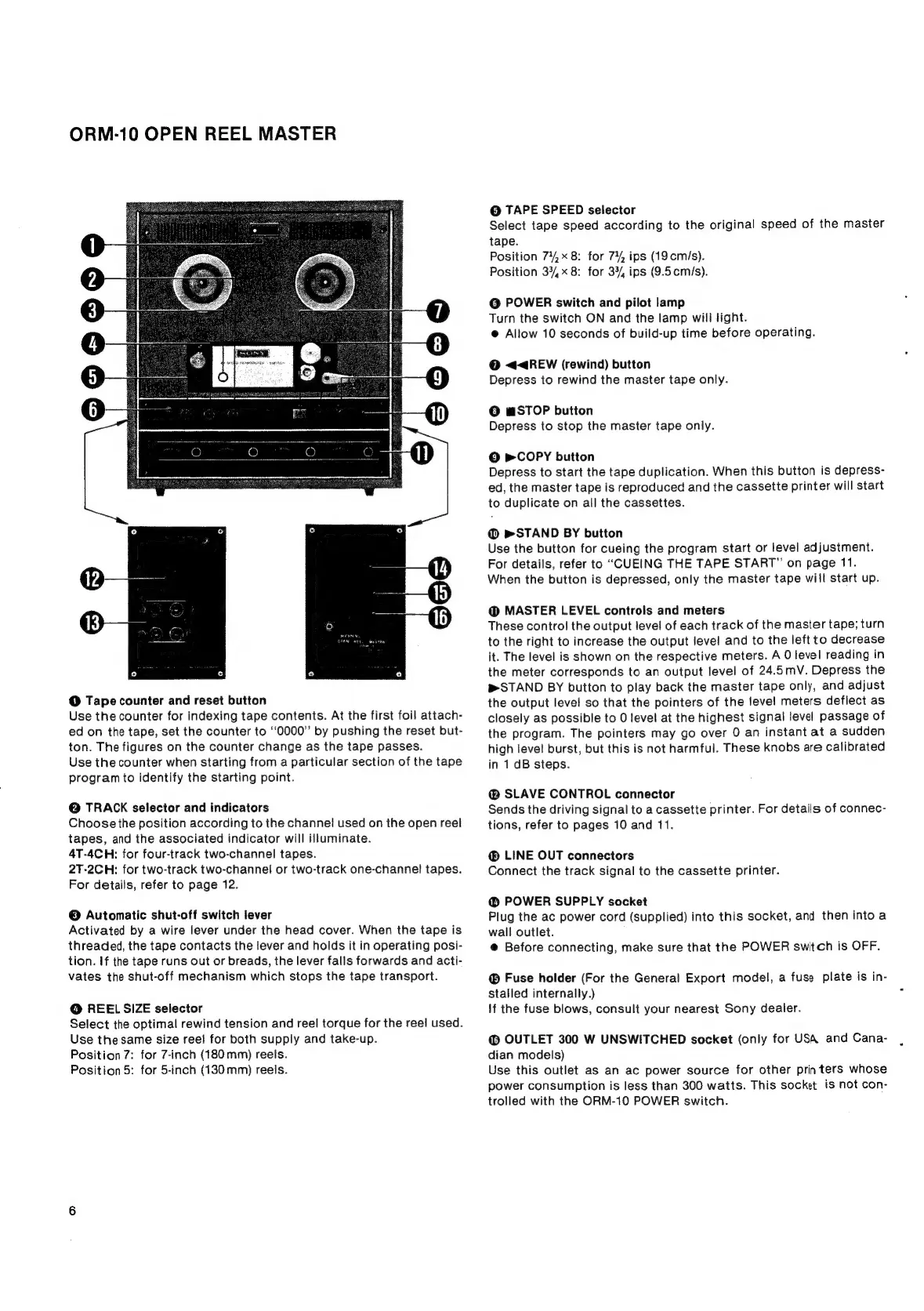
ORM-10
OPEN
REEL
MASTER
@
Tape
counter
and
reset
button
Use
the
counter
for
indexing
tape
contents.
At
the
first
foil
attach-
ed
on
the
tape,
set
the
counter
to
“0000”
by
pushing
the
reset
but-
ton.
The
figures
on
the
counter
change
as
the
tape
passes.
Use
the
counter
when
starting
from
a
particular
section
of
the
tape
program
to
identify
the
starting
point.
@
TRACK
selector
and
indicators
Choose
the
position
according
to
the
channel
used
on
the
open
reel
tapes,
and
the
associated
indicator
will
illuminate.
4T-4CH:
for
four-track
two-channel
tapes.
2T-2CH:
for
two-track
two-channel
or
two-track
one-channel
tapes.
For
details,
refer
to
page
12.
©
Automatic
shut-off
switch
lever
Activated
by
a
wire
lever
under
the
head
cover.
When
the
tape
is
threaded,
the
tape
contacts
the
lever
and
holds
it
in
operating
posi-
tion.
If
the
tape
runs
out
or
breads,
the
lever
falls
forwards
and
acti-
vates
the
shut-off
mechanism
which
stops
the
tape
transport.
@
REEL
SIZE
selector
Select
the
optimal
rewind
tension
and
reel
torque
for
the
reel
used.
Use
the
same
size
reel
for
both
supply
and
take-up.
Position
7:
for
7-inch
(180mm)
reets.
Position
5:
for
5-inch
(130mm)
reels.
@
TAPE
SPEED
selector
Select
tape
speed
according
to
the
original
speed
of
the
master
tape.
Position
74,
8:
for
74%,
ips
(19cm/s).
Position
37/,x
8:
for
33/,
ips
(9.5cm/s).
@
POWER
switch
and
pilot
lamp
Turn
the
switch
ON
and
the
lamp
will
light.
@
Allow
10
seconds
of
build-up
time
before
operating.
@
<<4REW
(rewind)
button
Depress
to
rewind
the
master
tape
only.
©
mSTOP
button
Depress
to
stop
the
master
tape
only.
©
pm
COPY
button
Depress
to
start
the
tape
duplication.
When
this
button
is
depress-
ed,
the
master
tape
is
reproduced
and
the
cassette
printer
will
start
to
duplicate
on
all
the
cassettes.
@
»&STAND
BY
button
Use
the
button
for
cueing
the
program
start
or
level
adjustment.
For
details,
refer
to
“CUEING
THE
TAPE
START”
on
page
11.
When
the
button
is
depressed,
only
the
master
tape
will
start
up.
@
MASTER
LEVEL
controls
and
meters
These
control
the
output
level
of
each
track
of
the
master
tape;
turn
to
the
right
to
increase
the
output
level
and
to
the
left
to
decrease
it.
The
level
is
shown
on
the
respective
meters.
A
0
level
reading
in
the
meter
corresponds
to
an
output
level
of
24.5mV.
Depress
the
STAND
BY
button
to
play
back
the
master
tape
only,
and
adjust
the
output
level
so
that
the
pointers
of
the
level
meters
deflect
as
closely
as
possible
to
0
level
at
the
highest
signal
level
passage
of
the
program.
The
pointers
may
go
over
0
an
instant
at
a
sudden
high
level
burst,
but
this
is
not
harmful.
These
knobs
are
calibrated
in
1
dB
steps.
SLAVE
CONTROL
connector
Sends
the
driving
signal
to
a
cassette
printer.
For
details
of
connec-
tions,
refer
to
pages
10
and
11.
®
LINE
OUT
connectors
Connect
the
track
signal
to
the
cassette
printer.
@
POWER
SUPPLY
socket
Plug
the
ac
power
cord
(supplied)
into
this
socket,
and
then
into
a
wall
outlet.
@
Before
connecting,
make
sure
that
the
POWER
switch
is
OFF.
®
Fuse
holder
(For
the
General
Export
model,
a
fuse
plate
is
in-
stalled
internally.)
!f
the
fuse
blows,
consult
your
nearest
Sony
dealer.
@
OUTLET
300
W
UNSWITCHED
socket
(only
for
USA
and
Cana-
dian
models)
Use
this
outlet
as
an ac
power
source
for
other
printers
whose
power
consumption
is
less
than
300
watts.
This
socket
is
not
con-
trolled
with
the
ORM-10
POWER
switch.

Related product manuals