EasyManua.ls Logo

Sony CCP-13B - Page 13

Sony CCP-13B
18 pages
Print Icon
To Next Page IconTo Next Page
To Previous Page IconTo Previous Page
Loading...
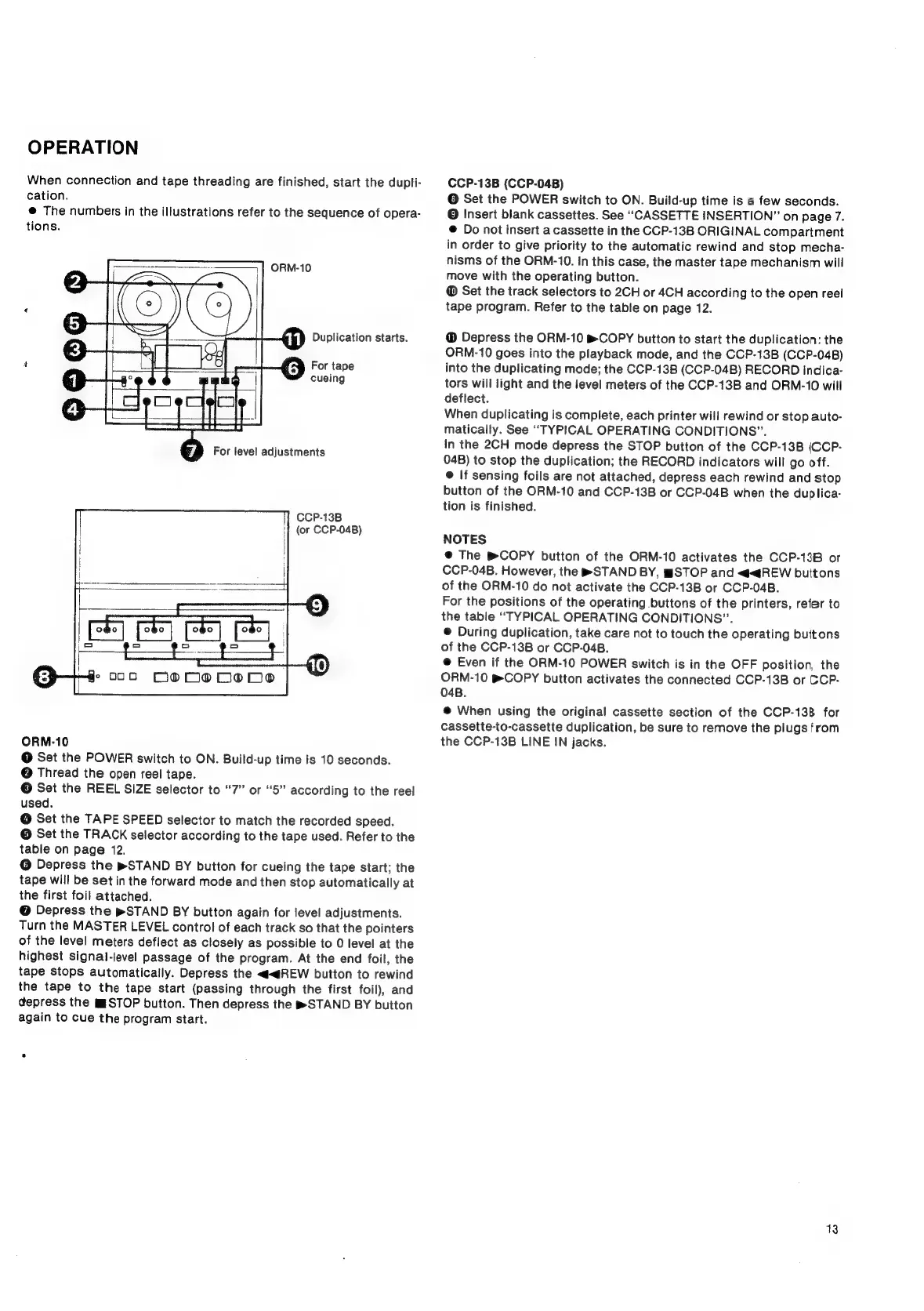
OPERATION
When
connection
and
tape
threading
are
finished,
start
the
dupli-
cation.
@
The
numbers
in
the
illustrations
refer
to
the
sequence
of
opera-
tions.
ORM-10
s&h
§
Duplication
starts.
i
6
For
tape
a
ag
cueing
For
level
adjustments
CCP-13B
(or
CCP-04B)
ORM-10
@
Set
the
POWER
switch
to
ON.
Build-up
time
is
10
seconds.
@
Thread
the
open
reel
tape.
©
Set
the
REEL
SIZE
selector
to
“7”
or
“5”
according
to
the
reel
used.
@
Set
the
TAPE
SPEED
selector
to
match
the
recorded
speed.
©
Set
the
TRACK
selector
according
to
the
tape
used.
Refer
to
the
table
on
page
12.
@
Depress
the
pSTAND
BY
button
for
cueing
the
tape
start;
the
tape
will
be
set
in
the
forward
mode
and
then
stop
automatically
at
the
first
foil
attached.
@
Depress
the
»STAND
BY
button
again
for
level
adjustments.
Turn
the
MASTER
LEVEL
control
of
each
track
so
that
the
pointers
of
the
level
meters
deflect
as
closely
as
possible
to
0
level
at
the
highest
signal-level
passage
of
the
program.
At
the
end
foil,
the
tape
stops
automatically.
Depress
the
<<@REW
button
to
rewind
the
tape
to
the
tape
start
(passing
through
the
first
foil),
and
depress
the
™§STOP
button.
Then
depress
the
STAND
BY
button
again
to
cue
the
program
start.
CCP-13B
(CCP-04B)
©
Set
the
POWER
switch
to
ON.
Build-up
time
is
a
few
seconds.
©
Insert
biank
cassettes.
See
“CASSETTE
INSERTION”
on
page
7.
@
Do
not
insert
a
cassette
in
the
CCP-13B
ORIGINAL
compartment
in
order
to
give
priority
to
the
automatic
rewind
and
stop
mecha-
nisms
of
the
ORM-10.
In
this
case,
the
master
tape
mechanism
will
move
with
the
operating
button.
®
Set
the
track
selectors
to
2CH
or
4CH
according
to
the
open
reel
tape
program.
Refer
to
the
table
on
page
12.
Depress
the
ORM-10
BCOPY
button
to
start
the
duplication:
the
ORM-10
goes
into
the
playback
mode,
and
the
CCP-13B
(CCP-04B)
into
the
duplicating
mode;
the
CCP-13B
(CCP-04B)
RECORD
indica-
tors
will
light
and
the
level
meters
of
the
CCP-13B
and
ORM-10
will
deflect.
When
duplicating
is
complete,
each
printer
will
rewind
or
stop
auto-
matically.
See
“TYPICAL
OPERATING
CONDITIONS”.
In
the
2CH
mode
depress
the
STOP
button
of
the
CCP-13B
(CCP-
04B)
to
stop
the
duplication;
the
RECORD
indicators
will
go
off.
@
If
sensing
foils
are
not
attached,
depress
each
rewind
and
stop
button
of
the
ORM-10
and
CCP-13B
or
CCP-04B
when
the
duplica-
tion
is
finished.
NOTES
@
The
BCOPY
button
of
the
ORM-10
activates
the
CCP-13B
or
CCP-04B.
However,
the
®STAND
BY,
mSTOP
and
<qREW
buitons
of
the
ORM-10
do
not
activate
the
CCP-13B
or
CCP-04B.
For the
positions
of
the
operating
buttons
of
the
printers,
refer
to
the
table
“TYPICAL
OPERATING
CONDITIONS”.
®
During
duplication,
take
care
not
to
touch
the
operating
buttons
of
the
CCP-13B
or
CCP-04B.
@
Even
if
the
ORM-10
POWER
switch
is
in
the
OFF
position,
the
ORM-10
&
COPY
button
activates
the
connected
CCP-13B
or
CCP-
O4B.
@
When
using
the
original
cassette
section
of
the
CCP-13B
for
cassette-to-cassette
duplication,
be
sure
to
remove
the
plugs
from
the
CCP-13B
LINE
IN
jacks.
13

Related product manuals