EasyManua.ls Logo

Sony CDP-400 - Page 25

Sony CDP-400
48 pages
Print Icon
To Next Page IconTo Next Page
To Previous Page IconTo Previous Page
Loading...
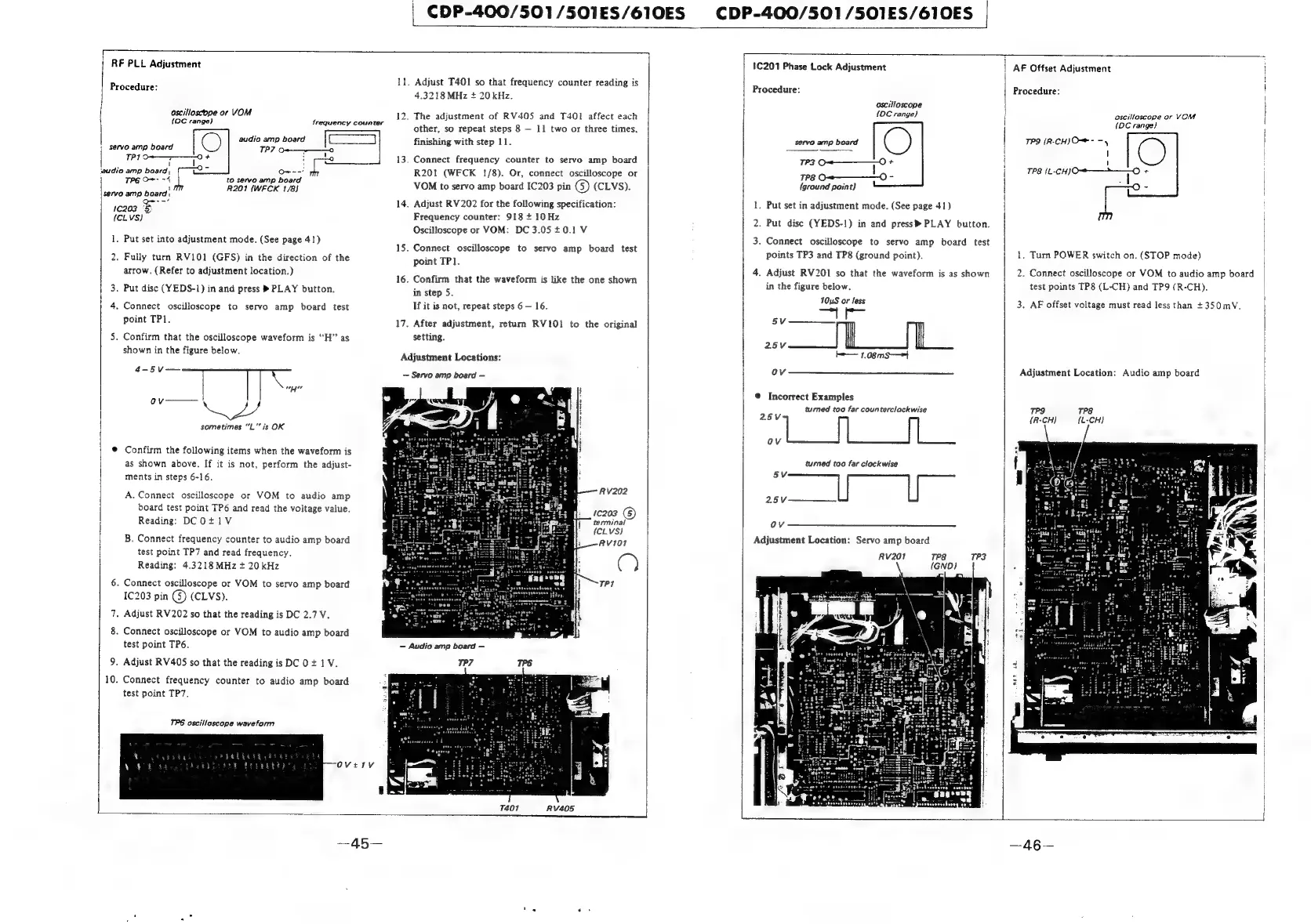
RF
PLL
Adjustment
servo
amp
a
1c209
(CLVS)
1.
2.
.
Confirm
that
the
oscilloscope
waveform
is
.
Connect
oscilloscope
or
VOM
to
servo
amp
board
.
Adjust
RV202
so
that
the
reading
is
DC
2.7
V.
.
Connect
oscilloscope
or
VOM
to
audio
amp
board
9.
Adjust
RV405
so
that
the
reading
is
DCO
+
1V.
.
Connect
frequency
counter
to
audio
amp
board
CDP-400/501/501ES/610ES
CDP-400/501
/S501ES/610ES
Procedure:
oscilloscope
or
VOM
(OC
range)
frequency
counter
audio
amp
board
|
s@rvo
amp
board
TP?
o+——-—_——o
PI
audio
are
on
Oe--’
to
servo
amp
board
R201
(WFCK
1/8)
Put
set
into
adjustment
mode.
(See
page
41)
Fully
turn
RV101
(GFS)
in
the
direction
of
the
arrow.
(Refer
to
adjustment
location.)
.
Put
disc
(YEDS-1)
in
and
press
®
PLAY
button.
.
Connect
oscilloscope
to
servo
amp
board
test
point
TP1.
OH?
as
shown
in
the
figure
below.
—T
wd
sometimes
“L”’
is
OK
Confirm
the
following
items
when
the
waveform
is
as
shown
above.
If
it
is
not,
perform
the
adjust-
ments
in
steps
6-16.
A.
Connect
oscilloscope
or
VOM
to
audio
amp
board
test
point
TP6
and
read
the
voltage
value.
Reading:
DCO+1V
B.
Connect
frequency
counter
to
audio
amp
board
test
point
TP7
and
read
frequency.
Reading:
4.3218MHz
+
20kHz
1C203
pin
(3)
(CLVS).
test
point
TP6.
test
point
TP7.
TP6
oscilloscope
waveform
ll.
14.
15.
16.
17.
Adjust
T401
so
that
frequency
counter
reading
is
4.3218
MHz
+
20
kHz.
.
The
adjustment
of
RV40S5
and
T401
affect
each
other,
so
repeat
steps
8
11
two
or
three
times,
finishing
with
step
11.
.
Connect
frequency
counter
to
servo
amp
board
R201
(WFCK
!/8).
Or,
connect
osciiloscope
or
VOM
to
servo
amp
board
IC203
pin
(5)
(CLVS).
Adjust
RV202
for
the
following
specification:
Frequency
counter:
918
+
10Hz
Oscilloscope
or
VOM:
DC
3.05
40.1
V
Connect
oscilloscope
to
servo
amp
board
test
point
TP1.
Confirm
that
the
waveform
is
like
the
one
shown
in
step
5.
If
it
is
not,
repeat
steps
6
16.
After
adjustment,
return
RVIOI
to
the
original
setting.
Adjustment
Locations:
Servo
amp
board
RV202
1€203
(6)
terminal
(CLvs)
AVION
iS
1C201
Phase
Lock
Adjustment
Procedure:
oscilloscope
{DC
range}
O
TP3
ae
+
1P8
O-—_—_——O
-
{ground
point}
servo
amp
board
lL.
Put
set
in
adjustment
mode.
(See
page
41)
2.
Put
disc
(YEDS-!)
in
and
press®
PLAY
button.
3.
Connect
oscilloscope
to
servo
amp
board
test
points
TP3
and
TP8
(ground
point).
4.
Adjust
RV201
so
that
the
waveform
is
as
shown
in
the
figure
below.
10uS
or
less
Sie
5V
25V
k—
1.08mS—>|
Ov
@
Incorrect
Examples
turned
too
far
counterclockwise
25V
i
ee
|
ee
|e
turned
too
far
clockwise
SV
2.5V
U
U
Ov
Adjustment
Location:
Servo
amp
board
Rv201
TP8
TP3
AF
Offset
Adjustment
Procedure:
oscilloscope
or
VOM
{DC
range}
TP9
(R-CH)
Om
-
-
TPS
Ls
ce
cceD
be
+
1.
Turn
POWER
switch
on.
(STOP
mode)
2.
Connect
oscilloscope
or
VOM
to
audio
amp
board
test
points
TP8
(L-CH)
and
TP9
(R-CH).
3.
AF
offset
voltage
must
read
less
than
+350mV,
Adjustment
Location:
Audio
amp
board
TP9
(R-CH)
TP8
{L-CH)

Related product manuals