EasyManua.ls Logo

Sony CDP-400 - Page 26

Sony CDP-400
48 pages
Print Icon
To Next Page IconTo Next Page
To Previous Page IconTo Previous Page
Loading...
CDP-400/501/501ES/610ES
CDP-400/501
/501ES/610ES
|
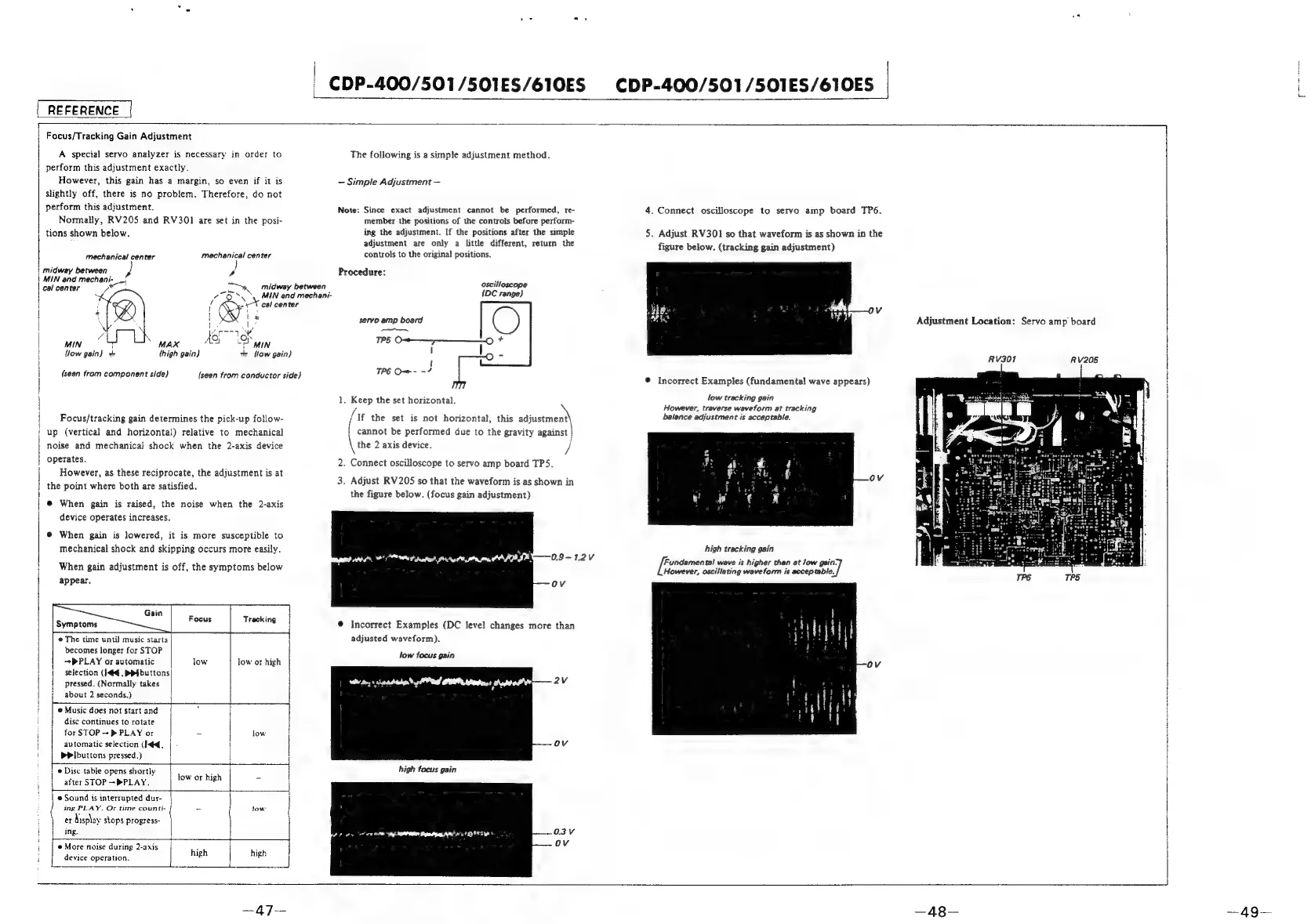
REFERENCE
Focus/Tracking
Gain
Adjustment
A
special
servo
analyzer
is
necessary
in
order
to
perform
this
adjustment
exactly.
However,
this
gain
has
a
margin,
so
even
if
it
is
slightly
off,
there
is
no
problem.
Therefore,
do
not
perform
this
adjustment.
Normally,
RV205
and
RV301
are
set
in
the
posi-
|
tions
shown
below.
(seen
fram
component
side)
{seen
from
conductor
side)
Focus/tracking
gain
determines
the
pick-up
follow-
'
up
(vertical
and
horizontal)
relative
to
mechanical
noise
and
mechanical]
shock
when
the
2-axis
device
operates.
However,
as
these
reciprocate,
the
adjustment
is
at
the
point
where
both
are
satisfied.
@
When
gain
is
raised,
the
noise
when
the
2-axis
|
device
operates
increases.
@
When
gain
is
lowered,
it
is
more
susceptible
to
mechanical
shock
and
skipping
occurs
more
easily.
|
When
gain
adjustment
is
off,
the
symptoms
below
appear.
Gain
F
:
Symptoms
‘ocus
Tracking
F ;
;
a
|
The
time
until
music
starts
becomes
longer
for
STOP
~+PPLAY
or
automatic
low
low
or
high
selection
(144,
PP}
buttons
pressed.
(Normally
takes
{
|
about
2
seconds.)
1S
isa
ae
i
@
Music
does
not
start
and
i
disc
continues
to
rotate
H
for
STOP
-+
>
PLAY
or
-
low
automatic
selection
(hd.
bPibuttons
pressed.)
i
ae
oe
j
Ve
Disc
table
opens
shortly
after
STOP
-PPLAY.
e
Sound
is
interrupted
dur-
ing
PLAY.
Or
time
counti-
_
low
:
er
Aisplay
stops
progress-
j
ing.
tow
or
high
Ess
i
e
More
noise
during
2-axis
i
device
operation.
fee
eee
i
Eee
high
high
The
following
is
a
simple
adjustment
method.
Simple
Adjustment
Note:
Since
exact
adjustment
cannot
be
performed,
re-
member
the
positions
of
the
controls
before
perform-
ing
the
adjustment.
If
the
positions
after
the
simple
adjustment
are
only
a
little
different,
return
the
mechanical
center
mechanical
center
controls
to
the
original
positions.
midway
between
,
}
}
Procedure:
and
mechani-__!
;
cal
center
x)
Ee
ee
midway
between
oscilloscope
7
S\
‘MIN
and
mechani-
{DC
range}
|
a
v
cal
center
|
>
H
x
servo
amp
board
C)
|
x
,
i
(Agen
ps
|
Oo
s
Py
|
MIN
7
MAX
Aor
|
MIN
TFS
©
ij
a
bs
I
(low
gain}
thigh
gain}
tr
flow
gain)
&
|
{
i
TP6
Ow-
=?
1.
Keep
the
set
horizontal.
/Mf
the
set
is
not
horizontal,
this
adjustment
cannot
be
performed
due
to
the
gravity
against
|
the
2
axis
device.
/
nN
.
Connect
oscilloscope
to
servo
amp
board
TPS.
3.
Adjust
RV205
so
that
the
waveform
is
as
shown
in
the
figure
below.
(focus
gain
adjustment)
pry
eaten
Nea
Lh
0.9
—1.2V
@
Incorrect
Examples
(DC
level
changes
more
than
adjusted
waveform).
low
focus
gain
2Vv
OV
high
focus
gain
Foe
ote
ne
Ap
ant
Depatgag
RR!
eT
ETT
NS
Oo.
O3V
ri
ov
4.
Connect
oscilloscope
to
servo
amp
board
TP6.
5.
Adjust
RV301
so
that
waveform
is
as
shown
in
the
figure
below.
(tracking
gain
adjustment)
®
Incorrect
Examples
(fundamental
wave
appears)
low
tracking
gain
However,
traverse
waveform
at
tracking
balance
adjustment
is
acceptable.
high
tracking
gain
Fundamental
wave
is
higher
than
at
low
gain.
However,
oscillating
waveform
is
acceptable.
po

Related product manuals