EasyManua.ls Logo

Sony CDP-C445 - Program Play for Custom Sequences; Programming Disc and Track Order; Managing Programmed Playback

Sony CDP-C445
26 pages
Print Icon
To Next Page IconTo Next Page
To Previous Page IconTo Previous Page
Loading...
Playing
in
a
Specified
Order
Program
Play
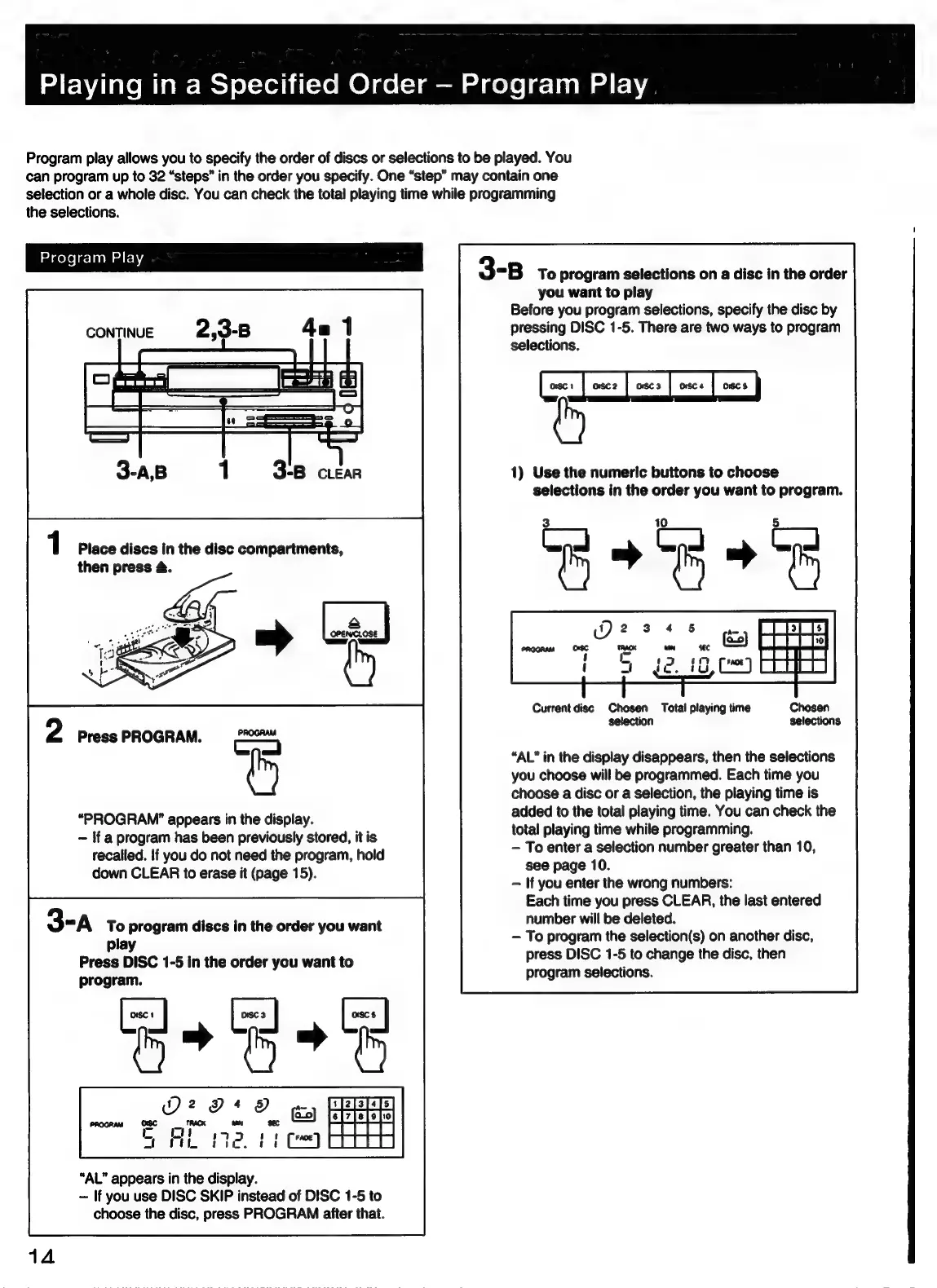
Program
play
allows
you
to
specify
the
order
of
discs
or
selections
to
be
played.
You
can
program
up
to
32
“steps”
in
the
order
you
specify.
One
“step”
may
contain
one
selection
or
a
whole
disc.
You
can
check
the
total
playing
time
while
programming
the
selections.
Program
Play
1
Place discs
in
the
disc
compartments,
then
press
4.
“PROGRAM”
appears
in
the
display.
~
If
a
program
has
been
previously
stored,
it
is
recalled.
if
you
do
not
need
the
program,
hold
down
CLEAR
to
erase
it
(page
15).
3-A
To
program
discs
in
the
order
you
want
play
Press
DISC
1-5
in
the
order
you
want
to
program.
“AL”
appears
in
the
display.
-=
If
you
use
DISC
SKIP
instead
of
DISC
1-5
to
choose
the
disc,
press
PROGRAM
after
that.
3-B
To
program
selections
on
a
disc
in
the
order
you
want
to
play
Before
you
program
selections,
specify
the
disc
by
pressing
DISC
1-5.
There
are
two
ways
to
program
selections.
coe
1)
Use
the
numeric
buttons
to
choose
selections
in
the
order
you
want
to
program.
Current
disc
Chosen
Total
playing
time
selection
“AL’
in
the
display
disappears,
then
the
selections
you
choose
will
be
programmed.
Each
time
you
choose
a
disc
or
a
selection,
the
playing
time
is
added
to
the
total
playing
time.
You
can
check
the
total
playing
time
while
programming.
To
enter
a
selection
number
greater
than
10,
see
page
10.
If
you
enter
the
wrong
numbers:
Each
time
you
press
CLEAR,
the
last
entered
number
will
be
deleted.
To
program
the
selection(s)
on
another
disc,
press
DISC
1-5
to
change
the
disc,
then
program
selections.

Related product manuals