EasyManua.ls Logo

Sony CDP-C445 - Recording Programs to Tape; Creating Tape Recordings from Programs; Checking and Editing Tape Programs

Sony CDP-C445
26 pages
Print Icon
To Next Page IconTo Next Page
To Previous Page IconTo Previous Page
Loading...
Playing
in
a
Specified
Order
Recording
Programmed
Selections
You
can
make
a
program
to
be
recorded
fit
to
your
tape
length.
By
entering
Il,
you
can
divide
a
program
into
side
A
and
B.
At
the
end
of
a
program
for
side
A,
the
player
automatically
pauses
before
side
A
ends
so
that
a
selection
is
not
cut
off.
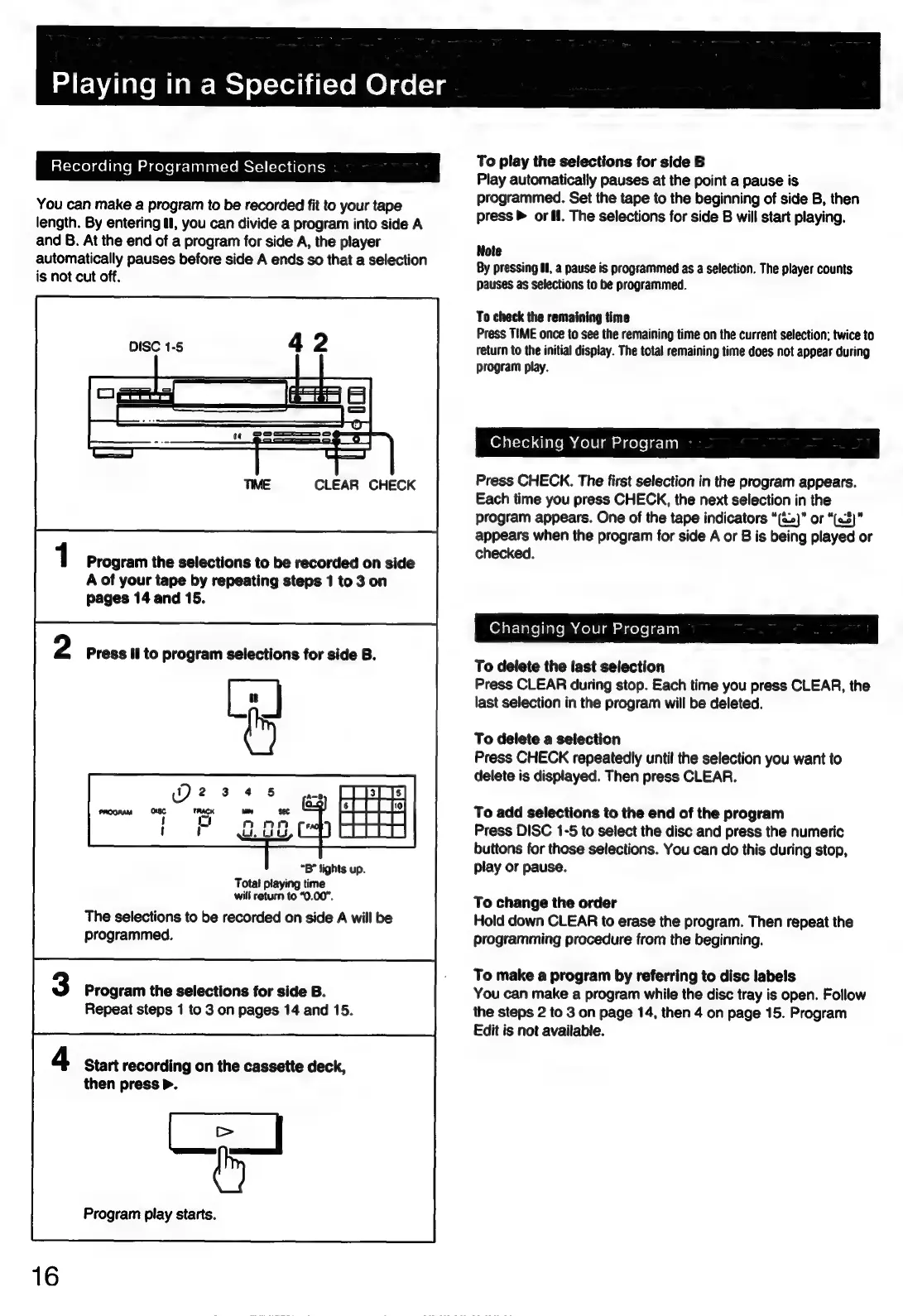
DISC
1-5
CLEAR
CHECK
Program
the
selections
to
be
recorded
on
side
A
of
your
tape
by
repeating
steps
1
to
3
on
pages
14
and
15.
Press
il
to
program
selections
for
side
B.
“B”
lights
up.
Total
playing
time
will
return
to
“0.00”.
The
selections
to
be
recorded
on
side
A
will
be
programmed.
Program
the
selections
for
side
B.
Repeat
steps
1
to
3
on
pages
14
and
15.
Start
recording
on
the
cassette
deck,
then
press
>.
KE
Program
play
starts.
To
play
the
selections
for
side
B
Play
automatically
pauses
at
the
point
a
pause
is
programmed.
Set
the
tape
to
the
beginning
of
side
B,
then
press
>
or
I.
The
selections
for
side
B
will
start
playing.
Note
By
pressing
Ol,
a
pause
is
programmed
as
a
selection.
The
player
counts
pauses
as
selections
to
be
programmed.
To
check
the
remaining
time
Press
TIME
once
to
see
the
remaining
time
on
the
current
selection;
twice
to
return
to
the
initial
display.
The
total
remaining
time
does
not
appear
during
program
play.
Checking
Your
Program
Press
CHECK.
The
first
selection
in
the
program
appears.
Each
time
you
press
CHECK,
the
next
selection
in
the
program
appears.
One
of
the
tape
indicators
“(%.)”
or
“(a3)”
appears
when
the
program
for
side
A
or
B
is
being
played
or
checked.
Changing
Your
Program
To
delete
the
last
selection
Press
CLEAR
during
stop.
Each
time
you
press
CLEAR,
the
last
selection
in
the
program
will
be
deleted.
To
delete
a
selection
Press
CHECK
repeatedly
until
the
selection
you
want
to
delete
is
displayed.
Then
press
CLEAR.
To
add
selections
to
the
end
of
the
program
Press
DISC
1-5
to
select
the
disc
and
press
the
numeric
buttons
for
those
selections.
You
can
do
this
during
stop,
play
or
pause.
To
change
the
order
Hold
down
CLEAR
to
erase
the
program.
Then
repeat
the
programming
procedure
from
the
beginning.
To
make
a
program
by
referring
to
disc
labels
You
can
make
a
program
while
the
disc
tray
is
open.
Follow
the
steps
2
to
3
on
page
14,
then
4
on
page
15.
Program
Edit
is
not
available.

Related product manuals