rID
t
(+)1.
(-)
buttons
To control CDIUSB, the same as
CI)/®
(ALBUM
-/+)
on the unit.
Setup, sound setting, etc., can
be
operated by
t
•.
11m
SCRl
(scroll) button
To scroll the display item.
ITI]
Number buttons
To receive stored stations (press); store
stations (press and hold).
*1
If
an
HO
Radio
tuner
or
SAT
tuner
is connected:
when
(SOURCE)
is pressed, the
connected
device
tHO,"
"XM"
or
"SR") will
appear
in the display
Furthermore,
if
(
MODE)
ispressed,
you
can
switch
the
HO
Radio
tuner
band
or
SAT
tuner
band.
*2 This button
has
a tactile dot.
Note
If
the unit is
turned
off
and
the display disappears,
it
cannot
be
operated
with the
card
remote
commander
unless
(SOURCE)
on
the
unit
is
pressed.
or
a
disc
is
inserted
to activate the
unit
first.
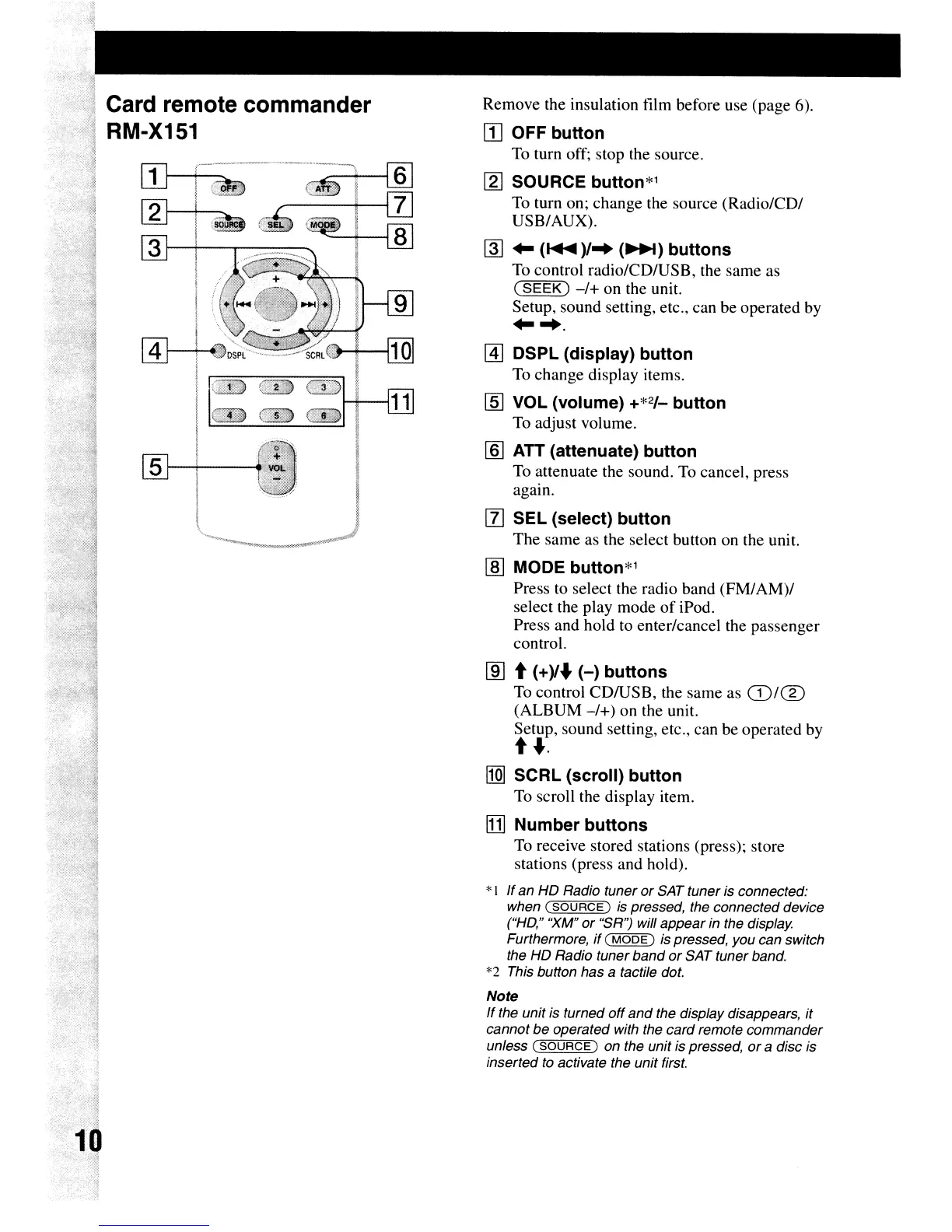
Remove the insulation film before use (page 6).
[I] OFF button
To turn off; stop the source.
[gJ
SOURCE button*1
To turn on; change the source (Radio/CD/
USB/AUX).
~
..
(
.....
)/-.
(~)
buttons
To control radio/CDIUSB, the same as
(SEEK)
-/+
on
the unit.
Setup, sound setting, etc., can be operated by
..
-..
@]
DSPl
(display) button
To change display items.
[§] VOL (volume) +*2/_ button
To adjust volume.
[§]
ATT (attenuate) button
To attenuate the sound. To cancel, press
again.
[l]
SEl
(select) button
The
same as the select button on the unit.
[§] MODE button*1
Press to select the radio band
(FM/
AM)/
select the play mode
of
iPod.
Press and hold to enter/cancel the passenger
control.
,
.~
!1
;j
Card remote commander
11
~)
RM-X151
;~
,"I
.-----
~~
"
~~





 To Next Page