Using
optional
equipment
Marine remote
commander
RM-X55M1X11 M
RM-X55M
II
GP/ALBM
-/+
~'f--,I.;'I------'~~-+-
SEEK
-/+
MUTING _
......
,.,'
(ATT)
OFF
---........~~d--
VOLUME
--~ri=3-~~
+/-
(....
~--
MODE
SOURCE
RM-X11M
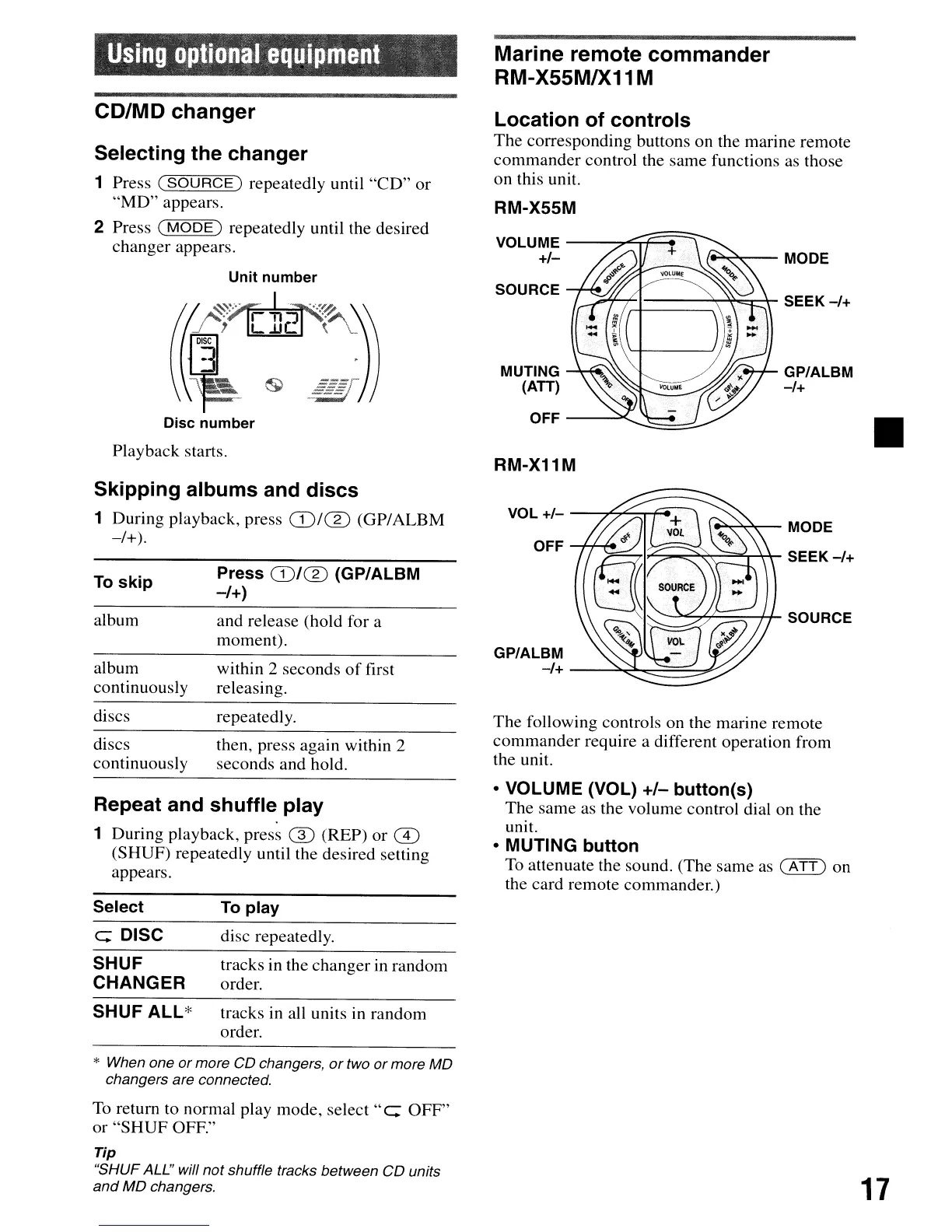
Location of controls
The
corresponding buttons on the marine remote
commander
control the same functions as those
on this unit.
Disc number
Playback starts.
Selecting the changer
1 Press
(SOURCE)
repeatedly until
"CD"
or
"MD"
appears.
2 Press
(MODE)
repeatedly until the desired
changer appears.
CD/MD changer
Skipping albums and discs
1 During playback, press
(J)/®
(GP/ALBM
-/+).
~~'7'--=---f-J1-
SOURCE
......
~-MODE
I~::;:~~~\-
SEEK
-/+
OFF~~
VOL
+/-
-~~~-r-.
GP/ALBM
-/+
--~~:::::::=:::~
within 2 seconds
of
first
releasing.
and release (hold for a
moment).
Press
CD/CD
(GP/ALBM
-/+)
album
album
continuously
To skip
discs
discs
continuously
repeatedly.
then, press again within
2
seconds and hold.
The
following controls on the marine remote
commander
require a different operation from
the unit.
Repeat and shuffle play
1 During playback, press ® (REP)
or
CD
(SHUF) repeatedly until the desired setting
appears.
• VOLUME (VOL)
+/-
button(s)
The
same
as the volume control dial on the
unit.
• MUTING button
To attenuate the sound. (The same as
(ATT)
on
the card remote commander.)
Select
To play
c: DISC
disc repeatedly.
SHUF
CHANGER
tracks in the changer in random
order.
SHUF
ALL*
tracks in all units in random
order.
* When one
or
more
CD
changers,
or
two
or
more
MD
changers are connected.
To return to normal play mode,
select"
c:
OFF"
or
"SHUF
OFF."
Tip
"SHUF ALL" will
not
shuffle tracks between
CD
units
and
MD
changers.
17



 To Next Page