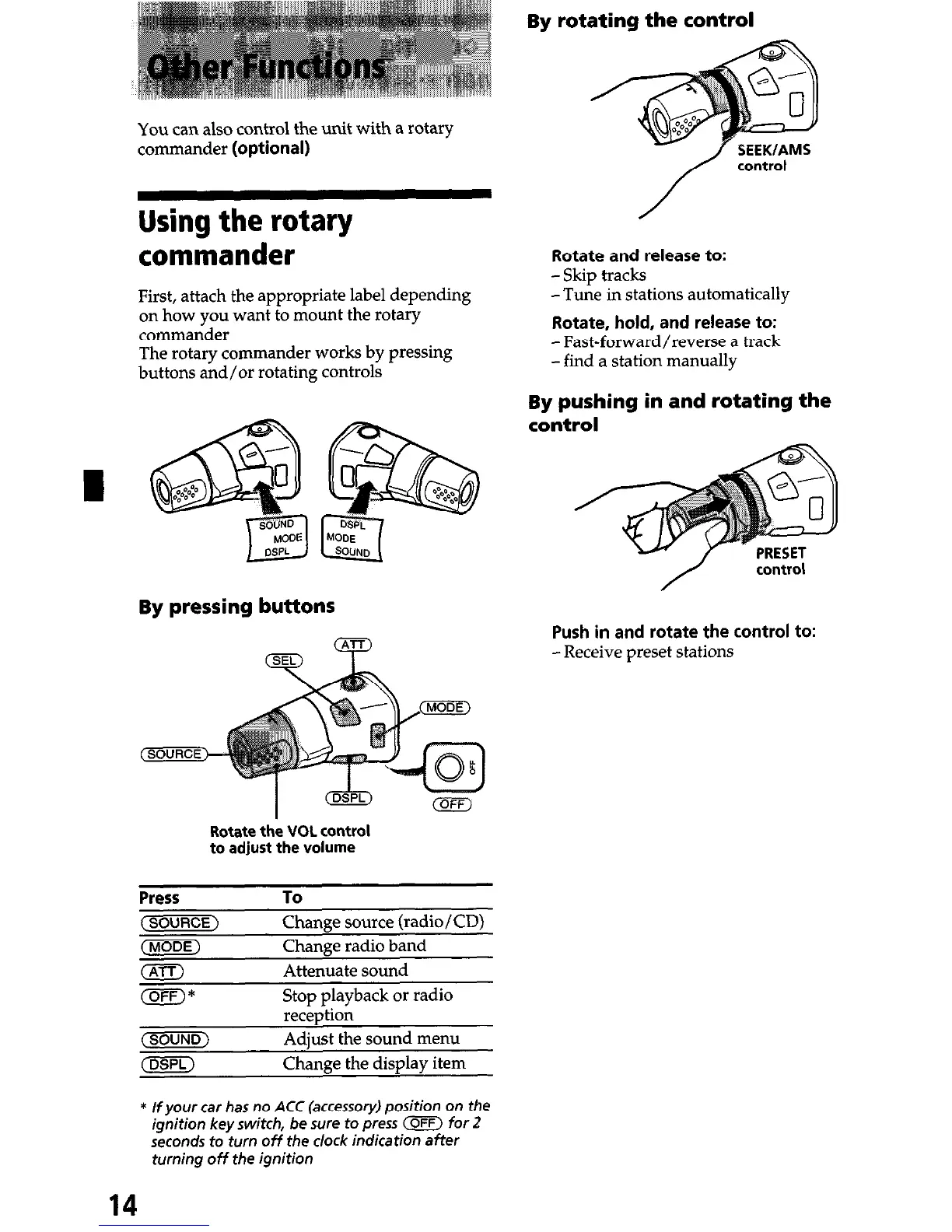
By rotating the control
You can also control the unit with a rotary
commander (optional)
Using the rotary
commander
First, attach the appropriate label depending
on how you want to mount the rotary
commander
The rotary commander works by pressing
buttons and/or rotating controls
By pressing buttons
Rotate the VOL control
to adjust the volume
Press
(SOURCE)
(MODE)
To
Change source (radio/CD)
Change radio band
Attenuate sound
Stop playback or radio
reception
Adjust the sound menu
Change the display item
Rotate and release to:
-Skip tracks
-Tune in stations automatically
Rotate, hold, and release to:
-Fast-forward/reverse a track
-find a station manually
By pushing in and rotating the
control
Push in and rotate the control to:
-Receive preset stations
* If your car has no ACC (accessory) position on the
ignition key switch, be sure to press (OFF) for 2
seconds to turn off the clock indication after
turning off the ignition
14


 To Next Page