Notes
l
For safety, turn off the ignition before cleaning
the connectors, and remove the key from the
ignition switch
l
Never touch the connectors direct/y with your
fingers or with any metal device
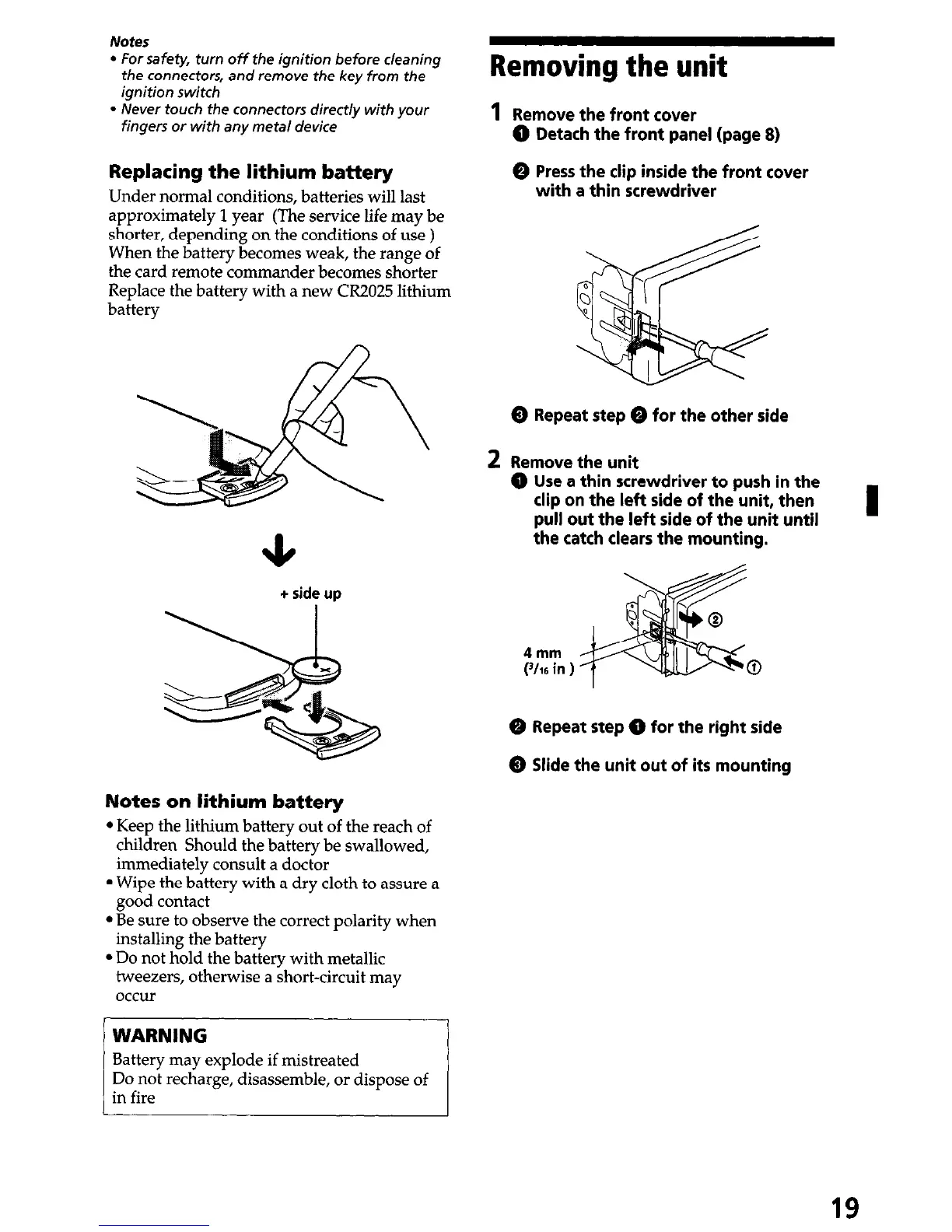
Replacing the lithium battery
Under normal conditions, batteries will last
approximately 1 year (The service life may be
shorter, depending on the conditions of use )
When the battery becomes weak, the range of
the card remote commander becomes shorter
Replace the battery with a new CR2025 lithium
battery
+ side
up
Notes on lithium battery
l
Keep the lithium battery out of the reach of
children Should the battery be swallowed,
immediately consult a doctor
l
Wipe the battery with a dry cloth to assure a
good contact
l
Be sure to observe the correct polarity when
installing the battery
l
Do not hold the battery with metallic
tweezers, otherwise a short-circuit may
occur
Battery may explode if mistreated
Removing the unit
1
Remove the front cover
@ Detach the front panel (page 8)
0 Press the clip inside the front cover
with a thin screwdriver
@ Repeat step 0 for the other side
2 Remove the unit
@ Use a thin screwdriver to push in the
clip on the left side of the unit, then
pull out the left side of the unit until
the catch clears the mounting.
4mm
(-l/16 in ) 0
@ Repeat step @ for the right side
@ Slide the unit out of its mounting
19


 To Next Page