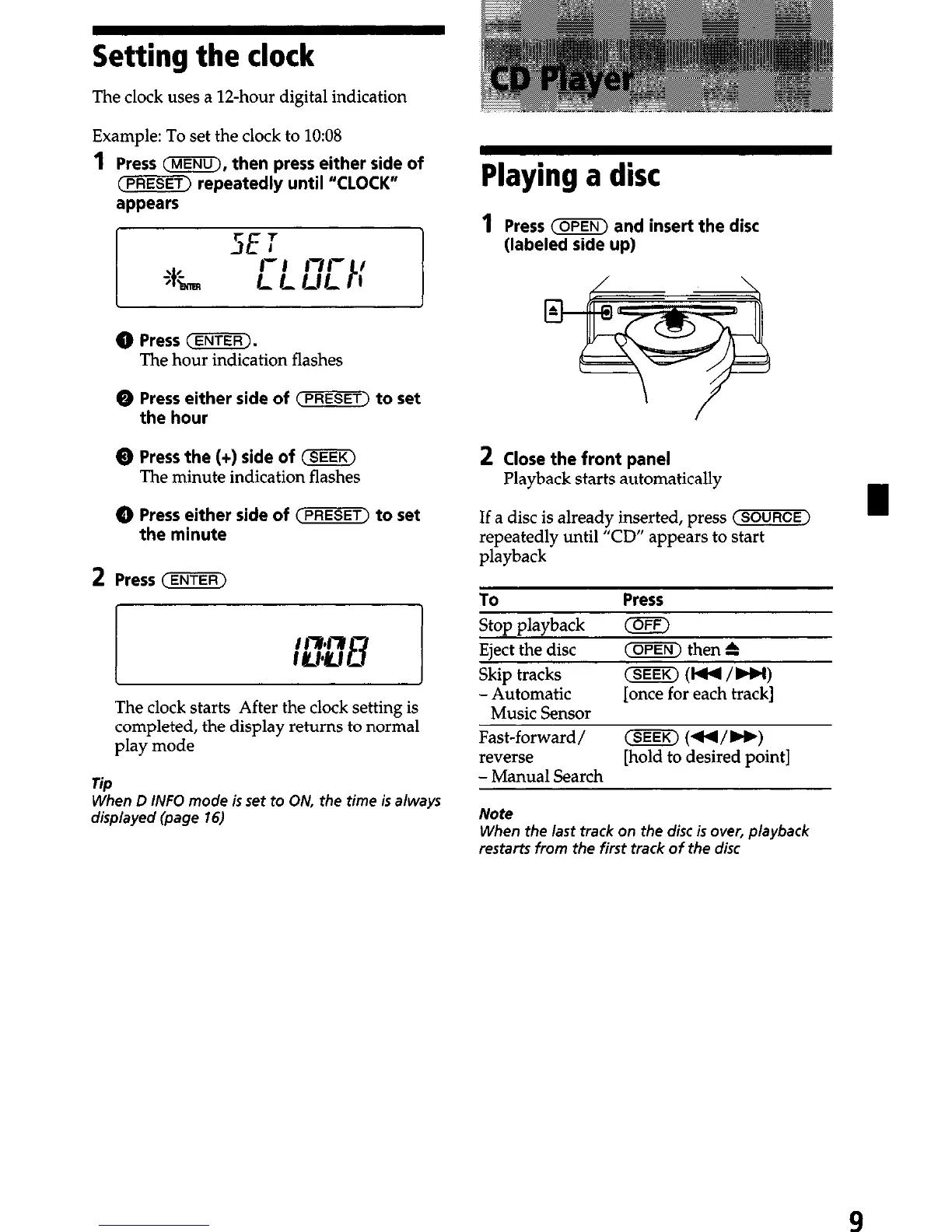
Setting the clock
The clock uses a 1Zhour digital indication
Example: To set the clock to lo:08
1
Press (MENU), then press either side of
(FFiEET) repeatedly until “CLOCK”
appears
@ Press (ENTER).
The hour indication flashes
Q Press either side of (-1 to set
the hour
Q Press the (+) side of (SEEK)
The minute indication flashes
Q Press either side of (PRESET) to set
the minute
2
Press (ENTER)
The clock starts After the clock setting is
completed, the display returns to normal
play mode
Tip
When D INFO mode is set to ON, the time is always
displayed (page 16)
Playing a disc
Press (OPEN) and insert the disc
(labeled side up)
Close the front panel
Playback starts automatically
I
If a disc is already inserted, press (m>
-
repeatedly until “CD” appears to start
playback
TO
Press
Stop playback
(OFF)
Eject the disc (OPEN) then h
Skip tracks
(SEEK) (lM/bbl)
-Automatic [once for each track]
Music Sensor
Fast-forward/ (SEEK) (44/H)
reverse [hold to desired point]
- Manual Search
Note
When the last track on the disc is over, playback
restarts from the first track of the disc
9


 To Next Page