/A?
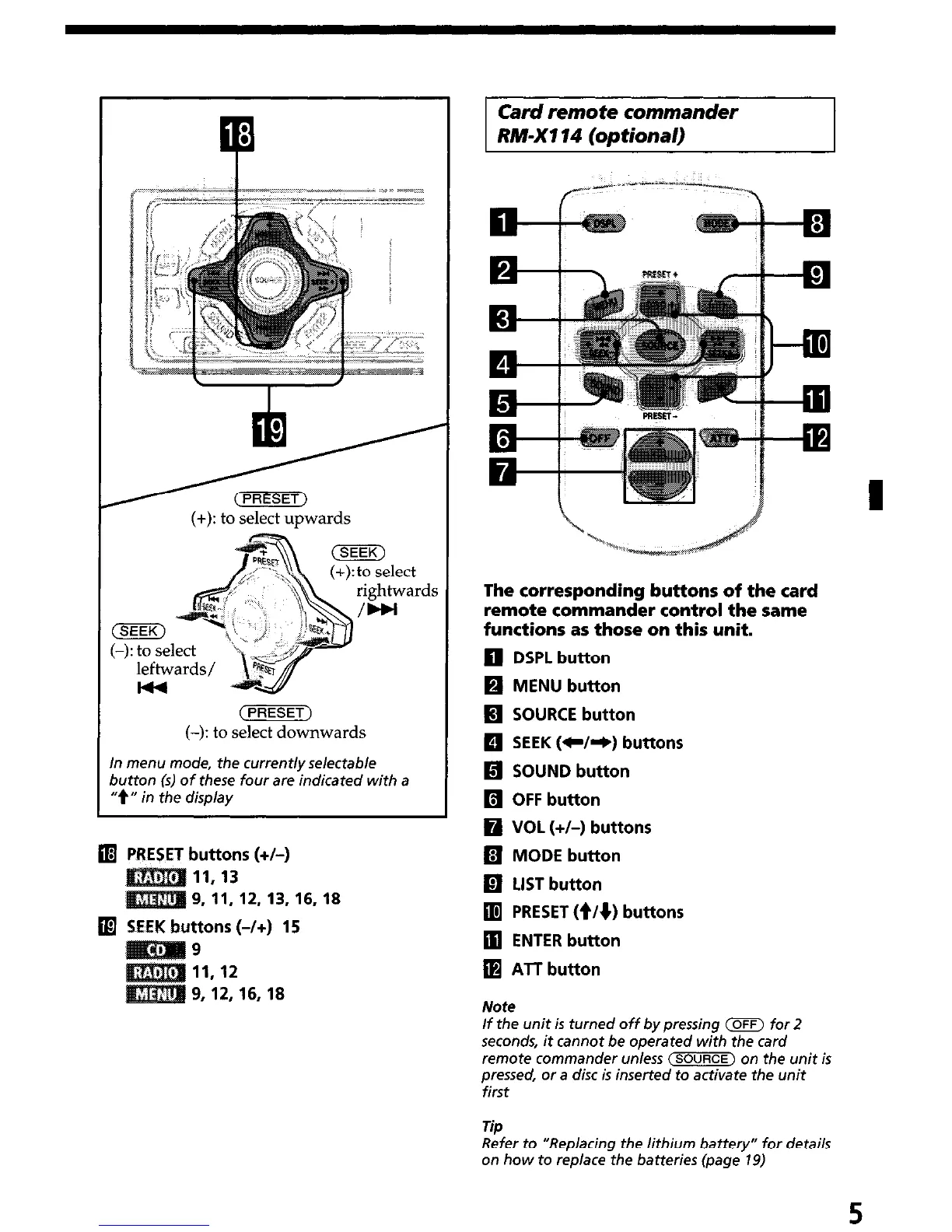
(+): to select upwards
(PRESET)
(-): to select downwards
In menu mode, the current/y selectable
button (s) of these four are indicated with a
“t” in the display
q
PRESET buttons (+/-)
11.13
9, 11,12,13,16,18
q
SEEK buttons (-/+) 15
9
11.12
9, 12, 16, 18
Card remote commander
RM-X114 (optional)
The corresponding buttons of the card
remote commander control the same
functions as those on this unit.
q
DSPL button
q
MENU button
H SOURCE button
q
SEEK (C/e) buttons
q
SOUND button
q
OFF button
q
VOL (+/-) buttons
fl MODE button
q
LIST button
q
PRESET (t/q) buttons
q
ENTER button
q
ATT button
Note
If the unit is turned off by pressing m for 2
seconds, it cannot be operated with the card
remote commander unless (SOURCE) on the unit is
pressed, or a disc is inserted to activate the unit
first
Tip
Refer to “Replacing the lithium battery” for details
on how to rep/ace the batteries (page 19)
5


 To Next Page