MODE
SOURCE
To
decrease
If
you need to mount the rotary commander on
the right hand side
of
the steering column, you
can reverse the operative direction.
1 While pushing the VOL control, press and
hold
(SEL).
Changing
the
operative
direction
The operative direction
of
the controls is factory-
set as shown below.
ATT
• ATT (attenuate)
button
To
attenuate the sound.
To
cancel, press again.
• PRESET/DISC
control
CDIUSB: The same as
G)/®
(ALBUM
-/+)
on the unit (push in and rotate).
Radio:
To
receive stored stations (push in and
rotate).
• VOL (volume)
control
The same as the control dial on the unit (rotate).
• SEEKIAMS
control
The same as
(SEEK)
+/-
on the unit (rotate, or
rotate and hold).
• DSPL
(display)
button
To
change display items.
~SPL
~-(
0,)
VOL SEEK/AMS OFF
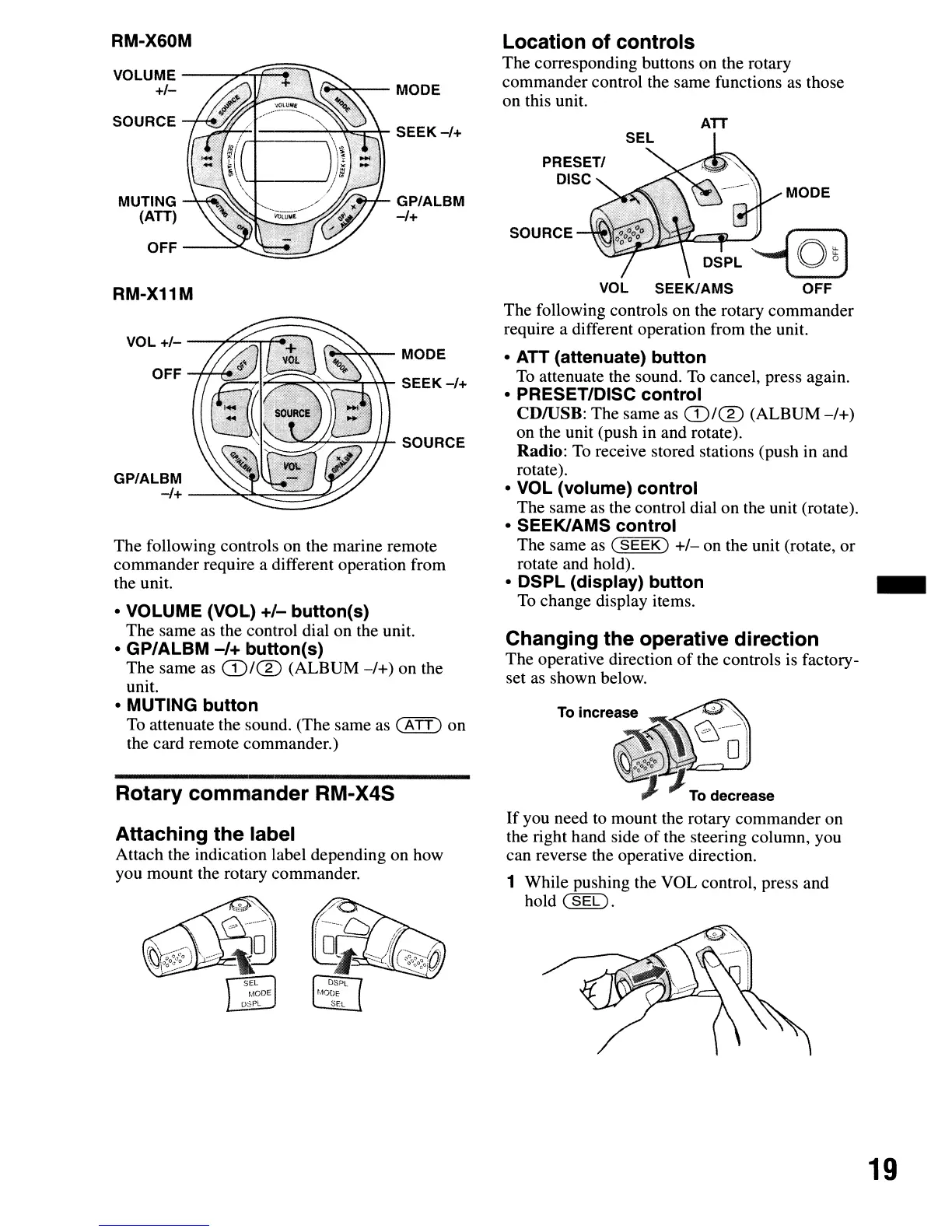
The following controls on the rotary commander
require a different operation from the unit.
Location
of
controls
The corresponding buttons on the rotary
commander control the same functions as those
on this unit.
GP/ALBM
-/+
~~MODE
SEEK-/+
-'7'--=-+1-
SOURCE
~~-I---"""'~"';;:""~
SEEK
-/+
OFF
-+-f--f,
..
;
VOL
+/-
---"'",,",,"'='T"'1f'1
MUTING
~f4r.~'~
(ATT)
OFF
-----'~~~_
Rotary
commander
RM-X4S
Attaching
the
label
Attach the indication label depending on how
you mount the rotary commander.
• VOLUME (VOL)
+/-
button(s)
The same as the control dial on the unit.
• GP/ALBM
-/+
button(s)
The same as
G)/®
(ALBUM
-/+)
on the
unit.
• MUTING
button
To
attenuate the sound. (The same as
(A
TT)
on
the card remote commander.)
The following controls on the marine remote
commander require a different operation from
the unit.
GP/ALBM
-/+
--~~~=::...",.~
VOLUME
--~;j£~~
+/-
(
....
~-
MODE
RM-X11M
SOURCE
RM-X60M
19



 To Next Page