22
Receiving the stored stations
1 Press (SOURCE) repeatedly to select
the radio.
2 Press (MODE) repeatedly to select the
desired band.
Radio reception of the desired band starts.
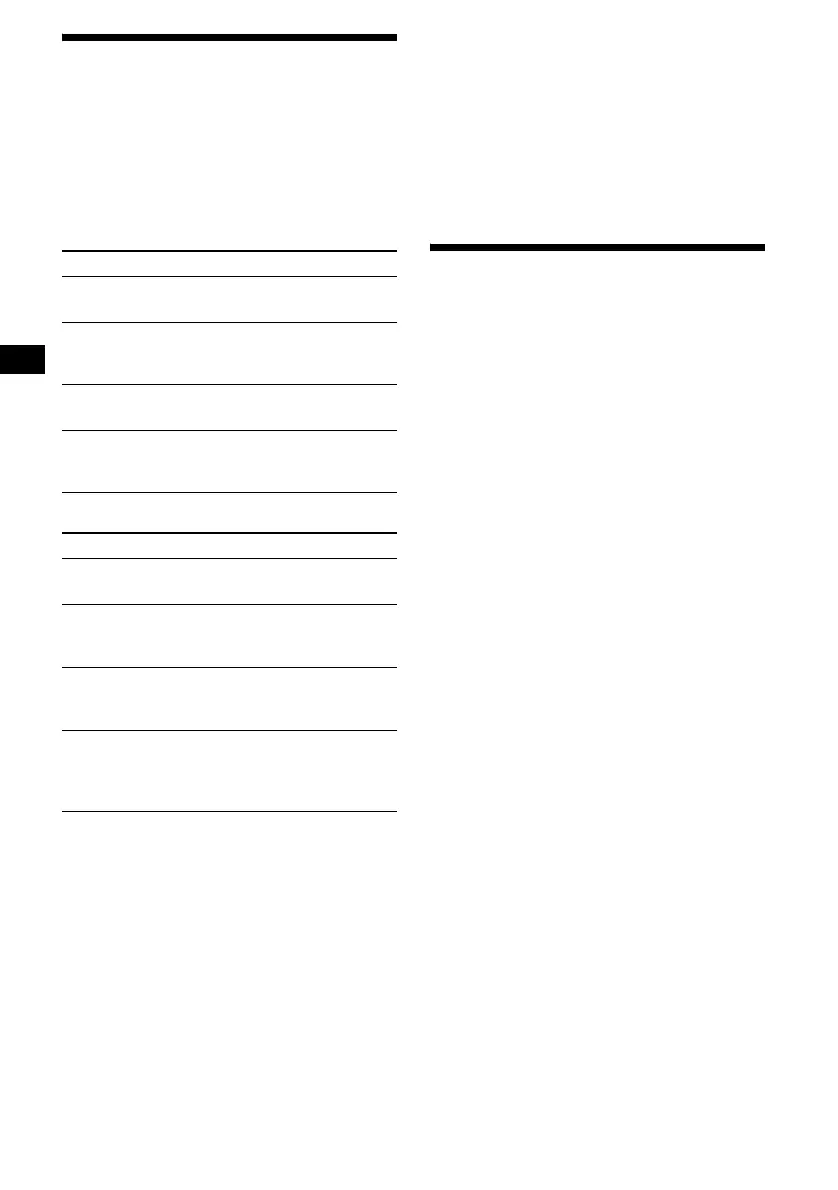
Operation by the card remote commander:
Operation by the main unit:
* To stop searching, rotate the R dial in the reverse
direction.
Tip
If automatic tuning stops too frequently, set “Local” in
“PlayMode” to “ON.” Only the stations with relatively
strong signal will be tuned in (Local seek mode).
If FM stereo reception is poor
— Mono
Set “Mono” in “PlayMode” to “ON.”
The sound improves, but becomes monaural.
To restore stereo reception, set to “OFF.”
Tip
If FM broadcasts are difficult to hear, set “DSO” in
“Sound” to “OFF” (page 35).
Storing only desired stations
You can manually preset the desired stations on
any chosen preset memory.
1 Press (SOURCE) repeatedly to select
the radio.
2 Press (MODE) repeatedly to select the
desired band.
3 Press < or , to tune in the station
that you want to store.
4 Press the desired number button ((1)
to (6)) for 2 seconds until “Memory”
appears.
The number of the button you pressed is
displayed, and then the selected station is
assigned to this number and stored.
Note
If you try to store another station on the same stored
number, the previously stored station will be erased.
To
Stop radio
reception
Press (OFF).
Receive stored
stations
– Preset search
Press (1) to (6).
Press M/m
[until the desired station].
Search stations
– Automatic tuning
Press </,
[until the desired station].
Specify
frequencies
– Manual tuning
Press </,
[hold until the desired
frequency].
To
Stop radio
reception
Press (OFF).
Receive stored
stations
– Preset search
Rotate the R dial
[until the desired station].
Search stations
– Automatic tuning
Press (ENTER) once, then
rotate the R dial*
[until the desired station].
Specify
frequencies
– Manual tuning
Press (ENTER) twice, then
rotate the R dial
[until the desired
frequency].





 To Next Page