32
Display patterns and image types
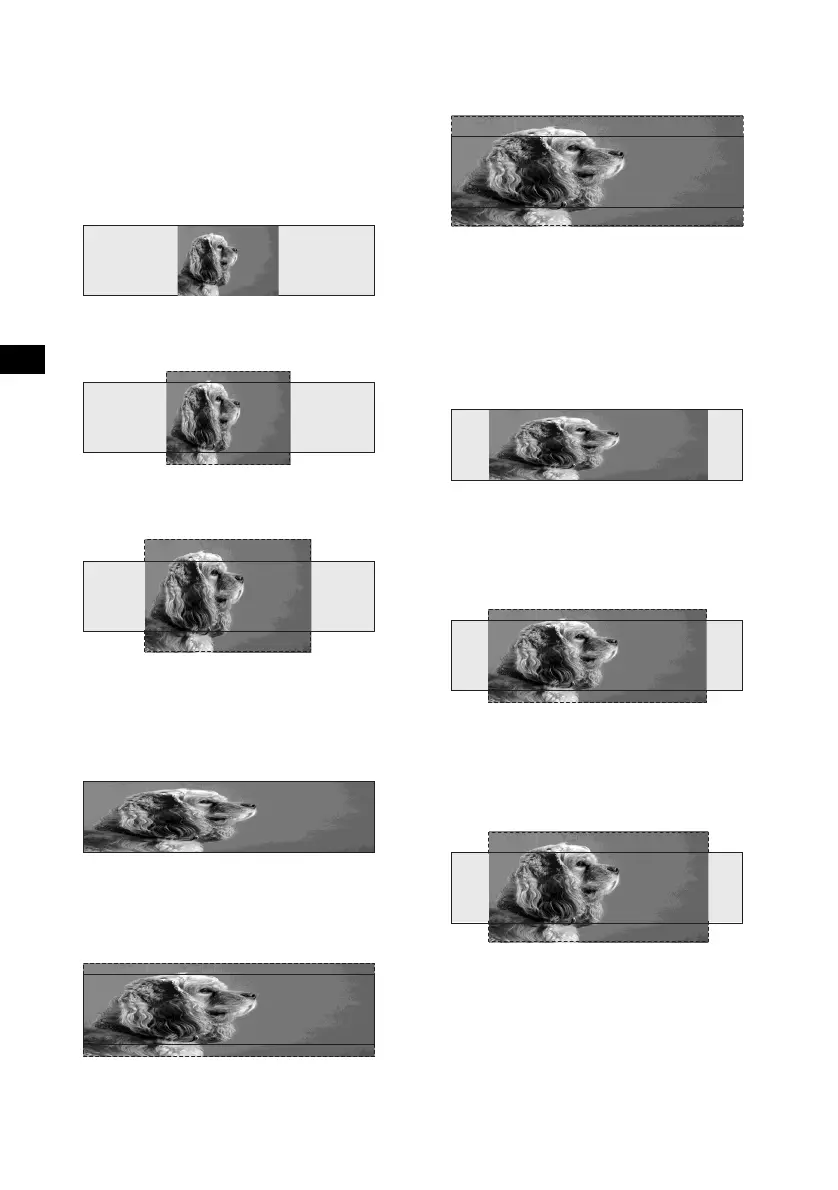
The following image types are available
depending on the selected display patterns in the
Video mode.
When “Video & Spectrum Analyser” or “Video
full” is selected.
Standard1:
An image with an aspect ratio of 4 to 3.
Wide1:
An image with an aspect ratio of 16 to 9.
Cinema1:
An image with an aspect ratio of 2.35 to 1
Standard2:
An image with an aspect ratio of 4 to 3, with only
the left and right sides of the image being
enlarged to fill the display.
Wide2:
An image with an aspect ratio of 16 to 9, with
only the left and right sides of the image being
enlarged to fill the display.
Cinema2:
An image with an aspect ratio of 2.35 to 1, with
only the left and right sides of the image being
enlarged to fill the display.
When “Video & Capture” or “Video &
Slideshow” is selected.
Standard3:
An image with an aspect ratio of 4 to 3, with only
the left and right sides of the image being
enlarged to fill the area for the Capture and Slide
show mode.
Wide3:
An image with an aspect ratio of 16 to 9, with
only the left and right sides of the image being
enlarged to fill the area for the Capture and Slide
show mode.
Cinema3:
An image with an aspect ratio of 2.35 to 1, with
only the left and right sides of the image being
enlarged to fill the area for the Capture and Slide
show mode.





 To Next Page