5
ICF-CD73/CD73V
SECTION 2
GENERAL
This section is extracted from
instruction manual.
5432
AU TO
OFF
VOLUME
TUNE/TIME SET
TIMER SET
M
A
X
M
IN
TIMER
SET
ON/OFF
MODE
PRESET TUNING/PRESET TIMER
SELECT/ PRESET
CLOCK
1
RADIO CD
SHUFFLE
REP1
MHz
kHz
AUTO OFF
TIMER
PRESET
TRACK
FM12PM
AM
ALL
RADIO
ON
BAND
OFF
CD
FM wire antenna
5432
AUTO
OFF
VOLUME
TUNE/TIME SET
TIMER SET
MAX
MIN
TIMER
SET
ON/OFF
MODE
PRESET TUNING/PRESET TIMER
SELECT/ PRESET
CLOCK
1
RADIO CD
SHUFFLE
REP1
MHz
kHz
AUTO OFF
TIMER
PRESET
TRACK
WEATHER
TV
FM12PM
AM
ALL
RADIO
ON
BAND
OFF
CD
FM wire antenna
ICF-CD73 ICF-CD73V
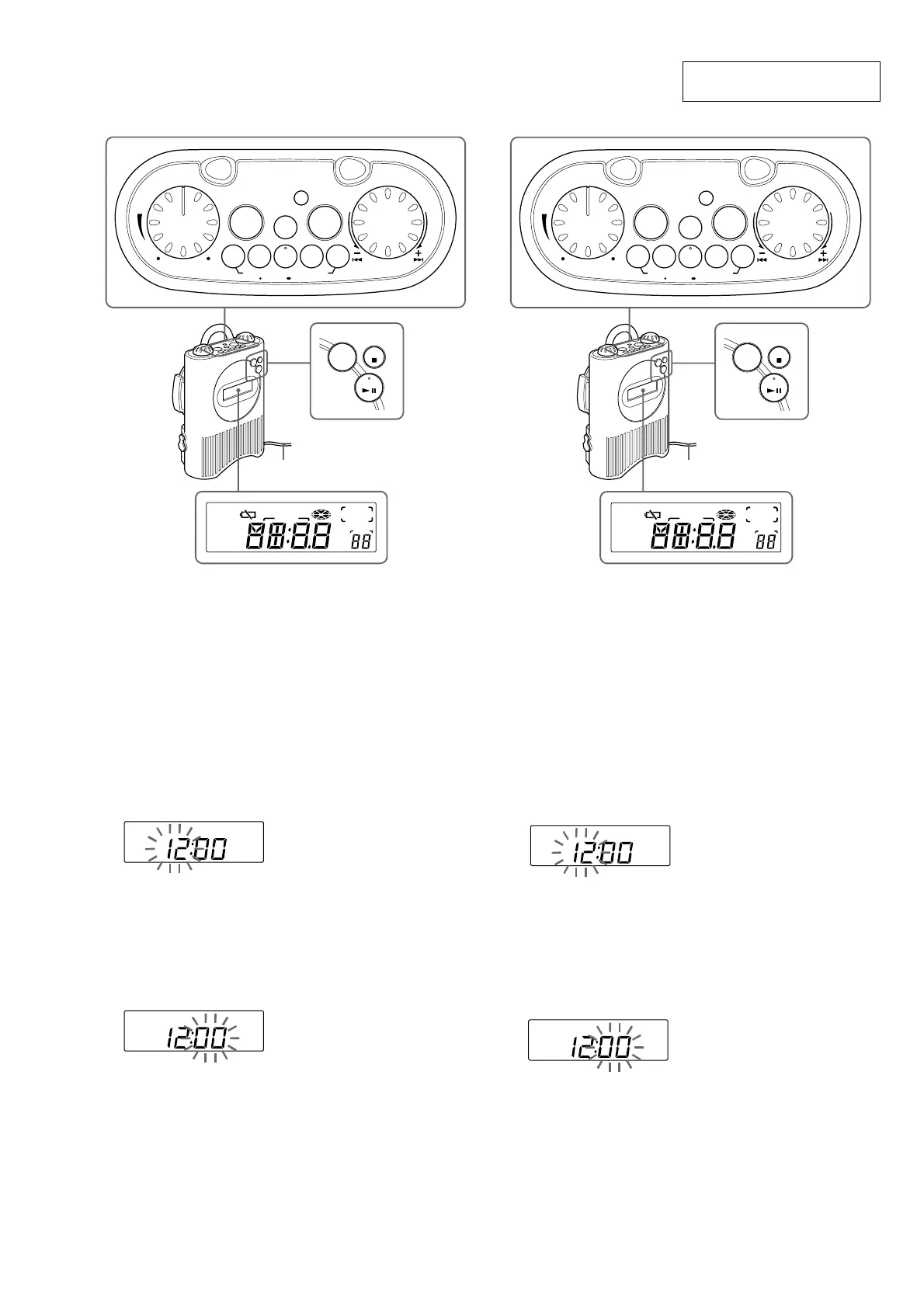
Setting the Clock
The display will flash “AM12:00” when the
batteries are installed or the AC power adaptor is
plugged in for the first time.
1 Press and hold down CLOCK for more
than 2 seconds.
The beep sounds and the hour flashes in the
display.
2 Rotate in either +/– direction the TUNE/
TIME SET/TIMER SET dial until
correct hour appears in the display.
RADIO CD
SHUFFLE
REP1
MHz
kHz
AUTO OFF
TIMER
PRESET
TRACK
WEATHER
TV
FM12PM
AM
ALL
Each rotation of the dial changes the digit(s)
by one.
When you hold the dial, the digit(s) change
rapidly.
3 Press CLOCK .
The beep sounds and the minute starts to
flash. Repeat step 2 to set the minute. After
setting the minute, press CLOCK again. The
two beeps sound and the clock starts from
0 seconds.
RADIO CD
SHUFFLE
REP1
MHz
kHz
AUTO OFF
TIMER
PRESET
TRACK
WEATHER
TV
FM12PM
AM
ALL
12-hour system: “AM 12:00” = midnight
24-hour system: “0:00” = midnight
Notes
•You can set the clock also during the radio
reception/CD playback mode.
•To set the current time quickly, rotate and hold
in either +/– direction the TUNE/TIME SET/
TIMER SET dial.
•To set the current time exactly, follow step 2
and press CLOCK again with the time signal of
a radio station.
the
Setting the Clock
The display will flash “AM12:00” when the
batteries are installed or the AC power adaptor
is plugged in for the first time.
1
Hold down CLOCK for more than
2 seconds.
The beep sounds and the hour flashes in the
display.
2
Rotate in either +/– direction the TUNE/
TIME SET/TIMER SET dial until the
correct hour appears in the display.
RADIO CD
SHUFFLE
REP1
MHz
kHz
AUTO OFF
TIMER
PRESET
TRACK
WEATHER
TV
FM12PM
AM
ALL
Each rotation of the dial changes the digit(s)
by one.
When you hold the dial, the digit(s) change
rapidly.
3
Press CLOCK .
The beep sounds and the minute starts to
flash. Repeat step 2 to set the minute. After
setting the minute, press CLOCK again. The
two beeps sound and the clock starts from
0 seconds.
RADIO CD
SHUFFLE
REP1
MHz
kHz
AU TO OFF
TIMER
PRESET
TRACK
WEATHER
TV
FM12PM
AM
ALL
12-hour system: “AM 12:00” = midnight
“PM 12:00” = noon
Notes
•You can set the clock also during the radio
reception/CD playback mode.
•To set the current time quickly, rotate and hold
in either +/– direction the TUNE/TIME SET/
TIMER SET dial.
•To set the current time exactly, follow step 2
and press CLOCK again with the time signal of
a radio station.


 To Next Page