— 19 —
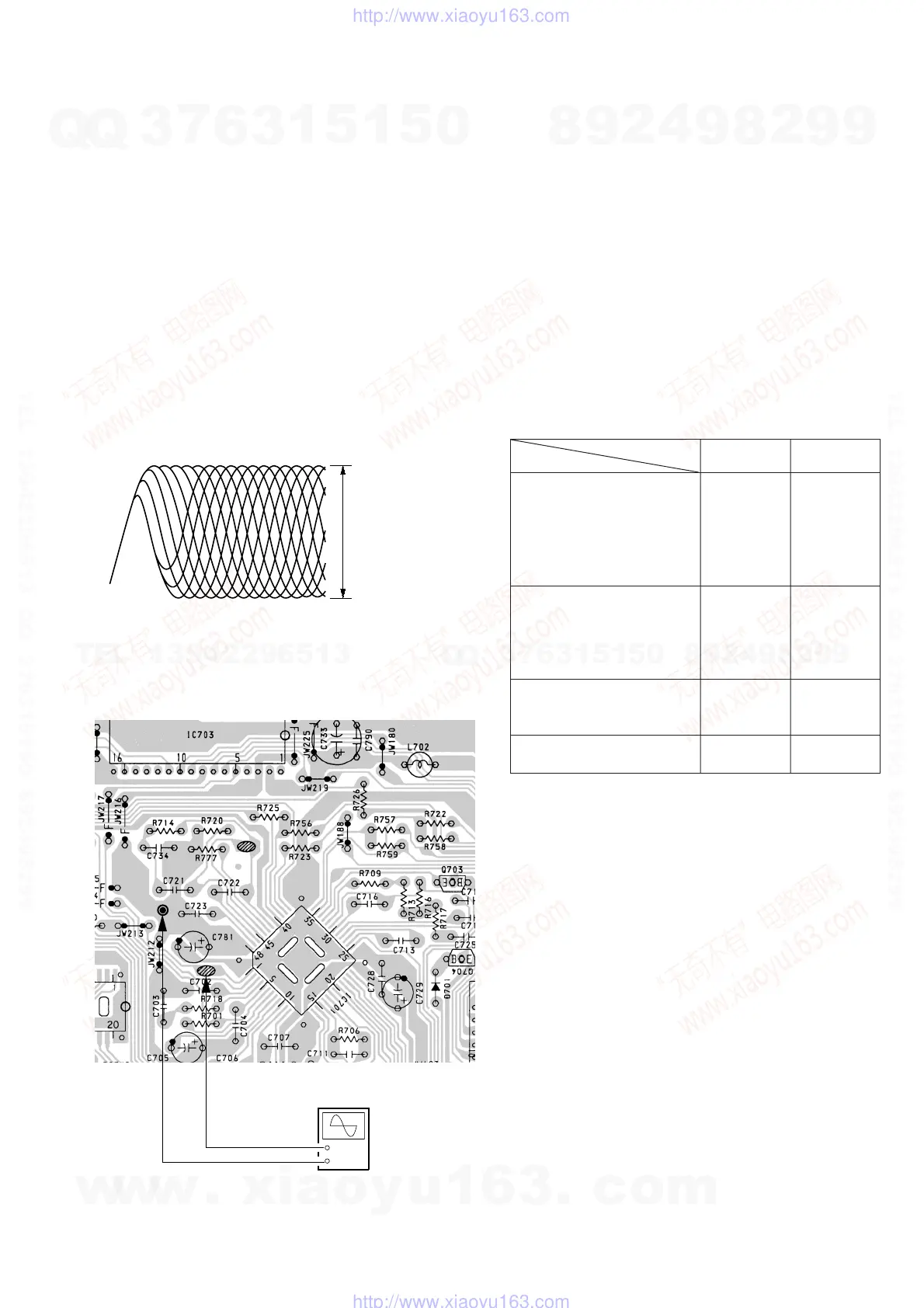
Focus Bias Adjustment
Adjustment Location : MAIN board (Component side)
(See page 21)
This check is to be done when the optical block replaced.
Adjustment Procedure:
1. Connect the oscilloscope to test point TP (VC) and TP (RFO)
on MAIN board.
2. Put the set into test mode.
3. Opitical pick-up setting to the center by + or – button pushing.
4. Insert disk (YEDS-18) and press ^ button.
5. Press the MODE button. (Tracking servo ON)
6. Adjust RV701 so that the oscilloscope wavewform is as shown
in the figure below (eye pattern).
A good eye pattern means that the diamond shape (◊) in the
center of the waveform can be clearly distinguished.
7. Release test mode after adjustment is completed.
• RF signal reference waveform (eye pattern)
When observing the eye pattern, set the oscilloscope for AC range
and raise vertical sensivity.
[MAIN BOARD] (Component side)
4-4. REFERENCE
Focus/Tracking Gain Adjustment
Adjustment Location : MAIN board (Component side)
(See page 21)
A frequency response analyzer is necessary in order to perform this
adjustment exactly.
However, this gain has a margin, so even if it is slightly off, there is
no problem. Therefore, do not perform this adjustment.
Focus/Tracking gain determines the pick-up follow-up (vertical and
horizontal) relative to mechanical noise and mechanical shock when
the 2-axis device operate.
However, as these reciprocate, the adjustment is at the point where
both are satisfied.
• When gain is raised, the noise when the 2-axis device operates
increases.
• When gain is lowered, it is more susceptible to mechanical shock
and skipping occurs more easily.
• When gain adjustment is off, the symptoms below appear.
Tracking
Gain
Symptoms
Focus
• The time until music starts
becomes longer for STOP ➡
CD ^ or automatic
selection (0 , ) buttons
pressed). (Normally takes
about 2 seconds.)
• Music does not start and disc
continues to rotate for STOP
➡ CD ^ or automatic
selection (0 , ) buttons
pressed.)
• Sound is interrupted during
PLAY. Or time counter
display stops progressing.
• More noise during 2-axis
device operation.
low
—
—
high
low or high
low
low
high
VOLT/DIV : 0.2V
TIME/DIV : 500ns
1.3 Vp-p
+0.2
–0.3
TP(TO)
TP(FO)
TP(FO)
TP(VC)
TP(VC)
Osillloscope
(DC range)
+
–
w
w
w
.
x
i
a
o
y
u
1
6
3
.
c
o
m
Q
Q
3
7
6
3
1
5
1
5
0
9
9
2
8
9
4
2
9
8
T
E
L
1
3
9
4
2
2
9
6
5
1
3
9
9
2
8
9
4
2
9
8
0
5
1
5
1
3
6
7
3
Q
Q
TEL 13942296513 QQ 376315150 892498299
TEL 13942296513 QQ 376315150 892498299
http://www.xiaoyu163.com
http://www.xiaoyu163.com


 To Next Page