5
HCD-DC1
Parts Identification
The items are arranged in alphabetical order.
Refer to the pages indicated in parentheses () for details.
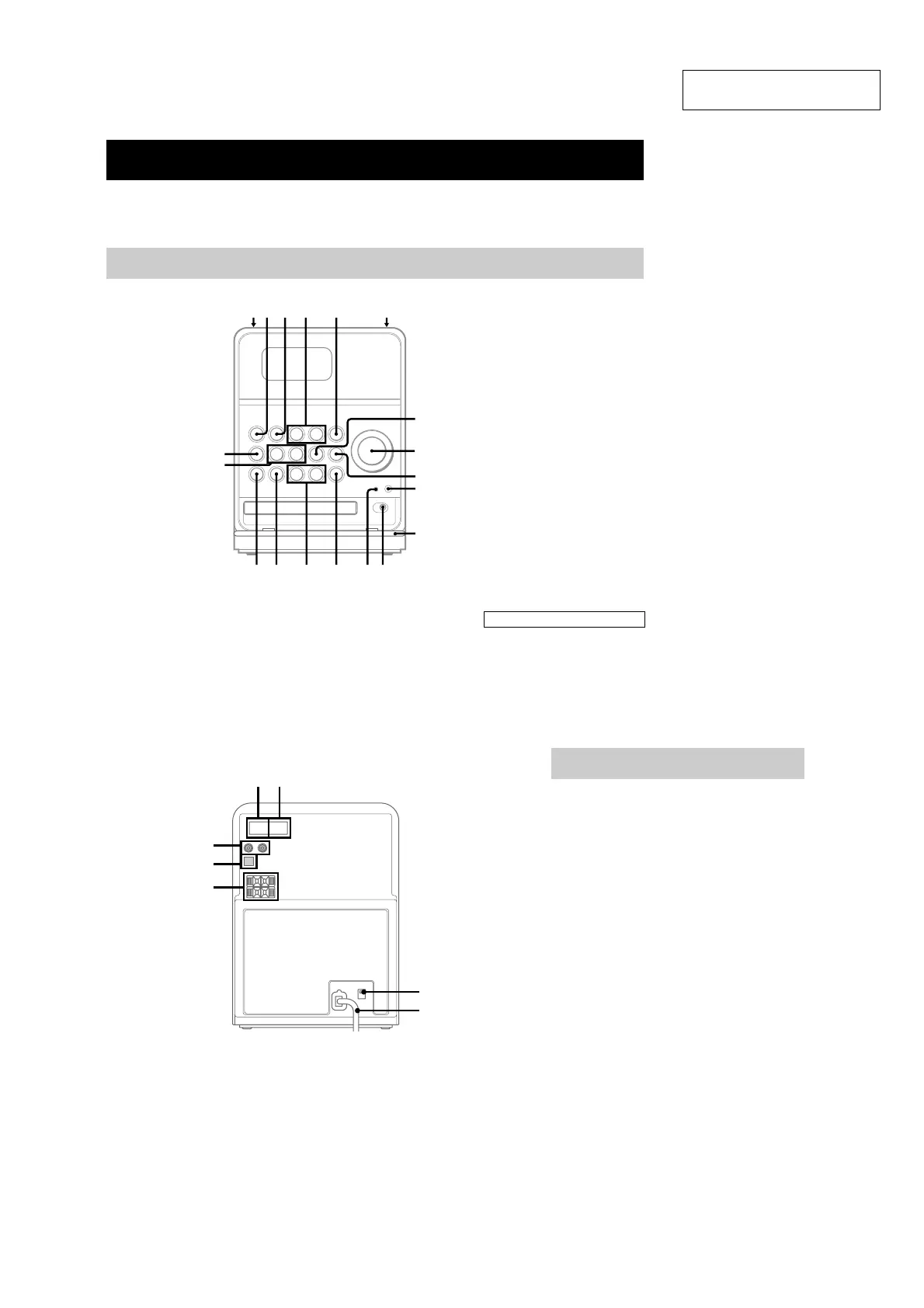
Main unit
CD cover qa (8, 18)
Shown open in the illustration
above.
CD SYNC 9 (13, 14)
CD .m/M> qg (8, 9,
14)
CD Z qf (8)
CD u qj (8, 9)
CD x qh (8, 9, 21)
DSG indicator qd (16)
FUNCTION 7 (8-10, 12-14, 18)
PHONES jack qs (18)
Remote sensor q;
TAPE PAUSE X 5 (12-14)
TAPE Y 2 (12-14)
TAPE m/M 4 (12)
TAPE x 3 (12-14, 21)
TUNER/BAND ql (10, 21)
VOLUME 8 (17)
BUTTON DESCRIPTIONS
@/1 (power) 1 (7, 10, 15, 17, 18)
Z 6 (12)
+/– qk (10, 11)
12
54
7
63
8
9
q;
qs
qf qdqh qgqj
qk
ql
qa
SECTION 2
GENERAL
• LOCATION OF CONTROLS
– Rear View –
– Front View –
21
3
4
5
7
6
1 AM ANTENNA terminals
2 FM ANTENNA jack or terminals
3 AUDIO IN MD (VIDEO) jacks
4 CD DIGITAL OUT OPTICAL connector
5 SPEAKER terminals
6 VOLTAGE SELECTOR switch
(Hong Kong, Malaysia and Singapore models)
7 AC power cord
Setting the time
1 Turn on the system.
2 Press TIMER SET on the remote.
If you are setting the clock for the first time,
go to step 5.
3 Press ./> on the remote
repeatedly until “SET CLOCK” appears
in the display.
4 Press ENTER on the remote.
The hour indication flashes.
5 Press ./> on the remote
repeatedly to set the hour.
6 Press ENTER on the remote.
The minute indication flashes.
7 Press ./> on the remote
repeatedly to set the minute.
8 Press ENTER on the remote.
The clock will begin operating.
To reset the system clock
Start over from step 1.
This section is extracted from
instruction manual.
Ver 1.1


 To Next Page