5
CX-LEM200
SECTION 2
GENERAL
This section is extracted
from instruction manual.
5
En
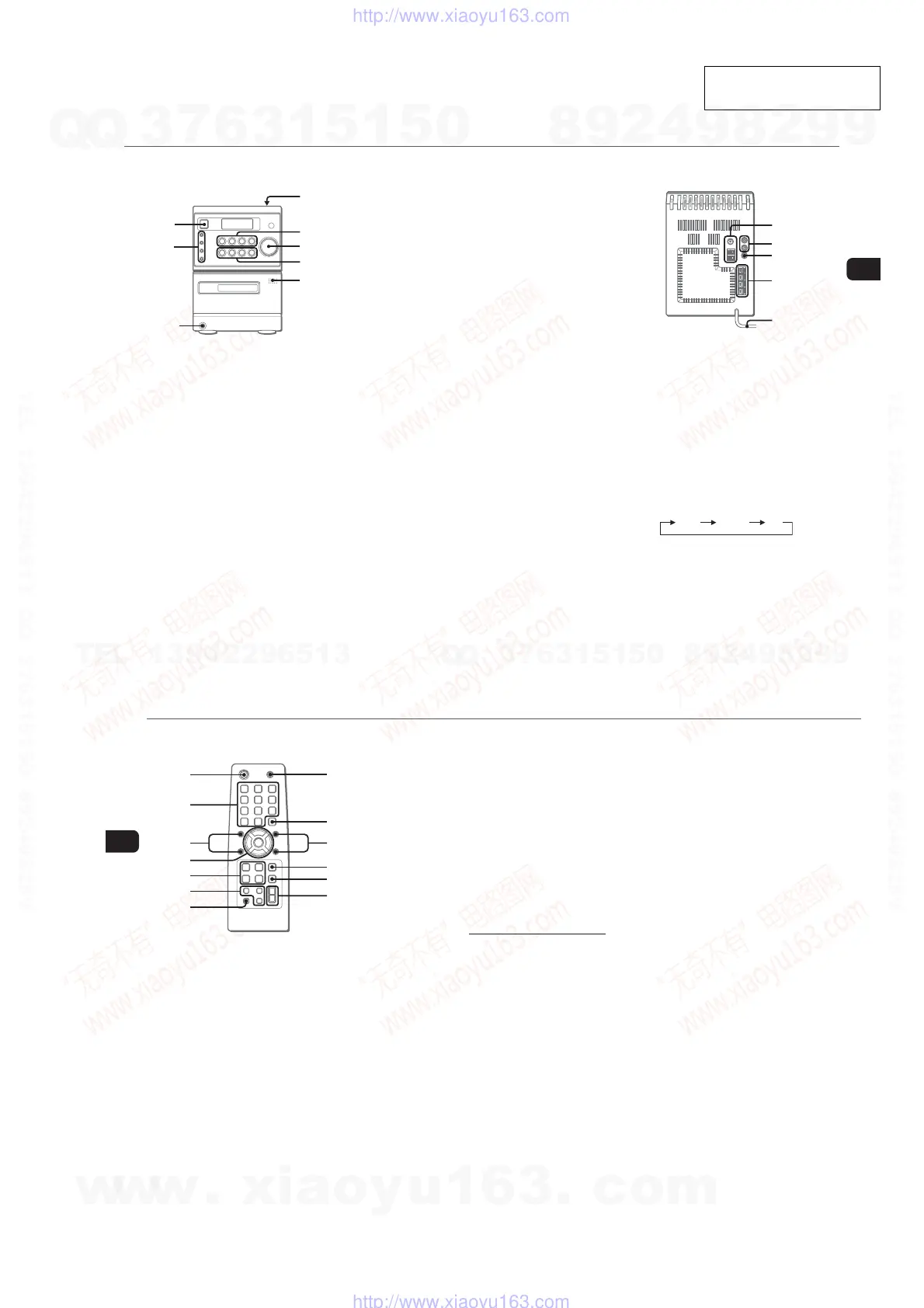
PARTS AND CONTROLS
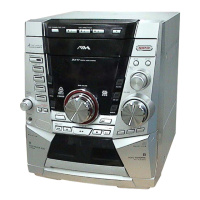
Main unit: front
Refer to the pages indicated in parentheses for details.
1
2
6
5
4
7
3
8
1 POWER 6STANDBY/ON (7)
Switches the unit on and off (standby).
2 ECO (7)
Sets the ECO mode on or off.
SYNCHRO REC (13)
Starts recording and CD play simultaneously.
REC START/PAUSE (13)
Starts and pauses recording.
DISPLAY (8)
Changes the display in CD playback mode.
3 PHONES jack
Plug in optional headphones set with a stereo mini plug
(ø3.5 mm). Speaker output is cancelled.
4 OPEN (8)
Opens or closes the disc compartment.
5 ECD (7-9)
Starts and pauses CD play.
TUNER/BAND (7, 10)
Selects tuner function and the tuner band.
cTAPE (REC MUTING) (7, 12, 13)
Starts playback.
Also used to enter 4-second blank spaces during
recording.
AUX (7)
Selects the function of external equipment connected to
AUX IN jacks.
6 VOLUME (11, 14)
Adjusts the volume.
7 f/r-, +t/g (8, 10-12, 14, 15)
CD: skips to a previous or a succeeding track when
pressed, searches a track in fast forward or reverse
playback when held down.
Tape: rewinds or fast forwards the tape.
Tuner: manually tunes up or down within the band.
sSTOP (8, 9, 12, 13)
CD and tape: stops playback.
Tuner: clears a preset station.
TONE (11)
Adjusts the bass or treble level.
8 zPUSH EJECT (12, 13)
Opens or closes the cassette holder.
Main unit: rear
Refer to the pages indicated in parentheses for details.
3
4
5
2
1
1 AM jack and FM 75 Ω terminal (4)
Plug in the supplied AM and FM antennas.
2 AUX IN jacks
Accept analogue sound signals from external equipment.
Connect external equipment using an optional connecting
cable with RCA phono plugs (red plug to R jack, white
plug to L jack). Refer also to the operating instructions
for your equipment.
To switch function to external input, press AUX.
To change a source name in the display of the
AUX function.
Hold down AUX and press POWER while the power is
on.
AUX VIDEO TV
3 SUB WOOFER jack
Connect optional powered sub woofer with a built-in
amplifier to the jack.
4 SPEAKER terminals (4)
Connect the speaker cords of the supplied speakers.
5 AC power cord (4)
6
En
Remote commander
Refer to the pages indicated in parentheses for details.
1
4
5
6
7
9
8
!
@
#
0
2
3
Buttons with the same or similar names on the main unit
basically have the same function.
1 POWER (7)
2 1–10/0, >10 (8-10)
CD: selects a track of the specified number.
Tuner: tunes in the station with the specified preset
number.
The numbered buttons take on these functions when pressed with
SHIFT held down
:
CLOCK (7)
Selects clock mode.
TIMER (14)
Selects timer mode.
TUNER MODE (10)
Switches between stereo or monaural FM reception.
3 SHUFFLE/PROGRAM (8, 9)
Selects shuffle or programmed CD playback mode.
REPEAT (8)
Selects repeat CD playback mode.
4 PRESETN,M (10)
f/r,t/g (8, 10-12, 14, 15)
ENTER (7, 10, 14, 15)
Determines the mode.
Stores the received station to preset.
5 ECD (7-9)
TUNER/BAND (7, 10)
dTAPE (7, 12)
Starts playback but cannot change the playback side.
AUX (7)
6 DISPLAY (8)
Changes the display in CD playback mode.
DIMMER (7)
Adjusts the display window brightness.
SLEEP (14)
Selects sleep-timer mode.
7 SHIFT
Hold down when pressing a numbered button to change
its function to that printed above the number.
8 MUTING (11)
To turn off the sound temporarily.
9 CLEAR (9, 10, 15)
CD: Clears a CD program.
Tuner: Clears a preset station.
0 TREBLE (11)
Adjusts the treble level.
BASS (11)
Adjusts the bass level.
! s (8, 9, 12, 13)
@ FUNCTION (13)
Switches the active function among TAPE, TUNER, AUX
(VIDEO or TV) and CD.
# VOLUME +,- (11)
w
w
w
.
x
i
a
o
y
u
1
6
3
.
c
o
m
Q
Q
3
7
6
3
1
5
1
5
0
9
9
2
8
9
4
2
9
8
T
E
L
1
3
9
4
2
2
9
6
5
1
3
9
9
2
8
9
4
2
9
8
0
5
1
5
1
3
6
7
3
Q
Q
TEL 13942296513 QQ 376315150 892498299
TEL 13942296513 QQ 376315150 892498299
http://www.xiaoyu163.com
http://www.xiaoyu163.com


 To Next Page