52
Recording TV programs using the Dial Timer (SLV-D550P only)
6
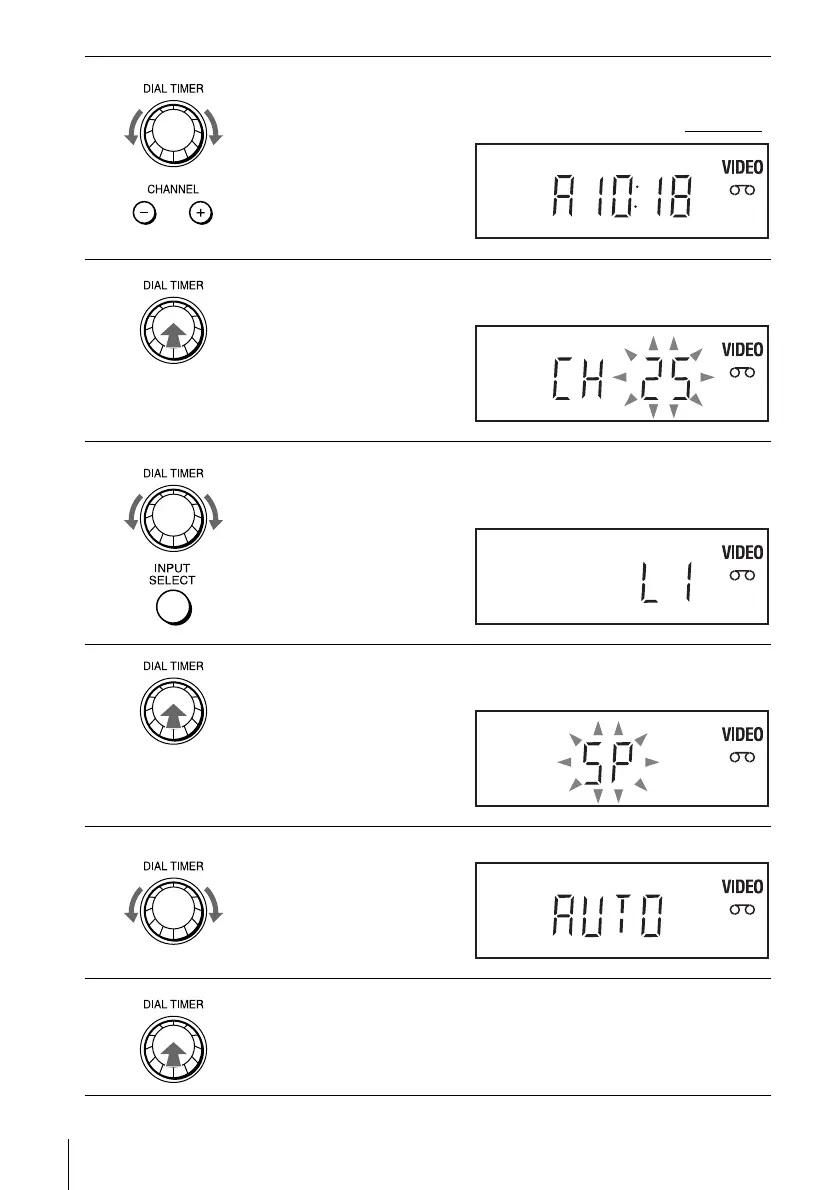
Turn DIAL TIMER to set the recording stop time.
You can set the recording stop time in 15 minute intervals or adjust the time
in one minute intervals by pressing the CHANNEL +/– buttons on the unit
.
7
Press DIAL TIMER.
Current channel flashes in the display window.
8
Turn DIAL TIMER to set the channel number.
To record from a source connected to the LINE IN 1 or LINE-2 IN jacks,
turn DIAL TIMER or press INPUT SELECT to display “L1” or “L2.”
9
Press DIAL TIMER.
Current tape speed flashes in the display window.
10
Turn DIAL TIMER to set the tape speed.
11
Press DIAL TIMER to complete the setting.
“OK” appears in the display window for about five seconds.
The timer indicator appears in the display window and the VCR stands by
for recording. When using a cable box, leave it on.















 To Next Page